The Series Add On for Paid Memberships Pro lets you drip-feed content to members over time, unlocking posts based on how long they have been a member. By default, the series listing page shows every post in the series, with a lock indicator on any content a member cannot yet access.
If you would rather hide upcoming content entirely, so members only see what they can read right now, this code recipe is what you need. It uses the pmpro_series_post_list_posts filter to trim the series list to only the posts a member has unlocked so far.
Do You Need This Recipe?
This recipe is a good fit if:
- You want to reduce spoilers or overwhelm by hiding future series content from members.
- Your content is sequential and you do not want members to see post titles or topics they have not yet reached.
- You want a cleaner, less cluttered series listing page.
If your members benefit from seeing what is coming next as a motivator to stay subscribed or complete earlier content, the default behavior (showing all items with access indicators) may serve them better. This recipe removes that preview visibility entirely.
Best Practices and Considerations
The recipe uses the member’s registration date, not their last renewal date. The pmpro_getMemberDays() function measures days since the member’s initial membership start date. If members cancel and rejoin, their day count may reset depending on your PMPro settings. Test this scenario with your specific gateway and membership configuration.
This recipe hides posts. It does not lock them. If a member navigates directly to the URL of a future series post, they may still be able to view it depending on your membership level restrictions. Use this recipe alongside PMPro’s built-in content restriction settings if you need full access control.
Logged-out visitors see the full, unfiltered post list. The snippet returns the original list unchanged for users who are not logged in. If you want non-members to see no series items at all, see the Customization section below.
Only posts before the first inaccessible item are shown. The loop stops at the first post the member cannot yet access. This assumes your series posts are ordered by delay in ascending order, which is the standard configuration. If your series has delays set out of order, the recipe will stop at the first inaccessible post and hide everything after it, even posts the member could technically view.
About the Code Recipe
The Series Add On for Paid Memberships Pro assigns a delay value to each post in a series. That delay represents the number of days after membership registration before a member can access that post.
When a member views the series listing page, PMPro runs the pmpro_series_post_list_posts filter to determine which posts to show. By default, all posts are included. This recipe hooks into that filter and returns only the posts the current member can access right now.
Here is what the code does, step by step:
- If the visitor is not logged in, the full post list is returned unchanged.
- It retrieves the number of days the current user has been an active member using
pmpro_getMemberDays(). - It loops through each post in the series in order.
- For each post, it checks whether the member’s days meet or exceed the post’s delay value. If so, the post is added to the display list.
- As soon as it encounters a post the member cannot yet access, the loop stops. No posts beyond that point are added, even if later posts in the series have shorter delay values.
Key variables in the snippet:
$post_list: The full array of posts assigned to the current series, including posts the member cannot yet access. This is what the filter receives before your function modifies it.$member_days: The number of days since the current user’s membership start date, returned bypmpro_getMemberDays(). This is compared against each post’s delay value.$sp->delay: The delay in days set on each individual post within the series. Posts with a delay of0are always accessible immediately.break: Once the loop encounters a post whose delay exceeds the member’s day count, it stops and returns only the posts collected so far.
Compatibility notes: This code recipe requires the Series Add On for Paid Memberships Pro to be installed and active.
When to use this recipe versus the Series Add On settings: The Series Add On controls access to individual posts based on membership duration. This recipe goes a step further by removing upcoming posts from the list view entirely. Use this recipe when you want to prevent members from seeing that future content exists, not just from accessing it.
Related Reading
Step-by-Step Implementation Guide
Step 1: Install and Activate the Series Add On
If you have not already done so, install and activate the Series Add On for Paid Memberships Pro from your WordPress dashboard under Memberships > Add Ons.
Step 2: Configure Your Series
Make sure you have an existing Series set up with posts assigned and delays configured in ascending order. Each post in the series should have a delay value (in days) that reflects when it should become available after the member registers.
Step 3: Add the Code Recipe
Copy the snippet linked in the code recipe below and add it to your site using a code snippets plugin or a site-specific plugin.
Step 4: Test With a Member Account
Log in as a test member account with a known membership start date and verify that the series list only shows posts the member should currently have access to. Use a staging site or a test user with a manually set start date to confirm behavior across different day counts.
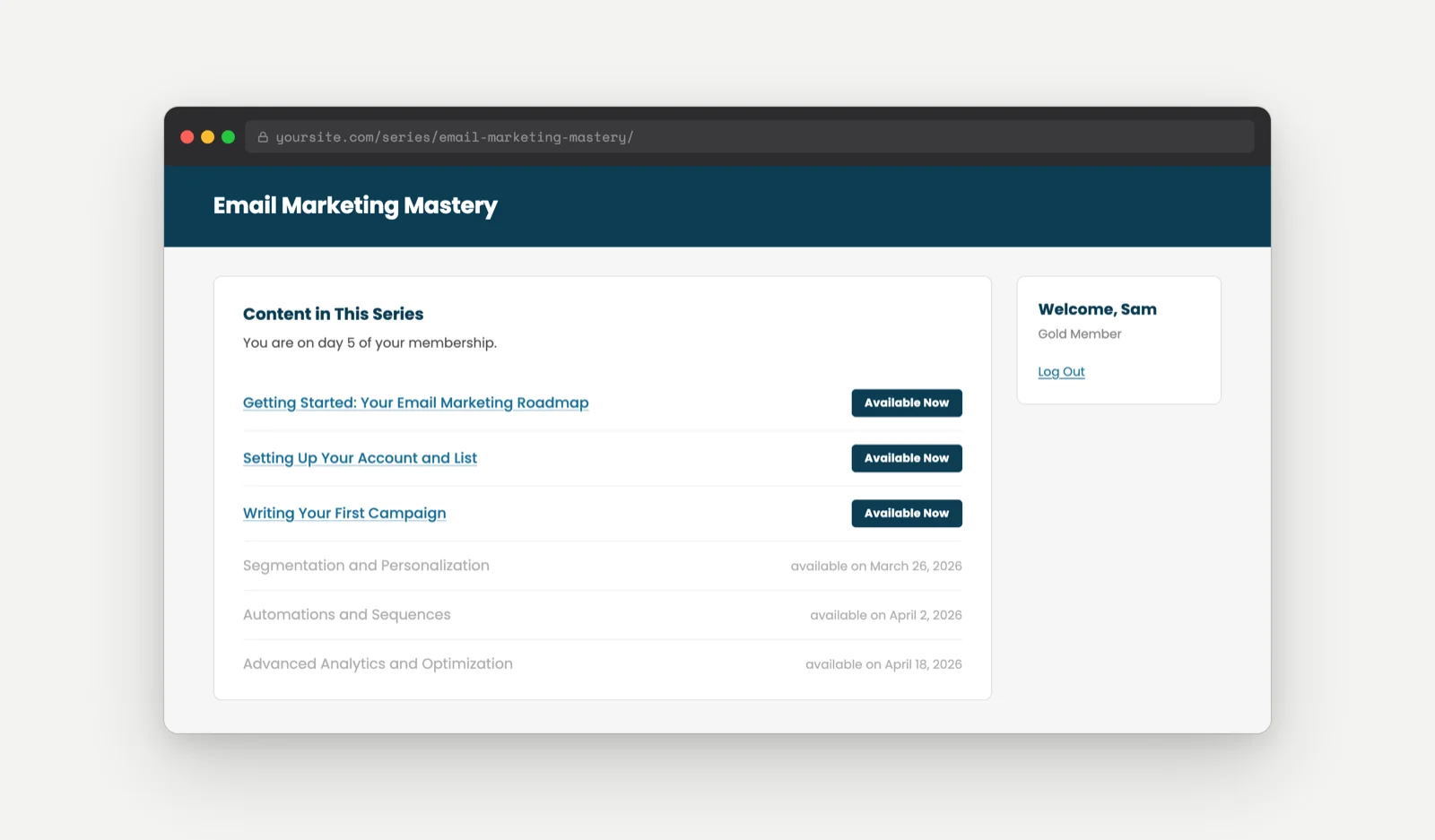
Before: the default series listing page shows every post, with locked items displayed alongside their future availability date.
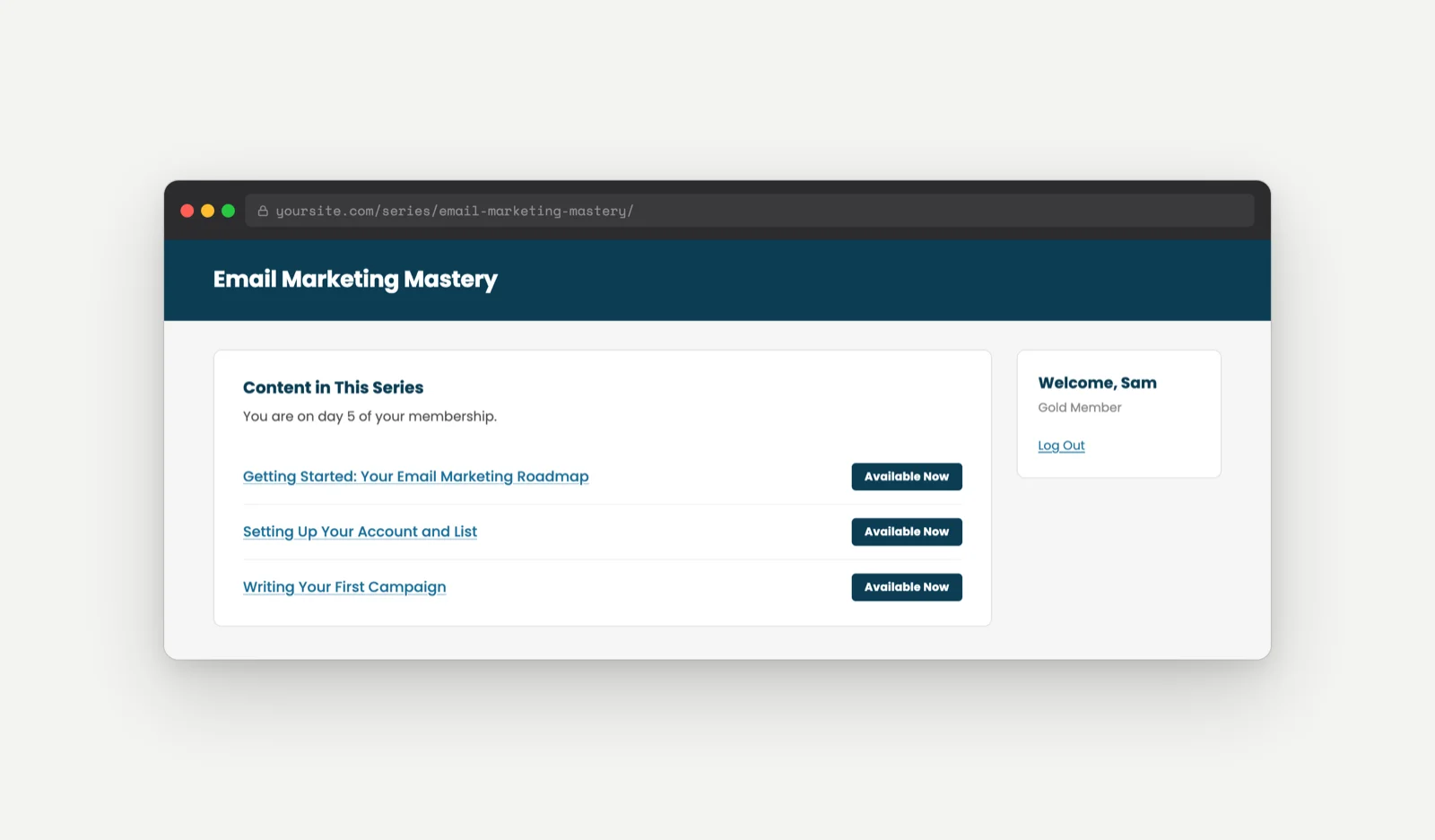
After: with the recipe in place, only the posts the member can currently access appear in the list.
The Code Recipe
Adding the Recipe to Your Website
You can add this recipe to your site by creating a custom plugin or using the Code Snippets plugin available for free in the WordPress repository. Read this companion article for step-by-step directions on either method.
How To Customize This Code Recipe
Apply the Filter to a Specific Series Only
If you have multiple series on your site and only want to hide upcoming posts in one of them, add an early check inside the function that compares $series_object->ID against the WordPress post ID of the specific series you want to target. Return $post_list unchanged for any other series, and let the rest of the function run only for your chosen series ID.
Adjust Behavior for Logged-Out Users
By default, the snippet returns the full list for logged-out users. If you want logged-out visitors to see no series posts at all, change the ! is_user_logged_in() early return to return array(); instead of return $post_list;.
Show a Teaser for the Next Locked Post
Rather than hiding all upcoming posts completely, you may want to show members a preview of what is coming next. Modify the loop to include the first locked post (the one that triggers the break) before stopping, and use the post’s delay value to display a label such as “Coming soon” or the calculated availability date.

Get Support From Our Team of Experts
Have a question about how to use this feature? Our Support Page outlines three ways to get support.
Our Max plans include hands-on help customizing your membership site and implementing new features. Upgrade to PMPro Max now »


