It’s here! This blog post covers the epic release of Memberlite 7.0, the most significant update to our membership theme since its original release.
This version is a ground-up refactor of how Memberlite handles layout, colors, navigation, and individual theme components. We rebuilt the foundation so Memberlite is faster, more accessible, and easier to customize, whether you’re designing in the Customizer, building with the block editor, or developing a child theme.
Read on for a full overview of what’s new in Memberlite 7.0, how to upgrade your site, and what’s coming next.
Key Features and Enhancements in Memberlite 7.0
New Layout System
Memberlite 7.0 replaces the Foundation framework float-based grid with a clean, custom flexbox layout system. The result is a lighter, more predictable layout that works better with modern CSS and the block editor.
For most sites, this change is invisible. Your pages will look the same, just rendered with a modern layout engine.
Revamped Color System
Memberlite has always let you pick a color scheme and override individual colors. That hasn’t changed. What has changed is everything under the hood.
In 7.0, we modernized the color schemes, tightened up how colors are stored and applied, and streamlined the styles so colors are more consistent across the entire theme: buttons, links, footer widgets, navigation, masthead, all of it.
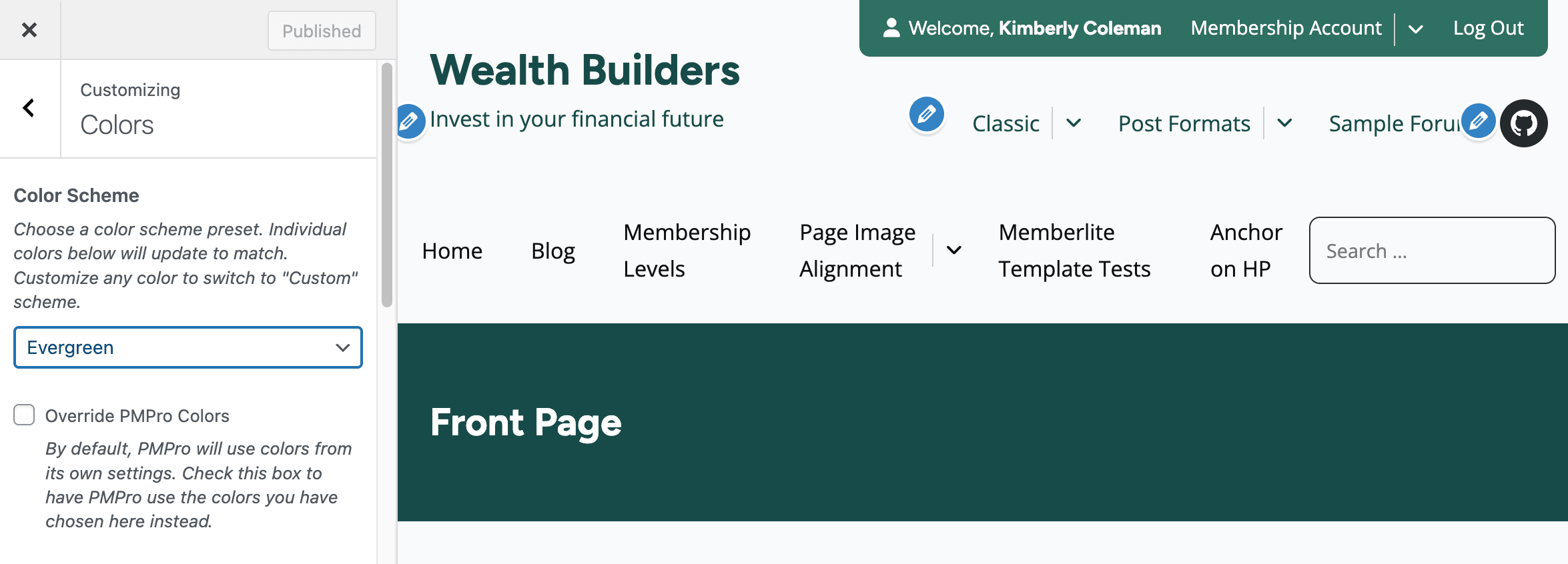
We also added a new option to sync your Memberlite colors with your PMPro Design Settings. Check one box in the Customizer and your theme colors stay in sync with PMPro. One place to keep everything looking sharp.
Where to find it: Appearance > Customize > Colors
The upgrade is automatic. When you update to 7.0, the system preserves your existing color scheme and any custom overrides. No manual changes required.
Button hover states also got an upgrade. They now adapt automatically to light and dark color configurations for better contrast and readability.
Modular Component Architecture
We broke the entire theme down into smaller, reusable component files — not just the header, but everywhere we could. The header, footer, post content, page content, navigation, masthead, and member info area are now individual template files that you can load, override, or swap independently.
For site owners, this means the theme is more stable and easier for us to update without breaking your customizations. For developers building child themes, this means you can override just the piece you need (like the member info area or the footer back to top link) without copying an entire template.
This component structure is also the foundation for variations: alternative layouts for the header, footer, and other sections that you’ll be able to select via theme settings and blocks in future versions. The header already supports variations in 7.0, and we’ll be expanding this to more components as we go.
Redesigned Mobile Navigation
We completely rewrote the mobile menu. It’s now a proper dialog component with improved keyboard navigation, focus management, and screen reader support. The mobile menu is faster to open, easier to navigate, and meets modern accessibility standards.
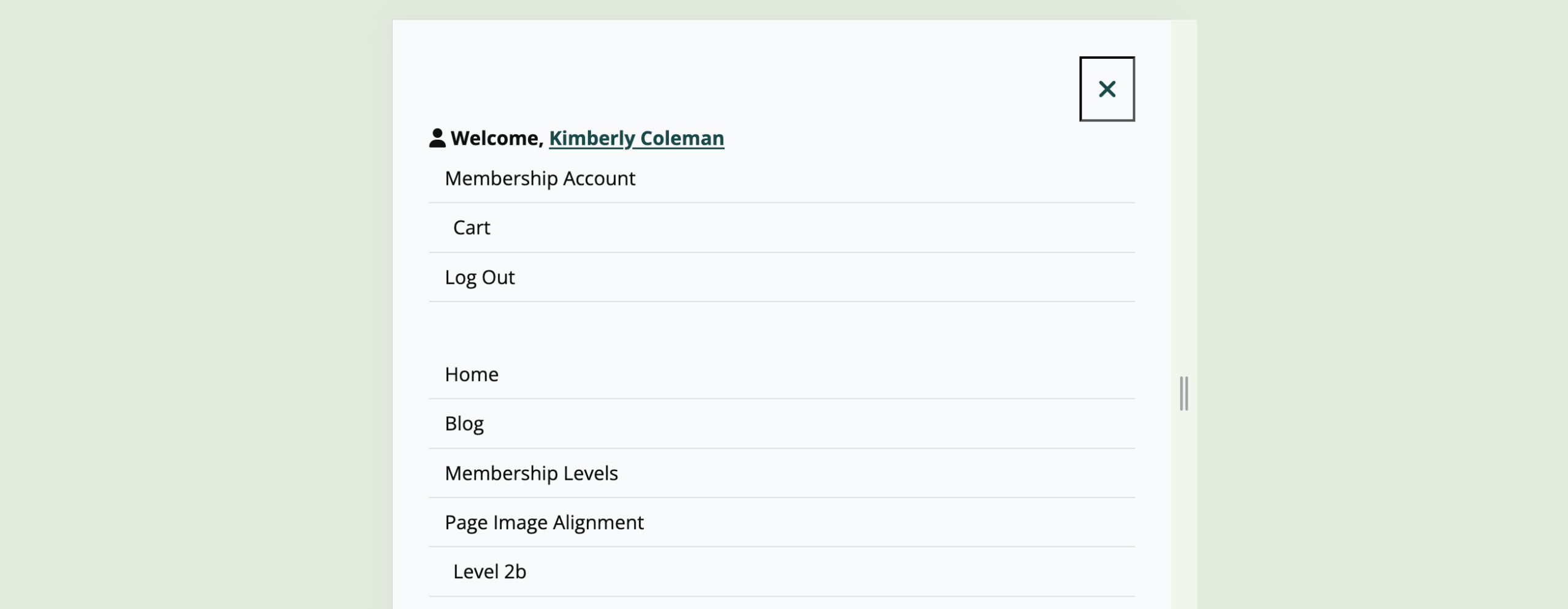
If you have custom JavaScript that interacts with the mobile menu, test it after upgrading to make sure everything still works as expected.
Block Patterns for Membership Sites
We’ve added Gutenberg block patterns for common membership site layouts. These are pre-built block arrangements you can insert directly from the block editor’s pattern inserter.
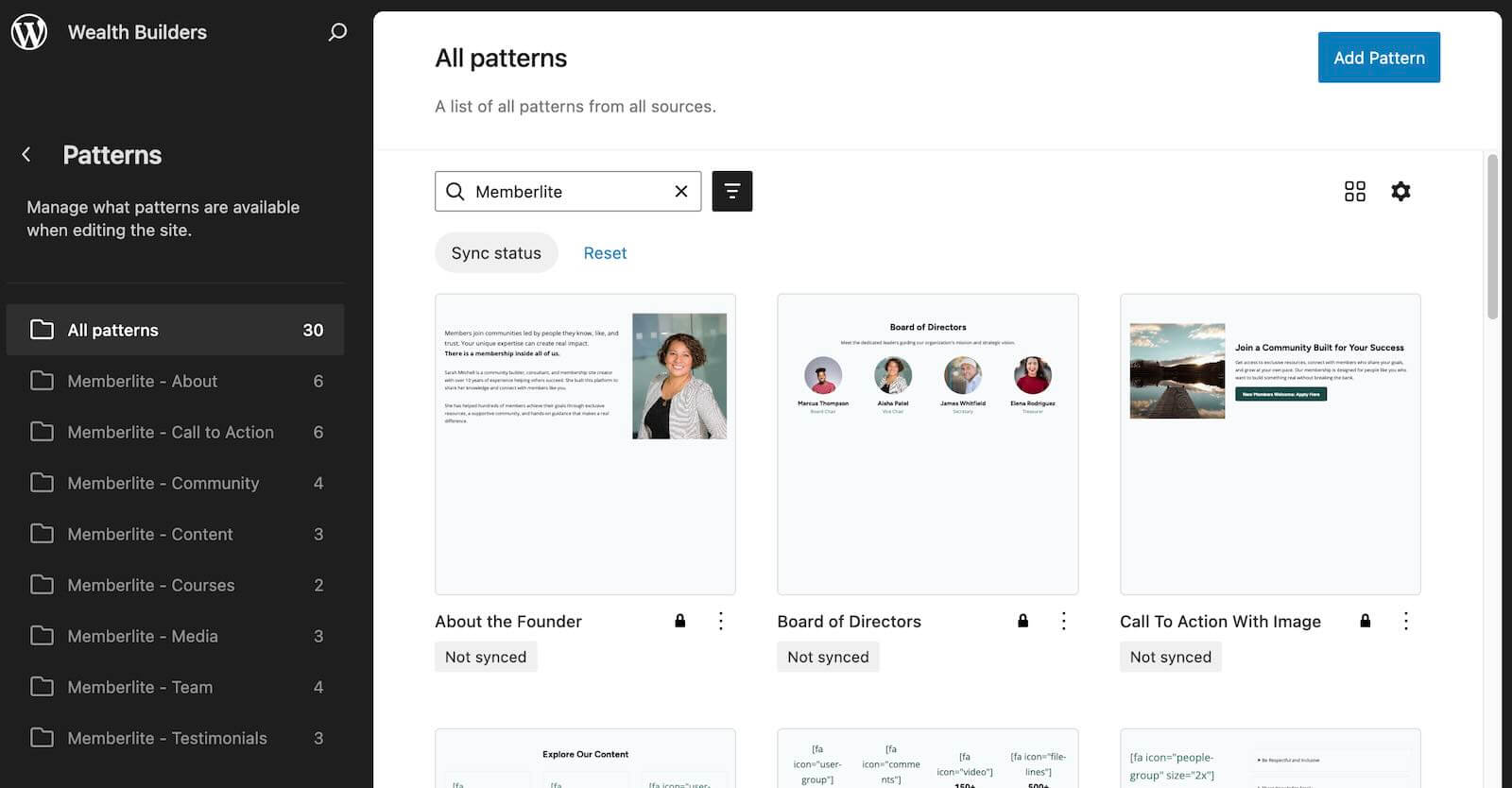
Use them to quickly set up membership landing pages, pricing sections, and other layouts without starting from scratch.
Where to find them: In the block editor, click the “+” inserter and browse the Patterns tab.
New Menu Management Tools
Three new tools that save time when managing your site’s navigation:
Duplicate any menu. Need a variation of an existing menu for logged-in vs. logged-out users? You can now duplicate a menu right from the Appearance > Menus screen instead of rebuilding it from scratch.
Export menus with relative URLs. When you export theme settings, the system now converts menu links to relative paths. This makes it much easier to move menus between environments, staging to production, or one site to another, without broken links.
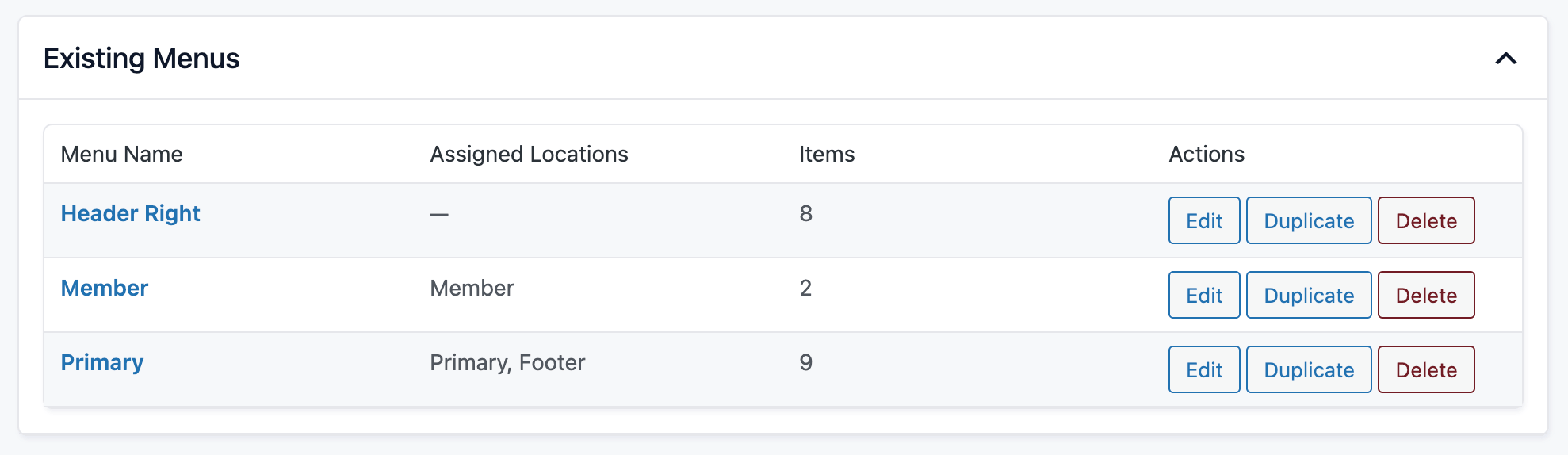
Import theme settings with menus. When you import or export theme settings, the system now includes menu assignments. This works across child theme and parent theme in both directions, so your full navigation setup travels with your settings.
Per-Page Display Settings
The old Blank and Interstitial page templates have been retired. In their place, 7.0 introduces per-page display settings controlled from the Block Editor sidebar:
- Hide Header: removes the site header on that page
- Hide Footer: removes the site footer on that page
- Hide Page Navigation: removes prev/next page links on that page
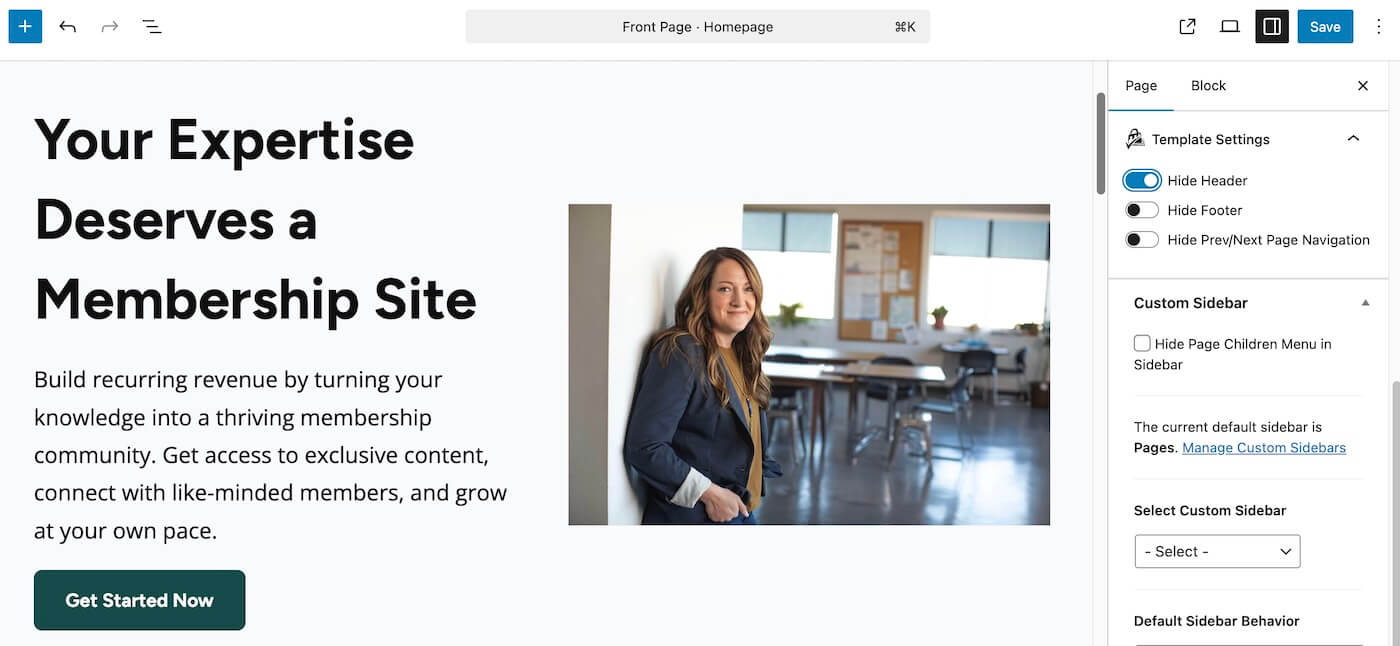
This gives you the same flexibility as the old templates, but on any page, without needing to assign a special template. It’s ideal for landing pages, checkout flows, or any page where you want a cleaner layout.
If your site was using the Blank or Interstitial templates, the upgrade automatically migrates those pages to the new per-page settings. Check the affected pages in the Block Editor to confirm the settings look right.
Developer Improvements
For theme developers and those building child themes:
- Sass (SCSS) architecture: All stylesheets have been converted from plain CSS to Sass for better organization and maintainability.
- RTL languages: RTL styles are now auto-generated from the main theme styles.
- Vanilla JavaScript: The jQuery dependency has been removed from the main Memberlite JS file. If your child theme’s scripts relied on jQuery being loaded by the parent theme, you may need to enqueue it separately.
- GitHub Actions build pipeline: Automated Sass compilation and a GitHub Actions deployment workflow for faster, more reliable releases going forward.
- Improved header accessibility: Header navigation now works correctly for both mouse and keyboard users, with proper focus states and ARIA attributes.
- Version numbers on all component templates: Every template part now includes a version number for easier debugging and child theme development.
How to Download and Update Memberlite
You can download the latest version directly from our downloads page here at the Paid Memberships Pro website.
Update Option 1: If You’re Using the PMPro Update Manager Plugin
If you have the PMPro Update Manager plugin active, Memberlite 7.0 can be updated automatically from the Appearance > Themes screen in the WordPress admin.
Update Option 2: Manual Update via .zip File
If you’re not using the PMPro Update Manager, you should install and activate this free Add On so that Memberlite, PMPro, and any PMPro Add Ons can be updated without the need to handle updates via .zip files. Once you install and activate the Update Manager Add On, you can upgrade Memberlite following the steps in Option 1 above.
Upgrading: What You Need to Know
The update handles migration automatically: colors, deprecated templates, and legacy settings are all converted for you. For most sites, the upgrade is seamless.
However, if you use a child theme or custom CSS, test on a staging site first. The changes in 7.0 are significant, and child themes that override parent templates may need adjustments.
Deprecated in 7.0
We have formally deprecated a few functions and features, with backward-compatible wrappers still in place.They still work, but will trigger deprecation notices in debug mode:
memberlite_getBreadcrumbs(): renamed tomemberlite_get_breadcrumbs()memberlite_page_title(): split intomemberlite_get_page_title()andmemberlite_get_page_description()- The
memberlite_editor_color_palettefilter: the editor palette is now built from individual color settings - Legacy color scheme definitions: moved to a deprecated file; existing schemes are migrated automatically
Looking Ahead
This release is as much about the future as it is about new features. The modular header architecture, CSS custom properties, and Sass build process make Memberlite significantly easier to extend and maintain. Future updates can ship faster and break less.
Here’s what this foundation unlocks:
- Alternative layout variations for every section of your site.
- More block patterns and full-page templates
- Deeper block editor integration
- Tighter integration with Paid Memberships Pro Add Ons
We’re committed to making Memberlite the best theme for membership sites, and 7.0 is the strongest foundation we’ve ever had to build on.
Memberlite 7.0 Full Changelog
- FEATURE: Refactored theme structure into smaller component files with a redesigned mobile navigation.
- FEATURE: Added Gutenberg block patterns for common membership site layouts.
- FEATURE: Updated theme build process with automated Sass compilation and GitHub Actions deployment workflow.
- FEATURE: Added theme support to duplicate an existing menu, export menus as custom links with relative URLs, and import theme settings with menus.
- ENHANCEMENT: Converted all stylesheets from CSS to Sass (SCSS) for better code organization and maintainability.
- ENHANCEMENT: Converted jQuery to vanilla JavaScript in the main Memberlite JS file.
- ENHANCEMENT: Improved header navigation accessibility for both mouse and keyboard users.
- ENHANCEMENT: Added adaptive button hover colors for light and dark color schemes.
- ENHANCEMENT: Automated RTL language styles generated from existing theme styles.
- ENHANCEMENT: Added PMPro icon next to the Memberlite admin menu and Template Settings page.
- ENHANCEMENT: Modernized color schemes with upgrade script and updated
theme.jsonfilter. - ENHANCEMENT: Streamlined colors and styles across the theme.
- ENHANCEMENT: Updated import function to properly handle legacy colors before saving to theme mods.
- ENHANCEMENT: Improved color mapping to WordPress presets and de-duplication of block editor color palette.
- ENHANCEMENT: Import and export theme settings now support child theme to parent theme and vice versa.
- ENHANCEMENT: Added version numbers to remaining component templates.
- ENHANCEMENT: Styling adjustments and fixes after Sass conversion.
- ENHANCEMENT: Turned off the enlarged excerpt display by default.
- REFACTOR: Customizer colors no longer stored with # symbols; added upgrade path for existing settings.
- BUG FIX: Fixed site title color in the Customizer.
- BUG FIX: Re-enabled color overrides for PMPro CSS variables.
- BUG FIX: Ensured
style.cssloads after the main theme stylesheet for correct cascade. - BUG FIX: Fixed link and button colors, footer widget link colors, and block table consistency.
- DEPRECATED: Renamed
memberlite_getBreadcrumbs()tomemberlite_get_breadcrumbs()for WordPress coding standards. - DEPRECATED: Split
memberlite_page_title()intomemberlite_get_page_title()andmemberlite_get_page_description()for more granular control over page title and description output. - DEPRECATED: Removed the
memberlite_editor_color_palettefilter; the editor color palette is now built from the color preset map. - DEPRECATED: Moved legacy color scheme definitions to deprecated file; sites using old schemes will be migrated automatically via the upgrade script.
Questions or Feedback?
We’d love to hear how 7.0 is working for you. If you run into any issues or have suggestions for future improvements, reach out through our support channels or join the conversation in the PMPro Slack Community.


