
WELCOME TO THE HUB FOR
Podcasting
Here you’ll find all of the best resources we have to helps you build a membership site around your show with PMPro.
1. Define Your Membership’s Purpose
Before you choose tools or build pages, step back and decide what your membership site is for. Your podcast and your membership don’t have to be the same thing. In fact, many of the most successful podcasters keep their show free and public (streaming on Apple Podcasts, Spotify, and everywhere else) and use the membership site for something different entirely.
Your podcast is lead gen. Your membership site is where you monetize those leads.
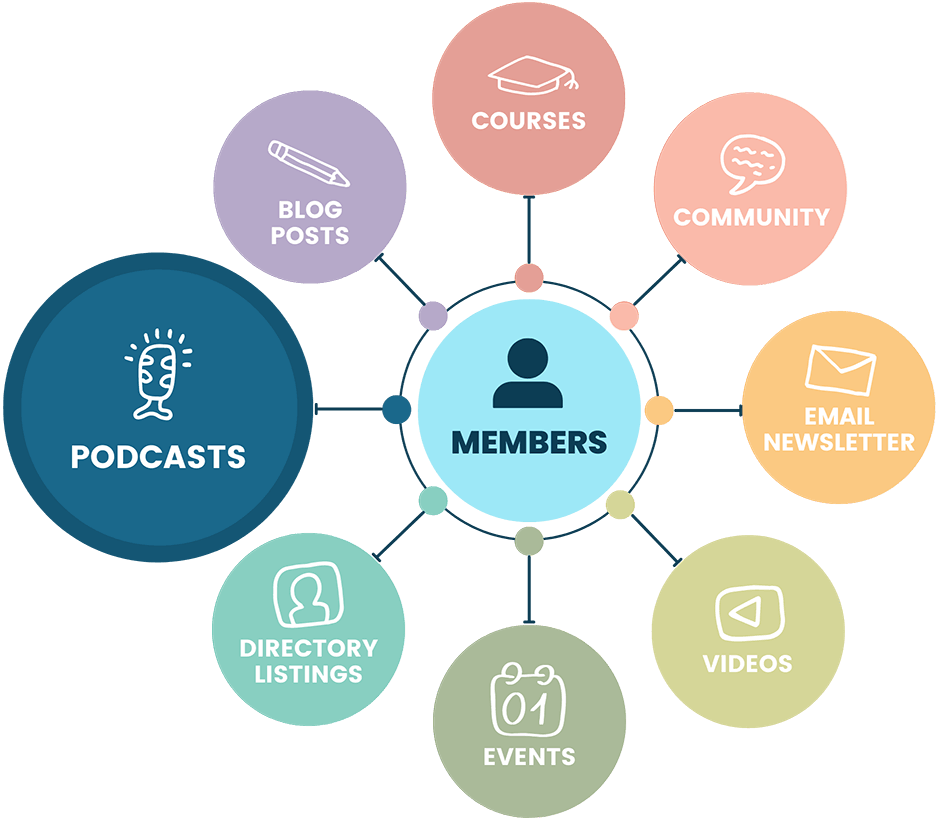
Here are some common membership models that work alongside a podcast:
- Private podcast episodes: Offer bonus episodes, extended interviews, ad-free listening, or early access through a private podcast feed that only members can access.
- Community access: Build a members-only community using BuddyPress or BuddyBoss or bbPress forums where your listeners can connect with each other and with you.
- Thought leadership and deep dives: Publish long-form articles, research, case studies, or analysis that goes deeper than what you cover on the show.
- Behind the scenes: Share how you make the podcast, what gets cut, your creative process, or personal updates that give members a closer connection to you as the creator.
- Private video: Record video versions of your podcast episodes and make them available exclusively to members. Keep the audio free on all the streaming platforms, but offer the video experience behind the membership.
- Courses and learning: Expand your best podcast content into structured courses or learning paths.
- A mix of all of the above: There are no hard set rules. The best membership sites combine several of these elements into a unique experience.
Write down your decision now. It will shape which tools you choose, how you structure membership levels, and how you market your site. You can always evolve, many podcast memberships start simple and grow over time.
2. Choose Your Tools
The tools you need depend on the membership model you chose in step 1. At minimum, you need a membership plugin to manage access and payments. If you’re offering a private podcast, you also need a way to deliver secure audio feeds.
For Private Podcast Delivery
You have two great options for delivering private podcast episodes to members:
Castos + Seriously Simple Podcasting
Our top recommendation for podcast hosting is Castos. Their WordPress plugin lets you manage episodes directly in WordPress.
Castos offers a direct integration with Paid Memberships Pro for private podcasting. It automatically adds and removes subscribers from your private feed based on their membership status.
When a member joins, they’re added to the private feed. When they cancel, they’re removed. No manual work.
Member RSS Feed Add On
The Member RSS Feed Add On creates unique, member-specific RSS feed URLs directly from WordPress. Each member gets a personalized feed URL with a secure memberkey parameter that determines which protected content appears in their feed.
Members can also use basic header authentication via WordPress Application Passwords for even more secure access, ideal for podcast apps that support authenticated RSS feeds.
The feed respects all of your PMPro content restrictions, so members only see episodes they have access to. This is a great option if you want to host and deliver everything directly from WordPress without a third-party podcast platform.
For All Podcast Memberships
- Other Podcast Hosting Platforms: If you prefer a different podcast host, you can use Zapier to connect PMPro with many other podcast hosting and distribution platforms.
- Email Marketing: Connect PMPro to an email marketing tool to notify members about new episodes and keep your audience engaged. We integrate with Mailchimp, Kit, MailPoet, and more. Refer to this guide on email marketing integrations for PMPro to see all available options.
- Recording and Editing Tools: For recording, tools like Riverside.fm and StreamYard support multiple guests and record each track separately. For editing, Descript makes audio editing as easy as editing a text document. These tools are independent of your membership site but essential to your podcasting workflow.
Looking for a specific Add On? You can now filter Add Ons on the Memberships > Add Ons screen in the WordPress Admin by Use Case. Start typing the term, like “Podcasting”, and the corresponding Add Ons will populate for you.
3. Create Your Podcast Site
This hub is focused on sites that use WordPress and Paid Memberships Pro to build a membership alongside your podcast. We recommend having a WordPress site whether your podcast membership is the only focus or if it’s a component of a larger subscription business.
Here’s how to create your podcast membership site with WordPress and PMPro:
- Choose a hosting platform designed for memberships.
- Set Up Your WordPress website.
- Download and Install Paid Memberships Pro
- Complete the PMPro Initial Setup
- If offering private podcast feeds (optional): Setup Castos, or activate the Member RSS Feed Add On.
- Configure your membership levels to match your chosen model from step 1. Map levels to private feeds, community access, content areas, or all of the above.
Your WordPress site is the primary place members can:
- Access premium content, like podcast episodes, show notes, transcripts, video, community, and more
- Manage their membership account
- View payment history and update billing information
- Subscribe to a private podcast feed in their favorite podcast app (if applicable)
- Update profile information like name, email address, and any additional user fields you need to collect
How Private Podcast Delivery Works
If you’re offering a private podcast, your members will listen in their favorite podcast app, but only authorized subscribers can access the feed. You have two approaches:
Option A: Castos Private Podcasting
- Automatic subscriber management: When a new member joins at a specific membership level, PMPro automatically adds them to the corresponding private podcast feed in Castos. When a member cancels or their subscription expires, they are automatically removed.
- Secure RSS feeds: Each member gets a unique, private RSS feed URL. This prevents unauthorized sharing and ensures only paying members can listen.
- Multiple podcast feeds: You can create different private podcasts for different membership levels. For example, a free-tier welcome podcast and a premium-tier deep-dive podcast.
Option B: Member RSS Feed Add On
- Member-specific feeds: Each member receives a unique RSS feed URL tied to their account. The feed displays all content the member has access to based on their current membership level.
- Secure memberkey access: Feed URLs include a unique
memberkeyparameter that authenticates the member. Example:https://www.yoursite.com/feed/?memberkey=58efacdc83d88e3edf - Authenticated RSS support: Members can also use basic header authentication via WordPress Application Passwords for an even more secure option, ideal for podcast apps that support authenticated RSS URLs.
- Podcast enclosure support: The Add On works with popular podcast plugins like Blubrry PowerPress. Protected enclosure URLs (such as MP3 files) are secured and only accessible with a valid member key.
- Category and tag feeds: Members can use RSS feeds for specific categories or tags (for example, a “Premium Podcast” category) combined with their memberkey to focus on a specific subset of content.
- Account page integration: The member’s personalized RSS feed link appears automatically on their Membership Account page, making it easy to copy and paste into their preferred podcast app.
The Free Podcast + Paid Membership Strategy
Many successful podcasters keep their show completely free and use membership for something else entirely. Here’s why this works so well:
- Your podcast builds the audience. Publish on Apple Podcasts, Spotify, and every other public directory. Use broad topics that showcase your expertise and personality. This is your lead generation engine.
- Your membership monetizes the audience. Offer community access, private video versions of episodes, behind-the-scenes content, thought leadership resources, courses, or exclusive bonus episodes. People who’ve heard your voice and experienced your value are much more inclined to join.
This approach lets your podcast grow without restrictions while giving your most engaged listeners a way to go deeper. You can always add a private podcast feed later as one more perk of membership.
4. Record, Publish, Sell, and Market
Once your site and tools are set up, it’s time to start creating episodes. There are no hard set rules in podcasting, you can blend education, storytelling, and entertainment, release episodes weekly or as a complete “season”.
Planning Your Content
Now is the time to think about your brand direction, your personal or business voice, and what tone your podcast will take.
- Create a content calendar for all of the episodes you have planned. This will make sure the content has a cohesive message and takes the pressure off coming up with topics spontaneously.
- Decide on a format: Solo episodes, interviews, co-hosted discussions, Q&A sessions, or a mix of all of these. The best podcasts deliver content with meaning, actionable advice, and impact.
- Plan your episode length. Consistency matters more than length. A focused 20-minute episode is more valuable than a rambling 90-minute one.
Recording and Editing
- Equipment: You don’t need a professional studio. A decent USB microphone and a quiet room are enough to get started. Invest in reliable equipment and do a test recording before each session.
- Recording software: For solo episodes, tools like Audacity or GarageBand work well. For guest interviews, Riverside.fm and StreamYard record each track separately, giving you an insurance policy should a single person’s audio fail.
- Editing: Basic audio editing skills are sufficient for most podcasts. Descript makes editing as easy as editing a text document and includes automatic sound enhancement settings. If editing isn’t your forte, consider hiring a freelance editor.
Publishing Episodes
With Castos, publishing is straightforward:
- Create a new podcast episode post in WordPress.
- Upload your audio file (it’s automatically sent to Castos for hosting).
- Add your show notes, transcript, and any companion content.
- Set membership level restrictions using PMPro to protect premium content.
- Publish. Your private podcast subscribers will automatically receive the new episode in their podcast app.
Companion content is a big opportunity. For each episode, consider creating a blog post with show notes, links, guest bios, and a full transcript. This gives you more data on what members find valuable and encourages clickthroughs back to your membership site.
Which Content Should Be Free and Which Paid?
- Free podcast: Use broad topics that attract new listeners and potential members. Think of your free podcast as a lead generation tool.
- Paid podcast: Offer in-depth analyses, expert interviews, more personal stories, highly specialized topics, ad-free listening, and bonus episodes.
Sell and Market Your Podcast Membership
You may already have a prime target audience for your membership through one of the following groups:
- An existing audience that listens to your free public podcast
- Subscribers to a free newsletter or blog
- Lots of followers on your favorite social media channel
- Your most engaged YouTube channel viewers and subscribers
This existing audience is the perfect group to start selling your paid podcast to.
Starting From Scratch: Building a New Audience
The number one question we get when people start a membership site is how do you build an audience… if you don’t have one.
This is a huge challenge that takes a multi-pronged attack plan.
First, it’s very hard to introduce yourself to potential listeners if the only thing you offer is a paid product.
Consider starting a free public podcast first.
Starting with free gives people a taste of your content. And people who’ve had a taste are much more inclined to sign up for your premium episodes. Your free podcast is essentially your best marketing tool.
Podcast Membership Pricing Advice
Podcast membership pricing is very dependent on your niche and your target audience. For specialized industry content, a podcast subscription could be $20–$50 USD per month. For individual creators, you might consider $5–$15 USD per month.
The good news is that you own your platform, so the fees are significantly lower as compared to hosted solutions like Patreon that charge 5–15% in service charges on top of payment processing fees.
Promote Your Podcast Everywhere
Once your podcast is ready to sell, link to it everywhere.
- Link directly to the landing page on your website that accepts signups and payment.
- Promote your paid podcast within your free public episodes and weave it into the content naturally.
- Add a link to your podcast membership in all of your social media bios and descriptions.
- Insert a prominent link in the main menu of your website or at the top right section of your site’s header area.
- Cross-promote on your existing channels: email newsletters, blog posts, and social media.
- When you have guests, ask that they also promote the episode through their own channels.
Use Your Podcast to Subtly Promote Premium Content
Your free podcast episodes are a natural place to drive interest in your membership.
- Weave community stories: Share anecdotes or highlights from your membership community. This gives listeners a glimpse of what they could be a part of.
- Reference exclusive content: Mention specific topics or episodes available only to members. For instance, “We covered this in much more depth in last week’s members-only episode.”
- Incorporate educational elements: Share key points from your premium content, hinting at the depth available behind the membership.
Make any promotion a part of the podcast narrative. Instead of abrupt ad breaks, weave your promotional messages into the fabric of your content. Strike a balance between providing valuable content and promoting your membership offerings.
SEO for Your Podcast
Just like blogging, you can engage in basic SEO for your podcast and episodes.
- Optimize each episode’s title and description.
- Create companion website content with a summary, links, guest bios, and a text transcript.
- Use categories and tags to organize content in your membership site.
Other Ways to Monetize a Podcast
Membership fees aren’t the only path to a money-making podcast. Consider these additional revenue streams:
- Sponsorships and ad revenue: 69% of listeners report that they were introduced to a new product through a podcast ad. Keep your listener’s interests in mind and ensure that promotional content is relevant.
- Affiliate marketing: Recommend products and services you believe in and earn commissions.
- Courses: Expand your best podcast content into deeper learning experiences.
- Merchandise: Sell branded merchandise related to your podcast.
Be open to experimenting. Deliver the kind of podcast experience you want, and trust that growing an audience of interested people is something you could monetize in many ways at any point.
Case Studies
Looking for some inspiration? See how real creators are using podcasting and membership together:
How a ‘Non-Tech’ Teacher Built a Thriving Online Course
Christian Leuschner publishes his German language lessons as a free podcast on Apple Podcasts, Spotify, and more, then drives engaged listeners to a paid membership site for structured courses and premium materials. A great example of the free podcast + paid membership strategy.
A Spiritual Teacher Transforms Lives with Guidance and Paid Memberships Pro
Kim Doucette uses her membership site, Open Up Wide, to deliver podcasts, meditations, seminars, and coaching to a global audience, content she previously could only offer in person.
Other Resources
- Member RSS Feed Add On: Create unique, member-specific RSS feed URLs with secure memberkey access and authenticated RSS support for delivering private podcasts directly from WordPress.
- Unlock a New Channel: The Benefits of Podcasting For Membership Sites: Our comprehensive guide to why podcasting is a transformative element for membership sites.
- Why Every Membership Site Should Have a Podcast: Our webinar covering everything you need to launch a public or private podcast.
- 10 Popular Pricing Models for Membership Sites: This post covers the different structures you might decide to use when pricing your podcast membership.
- How to Name Your Membership Levels or Subscription Options: Not sure what to name your podcast membership tiers? This post should help spark your imagination.
- Podcast memberships naturally evolve into a greater membership site. Consider adding a BuddyPress or BuddyBoss community, a course, or a paid newsletter to complement your podcast content.

