Restricting your shop to specific membership levels lets you create a standard members-only shop while offering exclusive access for all or selected members on your site. Instead of allowing anyone to browse products, only the members you choose can access the shop, giving them exclusive value and encouraging non-members to join.
This code recipe redirects visitors without the required membership level to your Membership Levels page, helping you protect your members-only shop while driving signups.
Understanding the pmpro_hasMembershipLevel() Function
The pmpro_hasMembershipLevel() function checks if a logged-in user has a specific membership level in Paid Memberships Pro. You can set it to look for one or multiple levels, and have the function return true in your code if the user matches the requirement.
About the Code Recipe
This code recipe redirects non-logged-in members and visitors away from your WooCommerce shop page to your membership levels page or a page of your choice. This is especially useful for site owners who want to create an exclusive members-only shop, ensuring that products remain a valuable benefit of membership.
The Code Recipe
Adding the Recipe to Your Website
You can add this recipe to your site by creating a custom plugin or using the Code Snippets plugin available for free in the WordPress repository. Read this companion article for step-by-step directions on either method.
How to Customize This Code Recipe
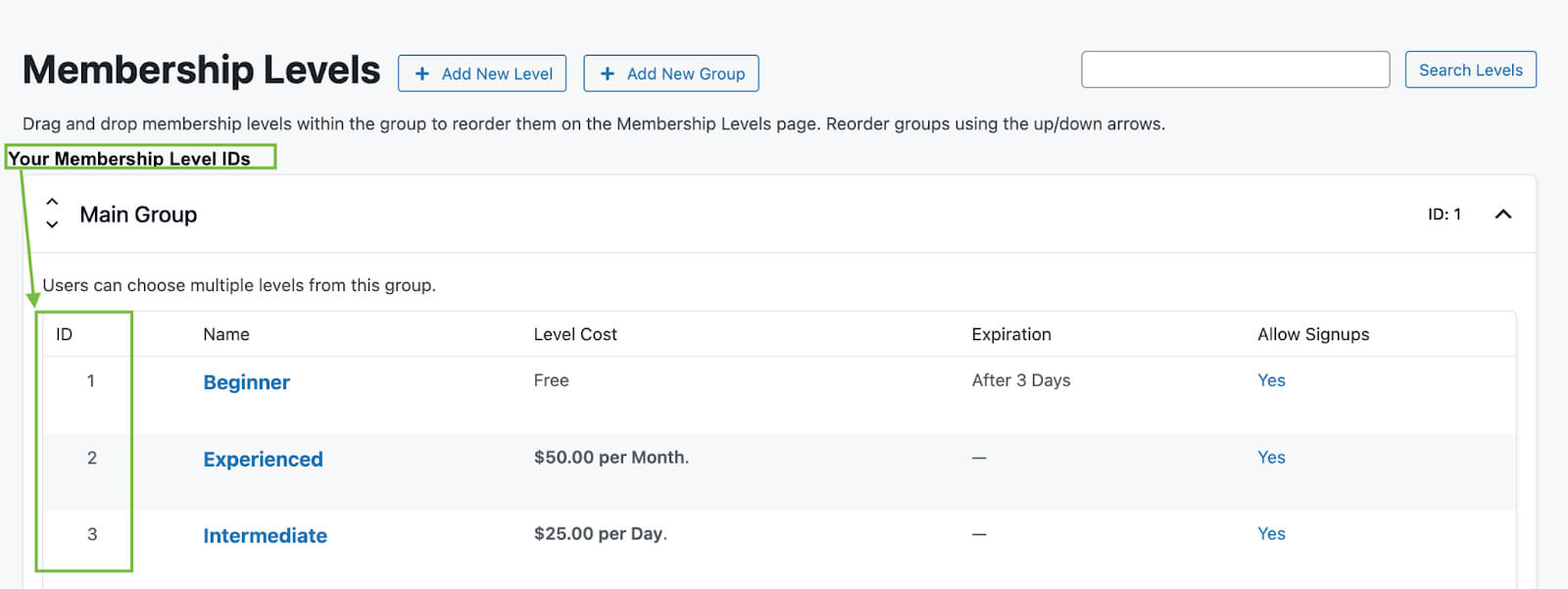
To customize this recipe, you will mainly need to update this code recipe with the membership level IDs that apply to your site.
- Replace 1, 2 with the IDs of the membership levels allowed to access your WooCommerce shop on line 32 of the code recipe.
- If you prefer to redirect to a custom page, you should replace
levelson line 37 with the slug of your custom page.
You can find these IDs by navigating to Memberships > Settings > Levels in the WordPress admin.
While this recipe does not require the WooCommerce Integration Add On, combining both can give you more control over product-level access, member pricing, and purchase restrictions.
You can also customize this recipe further by adjusting which WooCommerce pages are restricted. For example, you might decide to block only the shop archive while still allowing the cart or checkout for special cases.

Free Course: Membership Site Development—The Basics
Develop a deeper understanding of membership site development in this beginner-level course. Learn how to make your site work better, save yourself time and money, and improve your site's performance.


