We are excited to announce the release candidate (RC) for Paid Memberships Pro v3.7. The biggest updates in this release include Profile Pictures for members, Liquid Syntax in email templates, customizable Email Recipients (To/CC/BCC), an Admin Quick Search bar, a built-in Email Log, Background Exports powered by Action Scheduler, and powerful new Admin Filters for Orders and Subscriptions.
The rest of this post covers each major feature in detail, and highlights the enhancements, refactors, and deprecations included in this release. Keep reading to learn how to download and test the v3.7 release candidate.
Using the Release Candidate on Our Main Site
To show our confidence in the stability and reliability of v3.7, the main website you’re browsing now is already running PMPro v3.7 RC 1. We invite other sites, particularly those with a developer on the team, to join us in this crucial phase by testing the 3.7 version on their production websites.
Release Candidate Timeline
The RC phase is scheduled for roughly one week, after which we will proceed with the full PMPro v3.7 release.
- Download: The RC is available as a .zip file, downloadable directly from this post.
- Eligibility: We recommend the RC for production sites where a developer is available to address any potential issues with customizations or integrations.
- Feedback: Your insights and reports are invaluable. We encourage you to share your experiences, bugs, and suggestions to help us refine the final release.
PMPro v3.7 Live Stream
We’re hosting a launch party on Monday, March 23rd at 11am ET. Kim Coleman and Sam Daugherty will highlight what’s new in the Paid Memberships Pro v3.7.
When the live stream ends, the party is not over. Join us in the PMPro Slack community all day—our team will be on hand to help you update to PMPro v3.7 and start using all the new features and enhancements in your membership site.
Overview of Key Features in v3.7
Alongside numerous bug fixes and enhancements, below is an overview of the key features in PMPro v3.7.
Profile Pictures
PMPro v3.7 adds built-in profile picture support. Members can upload a custom avatar that replaces their Gravatar anywhere WordPress displays an avatar: in comments, on the membership account page, member directories, and more. You can even personalize the member’s experience by displaying their avatar anywhere in your site using the pmpro_member shortcode.
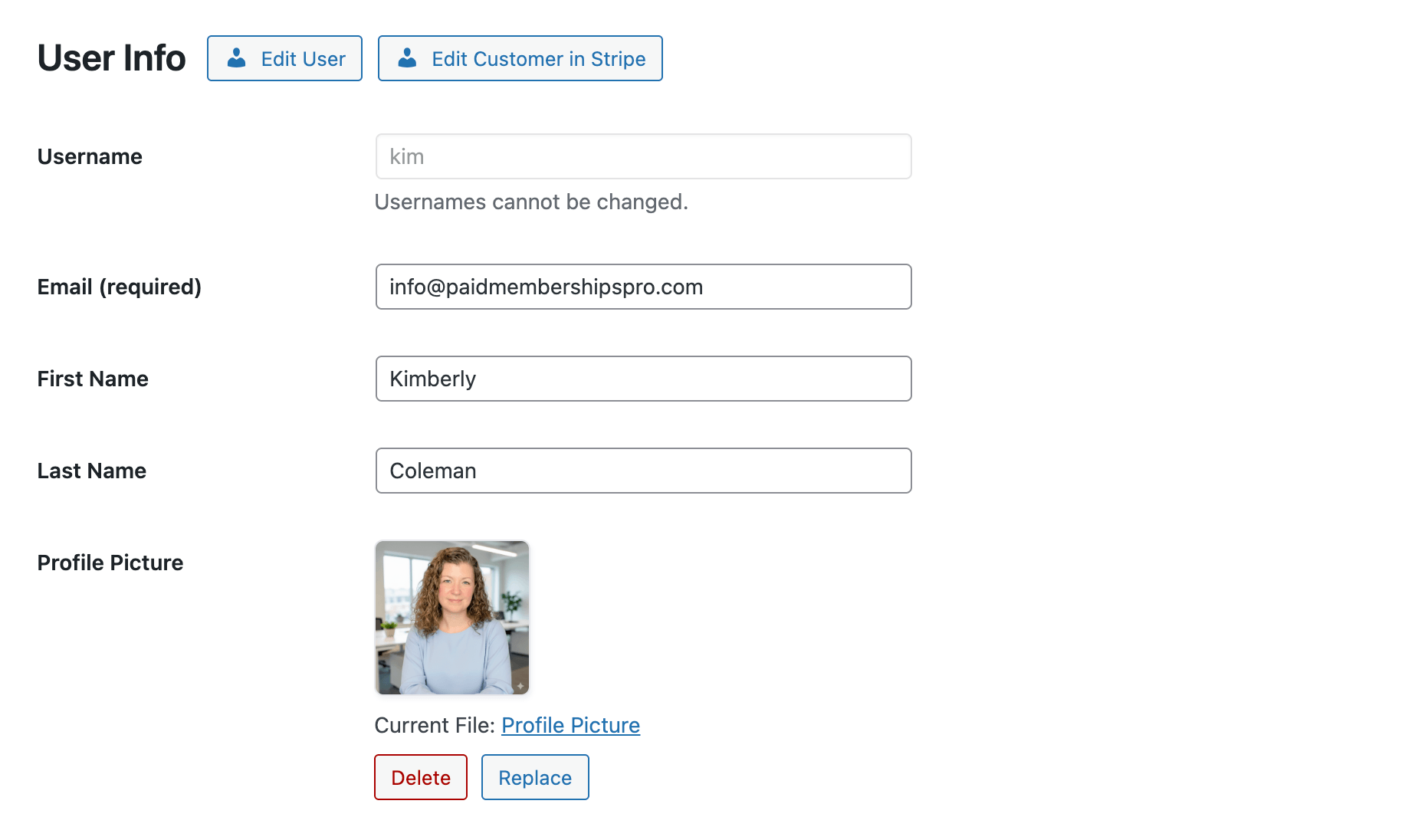
Profile pictures can be enabled in two ways:
- Sitewide: Enable for all users in Memberships > Settings > Advanced > Other Settings > Profile Pictures.
- Per level: Enable for specific membership levels by checking Enable Profile Pictures in the level’s Other Settings section.
When a member uploads an image, PMPro automatically crops it to a square, resizes it to a maximum of 1024px, and generates optimized sizes (96px, 256px, 512px) with retina support. The accepted file types are PNG, JPG, GIF, and WebP with a maximum size of 2 MB.
Members manage their profile picture from a dedicated Change Profile Picture page linked from their Membership Account. Administrators can also manage profile pictures from the Edit Member page in the admin.
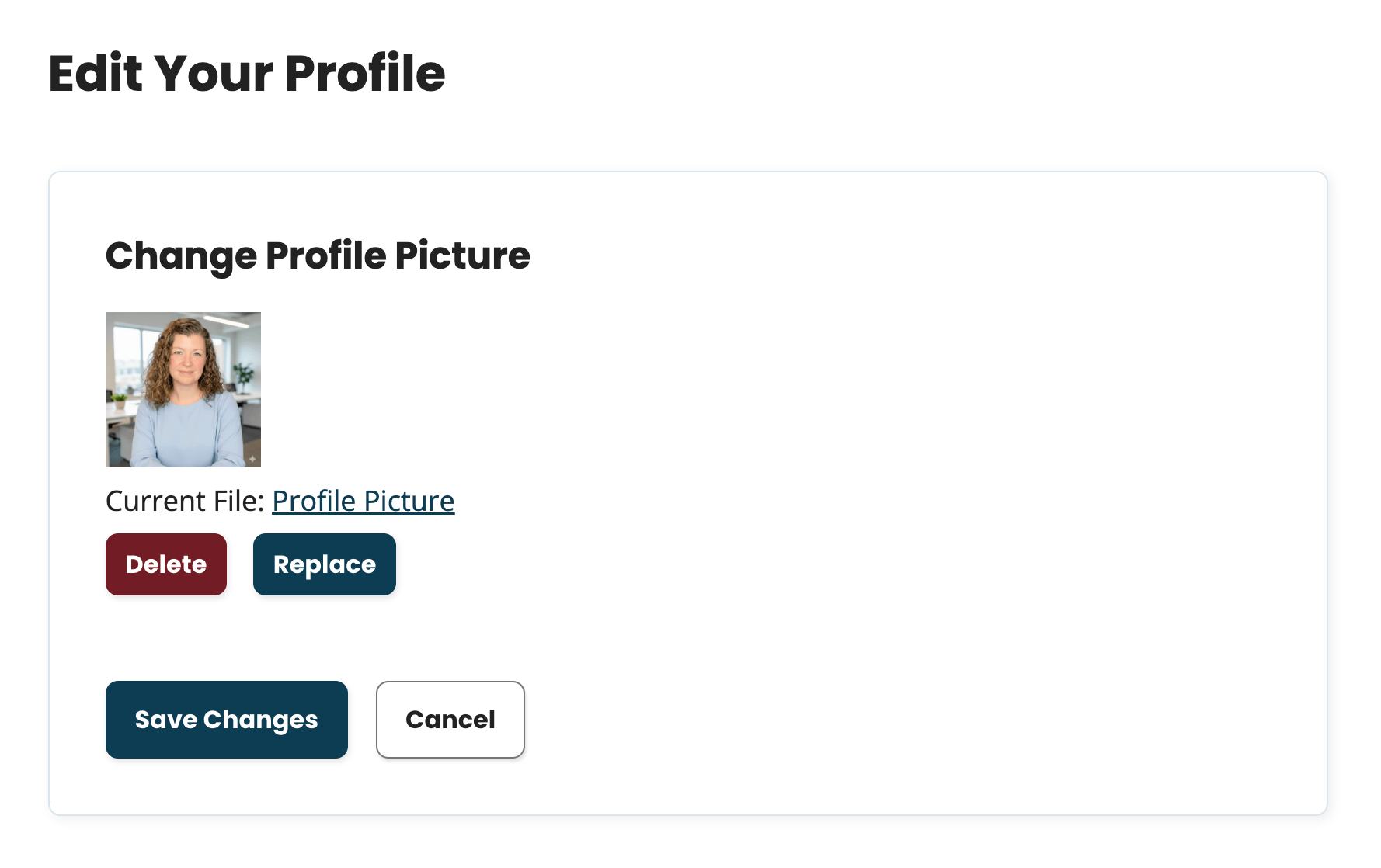
Avatar file names are anonymized then stored in wp-content/uploads/pmpro-avatars/. Files persist even if a member’s level changes, so the photo keeps showing even if they later move to a level without profile picture access.
This feature replaces the need for the Basic User Avatars plugin or any other tools you used to support local avatars. If you’re currently using that plugin, you can deactivate it after enabling PMPro’s built-in profile pictures. Reach out to our support team for help migrating a previous avatar system to the PMPro way (we have some scripts).
Liquid Syntax in Email Templates
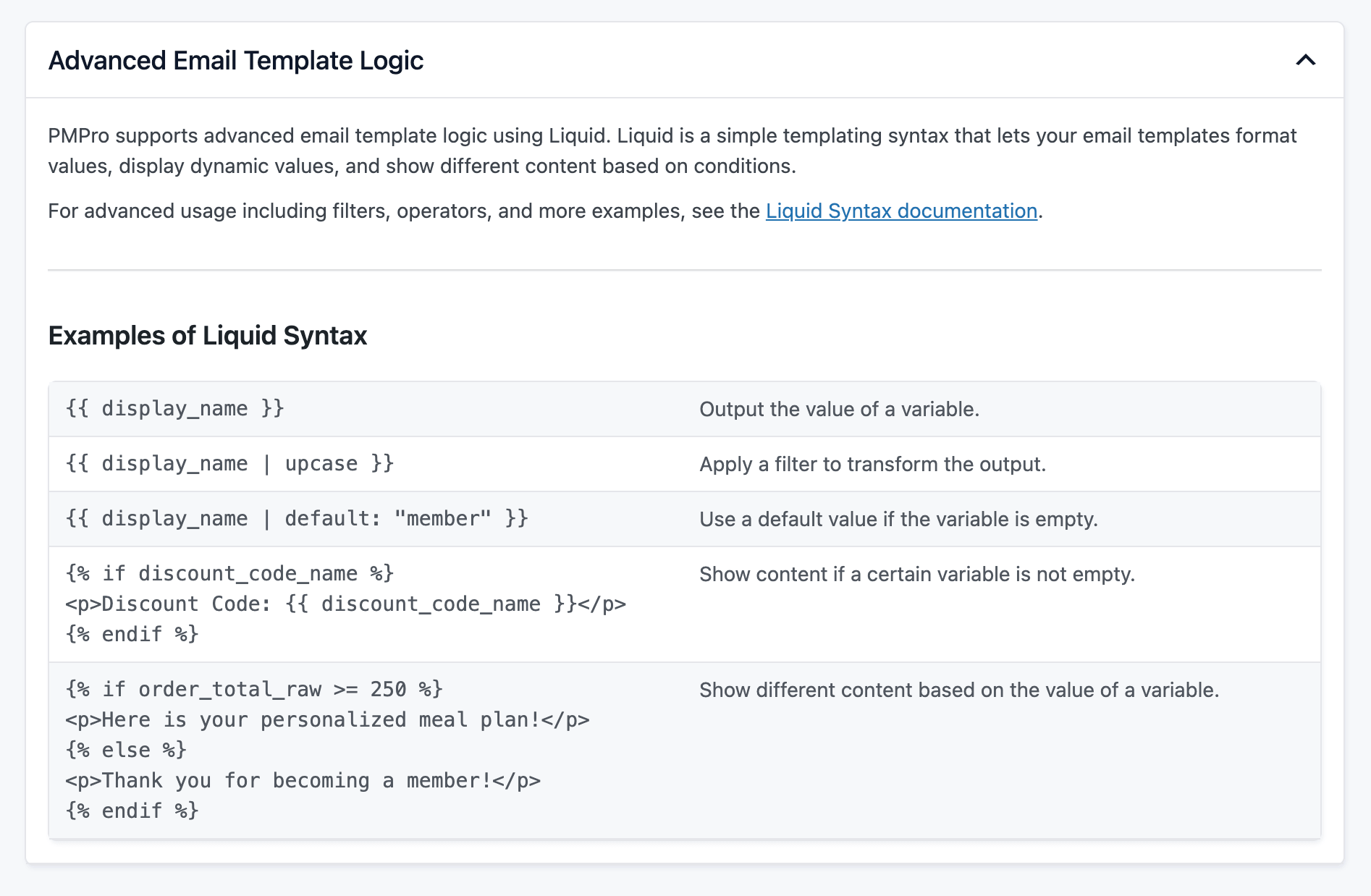
PMPro v3.7 introduces Liquid-style template syntax in email bodies, giving you conditional logic and text formatting without writing PHP.
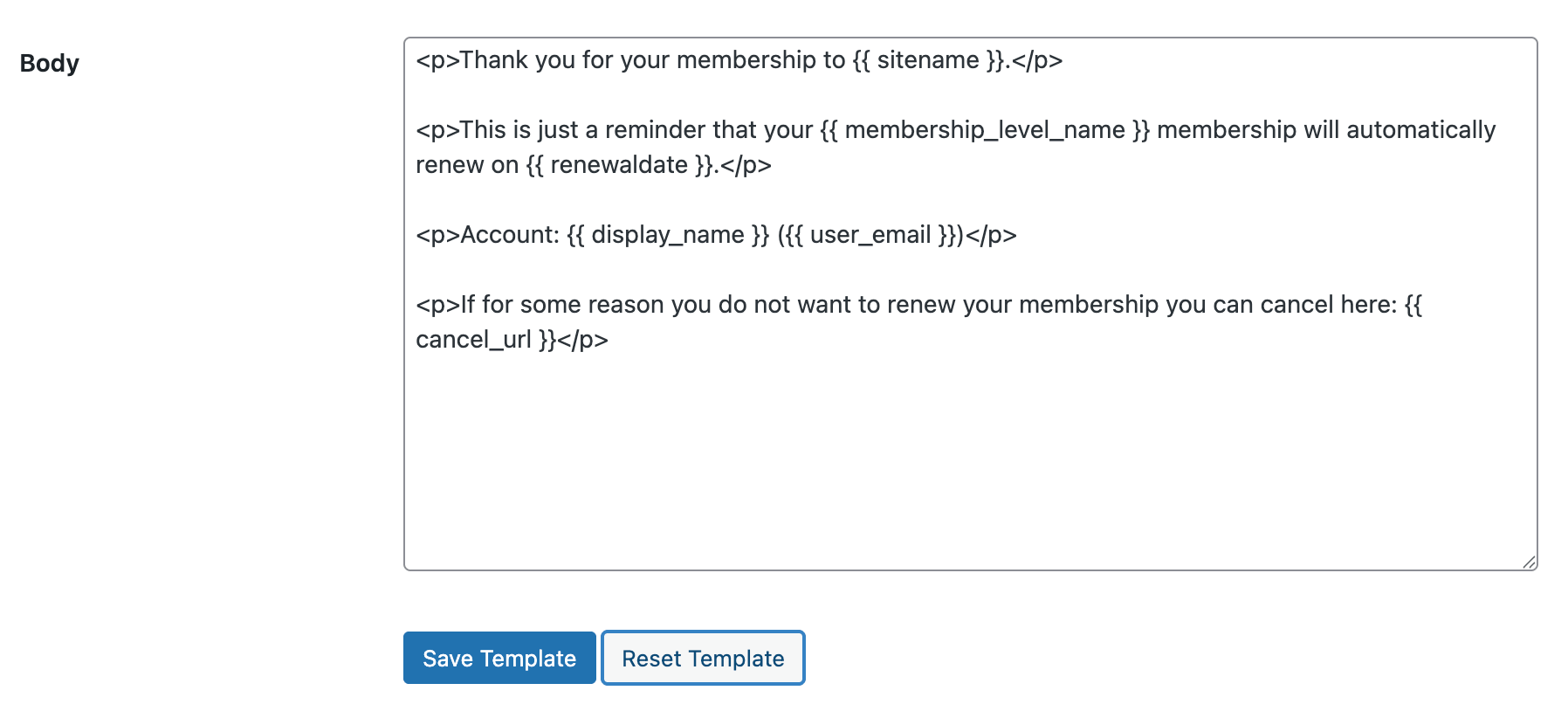
Output tags let you display variables with optional filters:
{{ name | upcase }}
{{ discount_code | default: "None" }}
Available filters include upcase, downcase, strip, and default.
Conditional blocks let you show or hide content based on variable values:
{% if membership_level_name == "Gold" %}
  Welcome to Gold! You have access to all content.
{% elsif membership_level_name == "Silver" %}
  Welcome to Silver! Upgrade to Gold for full access.
{% else %}
  Thanks for joining!
{% endif %}
Conditionals support comparison operators and boolean operators. You can check for empty values with the empty keyword, and nest conditionals inside each other.

Liquid syntax works alongside the existing !!variable!! placeholders. A new variable, {{ order_total_raw }}, provides the unformatted order total for use in numeric comparisons like {% if order_total_raw > 100 %}.
The email template editor includes a collapsible Advanced Email Template Logic panel with a quick syntax reference.
Email Template To, CC, and BCC Settings
Every email template now includes To, CC, and BCC fields directly in the template editor. Route specific notifications to additional team members, departments, or external systems: all without writing code.
You can use liquid placeholders in these fields, including {{ wordpress_admin_email }} and {{ user_email }}. Common use cases include:
- Sending admin checkout notifications to your sales team instead of the site admin.
- CC’ing a bookkeeper on every order-related email.
- BCC’ing your CRM inbox to automatically log membership communications.
Related: Customizing Email Templates
Admin Quick Search
A new search bar in the PMPro admin header lets you instantly find members, orders, subscriptions, levels, discount codes, settings pages, reports, and PMPro documentation.

Results are grouped by category and link directly to the relevant admin page. Quick search is fully keyboard navigable (arrow keys, Enter, and Escape) and respects WordPress capabilities so users only see results they have permission to access.
Email Log
PMPro now logs every email it sends, giving you full visibility into what was sent, to whom, and whether it was delivered.
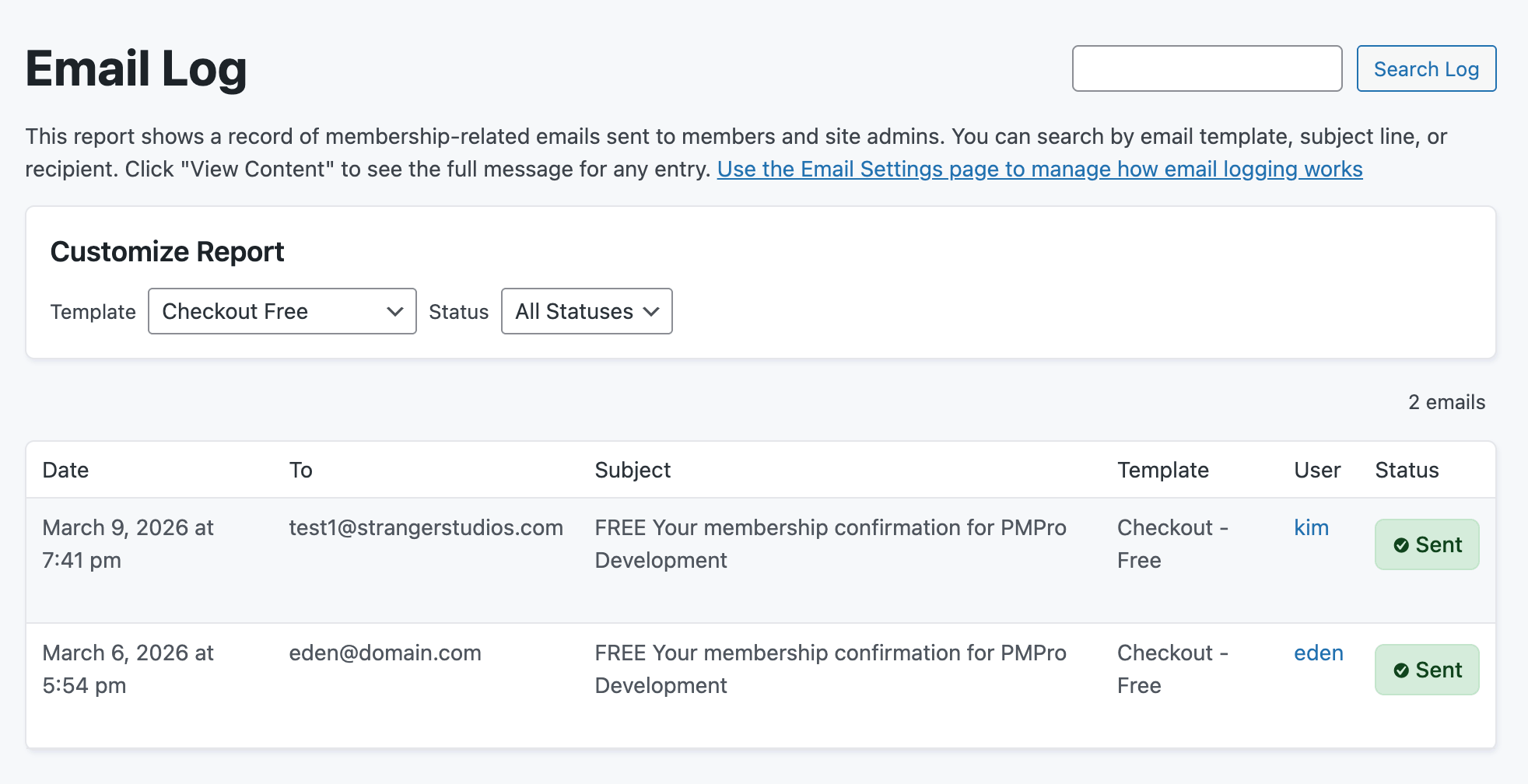
Each log entry captures the recipient, sender, CC/BCC, subject, full email body, template name, sent/failed status, timestamp, and any error message. You can click any entry to view the complete email in a modal with both rendered HTML and raw HTML views.
Access the email log from Memberships > Reports > Email Log for a site-wide view, or from the Email Log panel on individual Edit Member pages for a member-specific view.
Email logs are automatically purged after 90 days to keep your database clean. You can disable all email logging, customize the retention period, and perform a one-click purge from the Email Settings screen.
Background Exports
Member and order CSV exports now run in the background using Action Scheduler. Large exports process without blocking your browser or causing timeouts.
Exports with 500 or more items automatically run in the background, processed in batches of 250. You can navigate away, keep working, or even close your browser. The export continues on the server. Completed files are available for download for 6 hours.
Stripe Async Webhook Processing
For high-volume sites, v3.7 introduces opt-in asynchronous Stripe webhook processing. Time-sensitive events (like checkout completions) still process immediately, while deferrable events (like renewal payments) can be queued via Action Scheduler.
This helps sites that experience heavy renewal traffic or encounter duplicate webhook processing. Enable it with a one-line filter:
add_filter( 'pmpro_stripe_webhook_enable_async_processing', '__return_true' );
Related: Stripe Webhook Documentation
Orders and Subscriptions Admin Filters
The Orders and Subscriptions admin pages now include a collapsible sidebar filter panel, giving you powerful tools to narrow down your data without custom queries.
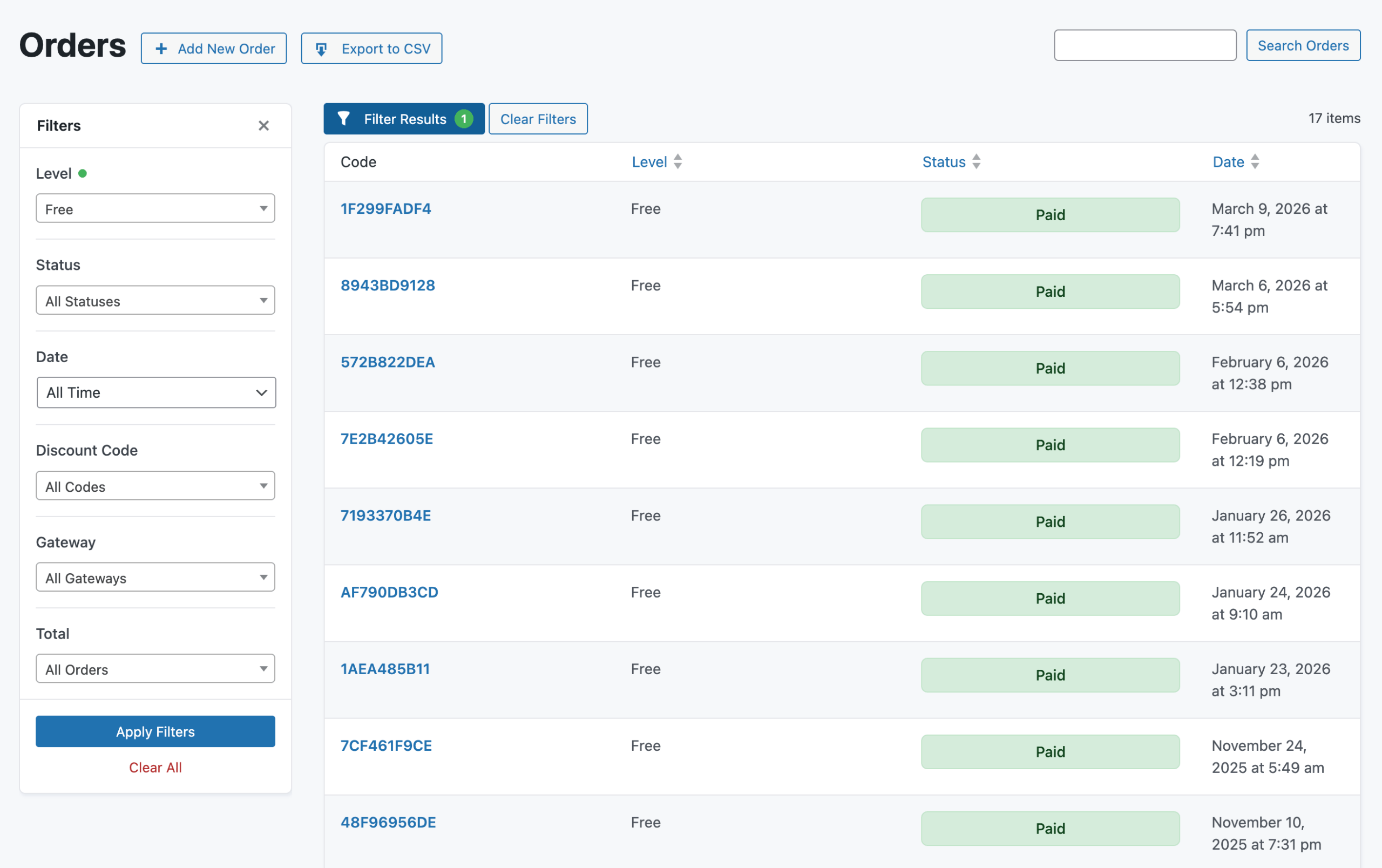
Orders can be filtered by Level, Status, Date Range (predefined or custom), Discount Code, Gateway, and Total (paid vs. free).
Subscriptions can be filtered by Level, Status (Active, Cancelled, Sync Error), and Gateway.
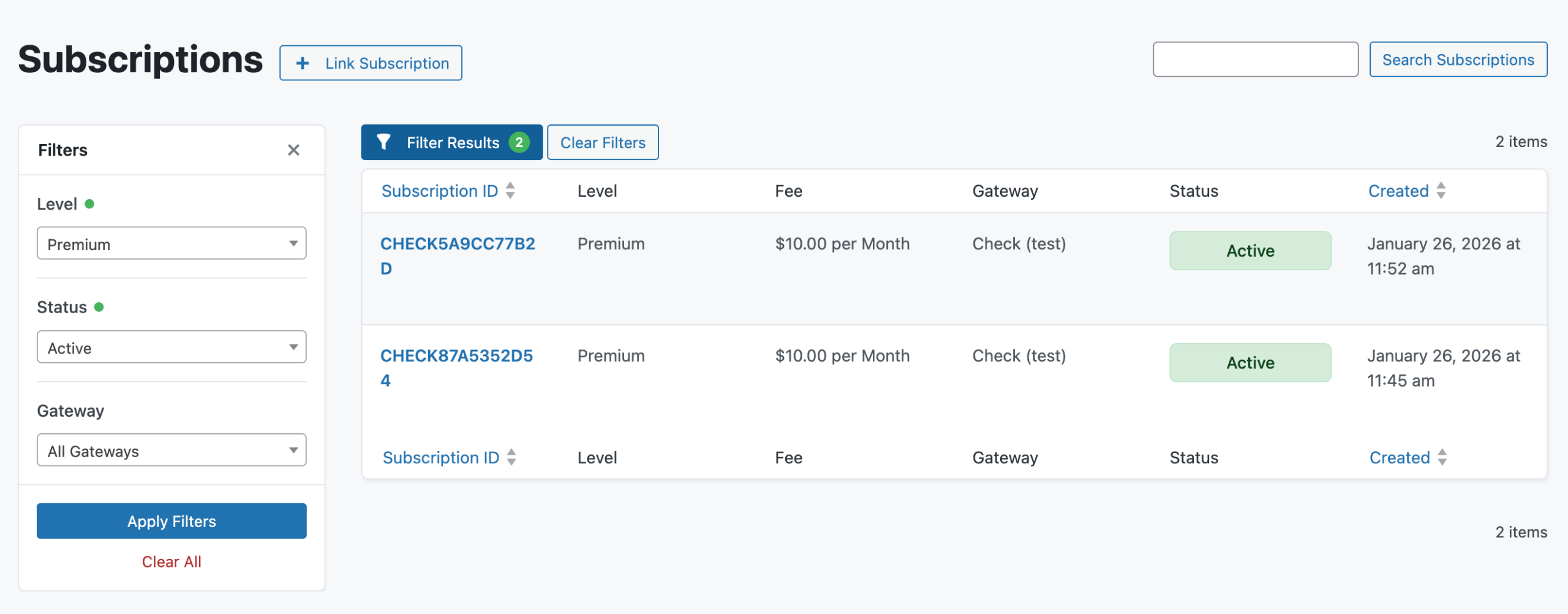
Click the Filter Results button to open the panel. A count badge shows how many filters are active, and each active filter displays a green dot indicator. Filters persist in the URL, so you can bookmark or share filtered views.
Site Health Information
PMPro v3.7 adds comprehensive debug information to the WordPress Site Health screen (Tools > Site Health > Info). The new PMPro section displays your payment gateway configuration, Action Scheduler health, membership levels, custom templates (with version comparison), library conflicts, and more.
A new site health test also checks for incorrectly named Add On folders and flags them as a critical issue, helping you catch installation problems before they cause errors.
Other Enhancements and Changes
Beyond the major features above, v3.7 includes several other improvements:
- Subscriptions admin: The Subscriptions admin page now follows the same view/edit pattern as the Orders page, with a consistent layout for viewing, editing, linking, and cancelling subscriptions.
- Billing page: The Billing page no longer redirects away after a successful billing update. Members stay on the page and see a confirmation message.
- reCAPTCHA v3 scoring: reCAPTCHA v3 now performs full score-based validation. PMPro evaluates the bot-likelihood score (default threshold: 0.5) and blocks low-scoring submissions. Customize the threshold with the
pmpro_recaptcha_v3_min_scorefilter. - New email variables: Added
{{ order_total_raw }},{{ order_gateway }},{{ wordpress_admin_email }}, and{{ pmpro_from_email }}. The{{ siteemail }}variable is soft-deprecated in favor of{{ pmpro_from_email }}. - Light/dark color scheme support: Frontend contextual messages now use the CSS
light-dark()function, automatically adapting colors when a WordPress theme declares a named color scheme. - Membership ID in member exports: The
membership_idfield is now included by default in member CSV exports. - Removed bundled translation files: Core translation
.poand.mofiles are no longer bundled with the plugin. PMPro now fully relies on our GlotPress server for translation management, reducing plugin file size. - Required PHP version updated to 7.4: The minimum required PHP version has been raised from 5.6 to 7.4.
- Admin toolbar accessibility: The admin toolbar menu items have been updated with improved screen reader text and
aria-hiddenattributes for better accessibility. - Members Per Level report caching: The Members Per Level report is now cached for improved performance on sites with many levels.
- Block editor compatibility: Moved to
enqueue_block_assetshook and resolved block editor warnings. - Capability updates: Changed capability check for admin user fields to
pmpro_edit_membersand added capability check for PMPro restricted directory access. - Removed
SQL_CALC_FOUND_ROWS: Replaced the deprecated MySQL modifier with a standardCOUNT()query for better database compatibility.
Deprecations
- Subscription Check Add On: This Add On is deprecated. The subscription verification functionality it provided is now handled natively by the core plugin.
pmpro_doing_webhook()read usage: Reading webhook status via this function is deprecated. The function still works for setting webhook status, but using it to check whether a webhook is processing will trigger a deprecation notice.
How to Download PMPro v3.7 RC 1
Last updated: March 10, 2026
Important: This RC is approved to use in a production environment. But, we recommend that you only put PMPro v3.7 RC 1 on your site if you are a developer or have access to one on your team.
Issues may arise if you have heavily customized PMPro or are using third-party plugins that have not been updated for v3.7 compatibility.
Providing Feedback on PMPro v3.7 RC 1
Anyone that chooses to use the release candidate version should share feedback, bugs, warnings, issues, and anything else worth reporting. Here’s how to share your feedback.
- Slack Community Members can share feedback in the
#devSlack channel. Join the Free Slack Community here. - If you do not wish to join the Slack Community, please submit your findings to us via our Contact Us page.
- Developers can open an issue and submit a pull request through our GitHub repository.
Your insights and contributions are invaluable to the improvement of PMPro.
Working Changelog for v3.7
- FEATURE: Added built-in profile picture support. Members can upload custom avatars that replace Gravatar images sitewide or per membership level.
- FEATURE: Added Liquid-style template syntax in email templates with output tags, filters, and conditional logic.
- FEATURE: Added customizable To, CC, and BCC recipient fields for each email template.
- FEATURE: Added a quick search bar in the PMPro admin header for finding members, orders, subscriptions, levels, discount codes, settings, reports, and documentation.
- FEATURE: Added built-in email logging with a full audit trail of every email sent by PMPro.
- FEATURE: Added background CSV exports for members and orders using Action Scheduler.
- FEATURE: Added opt-in asynchronous Stripe webhook processing for deferrable events.
- ENHANCEMENT: Added collapsible sidebar filter panels to the Orders and Subscriptions admin pages for filtering by level, status, gateway, date range, discount code, and total.
- ENHANCEMENT: Updated the Subscriptions admin page to follow the same view/edit pattern as Orders.
- ENHANCEMENT: The Billing page no longer redirects away after a successful billing update.
- ENHANCEMENT: reCAPTCHA v3 now performs score-based validation with a configurable threshold via the
pmpro_recaptcha_v3_min_scorefilter. - ENHANCEMENT: Added new email template variables:
{{ order_total_raw }},{{ order_gateway }},{{ wordpress_admin_email }}, and{{ pmpro_from_email }}. - ENHANCEMENT: Replaced the Dashicon admin menu icon with a custom SVG icon for a sharper appearance.
- ENHANCEMENT: Frontend contextual messages now support light/dark color schemes via the CSS
light-dark()function. - ENHANCEMENT: Added
membership_idas a default field in member CSV exports. - ENHANCEMENT: Added comprehensive debug information to the WordPress Site Health screen, including payment gateway, Action Scheduler health, custom templates, library conflicts, and more.
- ENHANCEMENT: Improved admin toolbar accessibility with screen reader text and
aria-hiddenattributes. - ENHANCEMENT: Cached the Members Per Level report for improved performance.
- ENHANCEMENT: Moved to
enqueue_block_assetshook for improved block editor compatibility. - ENHANCEMENT: Resolved block editor warnings.
- ENHANCEMENT: Changed capability check for admin user fields to
pmpro_edit_members. - ENHANCEMENT: Added capability check for PMPro restricted directory access.
- ENHANCEMENT: Replaced deprecated
SQL_CALC_FOUND_ROWSmodifier with standardCOUNT()query. - ENHANCEMENT: Updated checkout form submit handler for improved compatibility.
- ENHANCEMENT: Raised minimum required PHP version from 5.6 to 7.4.
- ENHANCEMENT: Removed bundled core translation files; translations are now managed via WordPress.org.
- DEPRECATED: Marked the Subscription Check Add On as deprecated. Functionality is now in the core plugin.
- DEPRECATED: Deprecated read usage of
pmpro_doing_webhook(). Use thePMPRO_DOING_WEBHOOKconstant directly instead. - DEPRECATED: Soft-deprecated the
{{ siteemail }}email variable in favor of{{ pmpro_from_email }}. - DEPRECATED: Removed old test scripts.


