When members log out of your site, the experience should be seamless and user-friendly. By default, WordPress sends users to the standard login page after logout. With Paid Memberships Pro, you can take control and enhance this experience by redirecting users and members to a personalized page, the homepage, or the Paid Memberships Pro login page.
These code recipes demonstrate how to redirect users and members on logout, whether by membership level, to the homepage, the PMPro login page, or other custom pages.
Understanding The wp_logout Hook
These recipes run on the wp_logout WordPress hook, which runs automatically whenever a user logs out of your WordPress site. You can use it to run custom PHP code, or most commonly to redirect users to a specific page or display a custom message after logout.
Code Recipe #1 (PHP): Redirect Members Upon Logout Based on Membership Level
This recipe sends members on membership level 1 to a specific page when they log out. Non-members and members of other levels are redirected to a separate page. To customize this recipe:
- Change the membership level ID
1on line 21 to your preferred membership level. - Replace
/level-1on line 22 with the slug of the page to redirect members to on logout - Replace
/other-levelson line 26 with the slug of the page to redirect non-members and members on other levels to.
Code Recipe #2 (PHP): Redirect All Users to Homepage or PMPro Login Page on Logout
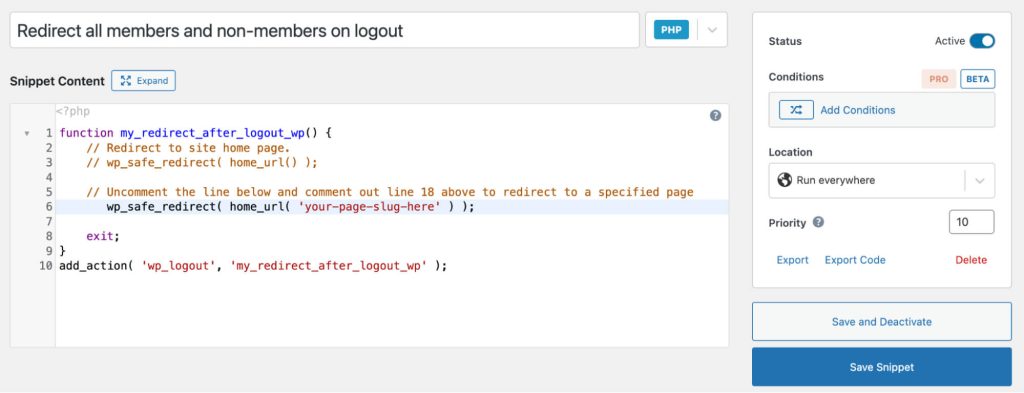
This recipe ensures that all users, regardless of membership status, are sent to the site’s homepage when they log out. To customize this recipe to redirect to the Paid Memberships Pro Login page:
- Replace
your-page-slug-hereon line 18 with your login page slug. For example,login.
Adding the Recipe to Your Website
You can add this recipe to your site by creating a custom plugin or using the Code Snippets plugin available for free in the WordPress repository. Read this companion article for step-by-step directions on either method.

Free Course: Membership Site Development—The Basics
Develop a deeper understanding of membership site development in this beginner-level course. Learn how to make your site work better, save yourself time and money, and improve your site's performance.


