
• Log In
  • Welcome
  • Features
  • Pricing
  • Documentation
  • Case Studies
  • Add Ons
  • Support
  • Learn
  • Events
  • Blog
  • Contact

Log In

Join Now | Lost Password?
Skip to content
Paid Memberships Pro WordPress Membership Plugin
  • Log In
  • Choose a Plan
  • Features
    • PMPro Platform
      • Plugin Features
      • Restrict Access
      • Register Members
      • Subscriptions
      • Hosting
      • All Features
    • Payment Gateways
      • Stripe
      • PayPal Express
      • Paystack
      • CCBill
      • Manual Payment
      • All Gateways
    • Add Ons
      • Integrations
      • Free Add Ons
      • Standard Add Ons
      • Plus Add Ons
      • All Add Ons

    Launch a Free Demo
    Explore PMPro in action with your own private demo site—preloaded with members, protected content, and premium Add Ons.

    Try PMPro Now
  • Use Cases
    • Associations
    • Blog and News
    • Communities
    • Courses
    • Directories
    • Paid Newsletters
    • Private Videos
    • Podcasting
  • Documentation
    • Download & Install
      • Download PMPro
      • Install Add Ons
      • Memberlite Theme
      • Setup WordPress
      • Staging Sites
      • Support
    • Initial Setup
      • Customize Pages
      • Payment Settings
      • Restrict Content
      • Membership Levels
      • Member Emails
      • User Fields
    • More Docs
      • Shortcodes & Blocks
      • Design Settings
      • Page Builders
      • Reporting
      • For Developers
      • Actions & Filters
      • All Docs

    Get your membership site up and running with Kim's help.

    Watch Initial Setup
  • Community
    • Engage & Learn
      • Upcoming Events
      • Courses
      • Videos
      • Step-by-Step Guides
      • Join Slack
      • Get Support
    • Blog
      • Case Studies
      • Product Comparison
      • Code Recipes
      • Release Notes
      • Migration Guides
      • All Blog Posts

    Join the Community
    Connect with other membership site creators who use PMPro to get paid.

    Join Slack
  • Pricing
Home  >  Blog  >  Restrict User Login for Members Only

Restrict User Login for Members Only

Estimated reading time: 7 minutes

TweetFacebookLinkedIn

As a membership site owner, you may want tighter control over who can log in to your website. Whether you are protecting premium content or ensuring account security, restricting logins based on membership status or our Email Confirmation Add On can help you maintain a trusted member environment.

This guide includes two recipes. One prevents users without an active membership from logging in. The other ensures that users must confirm their email address before they can log in. Both options help you enforce access rules and ensure that anyone who does not have an active membership level or a valid email address is not allowed to log into your site.

This is especially helpful for a site that is totally locked down for members only, where you only allow public access to the homepage and login screens.
Featured image for Restrict User Login for Members Only

Table of contents

  • Code Recipe #1: Restrict User Login to Active Members
    • Understanding the Code Recipe
    • About the Code Recipe
    • The Code Recipe
    • How to Customize This Code Recipe
  • Code Recipe #2: Require Confirmed Email Address to Log In
    • Understanding the Code Recipe
    • About the Code Recipe
    • The Code Recipe
  • Video: Coding with Sam Walkthrough

Code Recipe #1: Restrict User Login to Active Members

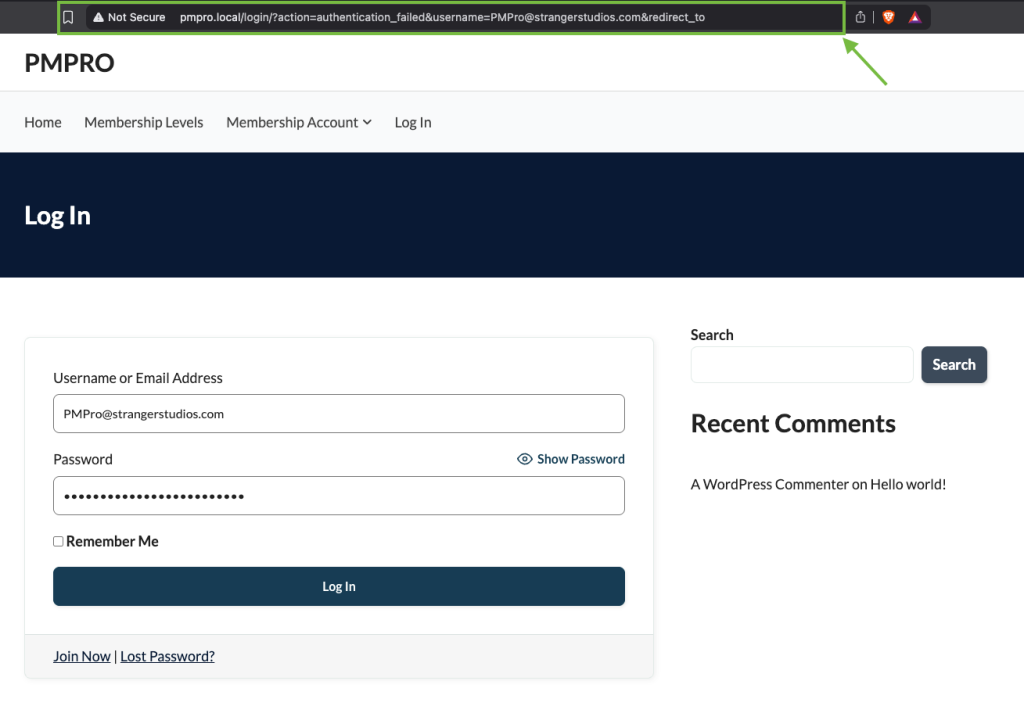
Screenshot of restricting user login for a user who is not an active member of your WordPress site.

Understanding the Code Recipe

This recipe uses the authenticate filter hook, which runs during the WordPress login process. By attaching custom logic to this filter, we can check whether a user has an active membership and stop the login if they don’t.

The function also includes checks to skip administrators and ensures the necessary Paid Memberships Pro function pmpro_getMembershipLevelsForUser() is available. If the user does not have any current membership levels, they will not be allowed to log in.

Note: Please use this recipe with caution as it is a very heavy-handed approach to blocking access to your site. As long as all of your content is correctly protected, a user without a membership level will not be able to view anything private. Also, note that a user with a previous membership level that is trying to log in as part of the checkout process will also be blocked. We suggest adding a message to your login page that logins will be blocked unless you have an active membership.

About the Code Recipe

This code recipe restricts user login attempts for any user who is not an active member of your WordPress site. Once this recipe is in place, any user who does not have a membership level will fail to authenticate. Administrators are excluded from this restriction on line 29 of this code. This is a very powerful recipe, so please use it with caution as this also blocks users who want to renew an expired or cancelled membership.

The Code Recipe

How to Customize This Code Recipe

If you need to exclude additional roles from login restrictions (such as editors or shop managers), you can modify the if ( in_array( 'administrator', $user->roles ) ) line in Recipe #1 by defining an array of allowed roles and using array_intersect() to match any of them. This allows you to add roles without removing the administrator check.

For example:

// Allow administrators and editors to bypass membership checks
$allowed_roles = array( 'administrator', 'editor' );
if ( array_intersect( $allowed_roles, $user->roles ) ) {
	return $user;
}

Code Recipe #2: Require Confirmed Email Address to Log In
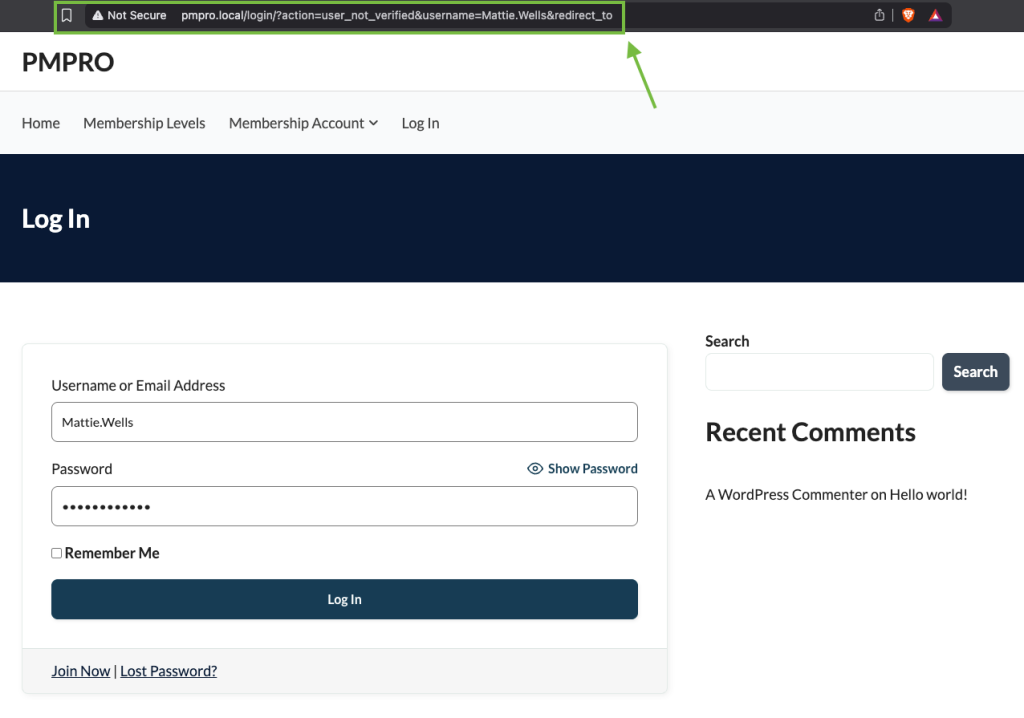
Screenshot of blocking login for users who have not confirmed their email address.

Understanding the Code Recipe

This recipe uses the wp_authenticate_user filter, which runs during login after the user is identified but before they are fully authenticated. The function checks if the user has a meta key named pmpro_email_confirmation_key set to validated.

This meta key is added by the Email Confirmation Add On, which requires users to click a link in their email to confirm their address. If the key is missing or not validated, login fails with an error.

About the Code Recipe

This code recipe blocks login for users who have not confirmed their email address. It’s a lighter restriction than the first recipe and is especially helpful when combined with the Email Confirmation Add On to reduce spam or fraudulent accounts.

Users will not see a clear error message when this login is blocked unless additional messaging is added to the login form. Use this method when you want to confirm users before granting access, but still allow expired or canceled members to log in and renew.

Note: At this time, users will not receive a warning message explaining why they are unable to log in if you are using the PMPro login page.

The Code Recipe

Adding the Recipe to Your Website

You can add this recipe to your site by creating a custom plugin or using the Code Snippets plugin available for free in the WordPress repository. Read this companion article for step-by-step directions on either method.

Video: Coding with Sam Walkthrough

Mary M Job

Author: Mary M Job

Mary is a Technical Support Engineer here at PMPro. She loves WordPress & Backpacking. In her spare time, she volunteers for the Nigerian, African and Global WordPress communities. You can find more about Mary and her other works on her personal website.

View more articles by Mary M Job »

Free Course: Membership Site Development—The Basics

Develop a deeper understanding of membership site development in this beginner-level course. Learn how to make your site work better, save yourself time and money, and improve your site's performance.

Take Free Course Now
Featured Image for Membership Site Development Course: The Basics


Was this article helpful?
YesNo
Tagged: login link, restrict, restrict membership. Posted in Code Recipes, Premium Code Recipes. Bookmark the permalink. Last updated: November 23, 2022.
Post navigation
← How to Grow Association Membership Using Social Proof
How to Create a Conditional Main Menu for Your Members in WordPress →

Paid Memberships Pro is recommended by our customers and users

Plugin Reviews

4.3 out of 5

G2

4.8 out of 5

Capterra

5 out of 5

We’re 100% GPL

Our plugin's code is not obfuscated, runs on as many sites as you want and can be customized to fit your project's needs. We just ask that you follow the GPLv2 guidelines by applying the GPLv2 license to any altered or unaltered version of PMPro that you distribute. License Details »

GPL v2

Recent Articles and Updates

  • Featured image for Allow Member to Opt-Out of New Series Post Email Notifications
    Allow Member to Opt-Out of New Series Post Email Notifications
  • Featured image for Require a Group Accounts Code to Register for a Membership Level.
    Require a Group Accounts Code to Register for a Membership Level
  • Featured image for Lucy's Painting Gallery case study
    From Hobby to Art Entrepreneurship: How Lucy’s Painting Gallery Became a Successful Online Teaching Hub Using Paid Memberships Pro

Platform

  • Pricing
  • Features
  • Product Comparison
  • Reviews
  • Case Studies
  • Best Membership Plugins
  • WordPress vs SaaS
  • Step-by-Step Guides

Use Cases

  • Associations
  • Blog & News
  • Community
  • Courses
  • Member Directory
  • Paid Newsletter
  • Podcast
  • Videos

Add Ons

  • Free
  • Standard
  • Plus
  • Admin
  • Integration
  • Payment
  • Third Party
  • View All

Get Help

  • Support
  • Documentation
  • Download & Install
  • Hosting
  • Developers
  • Blog
  • Slack Community
  • Contact Us

Company

  • About Us
  • Events
  • Brand Assets
  • Affiliates
  • Accessibility Statement
  • Sitemap
  • Privacy Policy
  • Terms of Service
Join Our Community
Follow Us On

© 2026 Paid Memberships Pro®. Paid Memberships Pro is a registered trademark of Stranger Studios, LLC. All Rights Reserved.

Open Office Hours: PMPro in Your Language with Andrew Lima • Thursday, January 29th at 11am ET. SEE DETAILS ▸


