The quick search bar in the PMPro admin header lets you instantly find members, orders, subscriptions, levels, discount codes, settings pages, reports, and even PMPro documentation.
Using Quick Search
The search bar appears at the top of every PMPro admin page, in the header area. Click into the field and start typing to search.
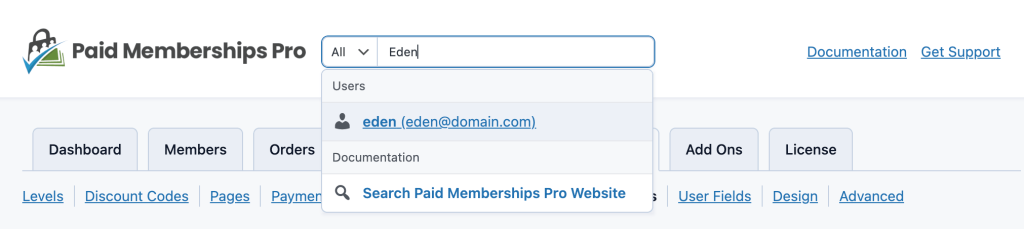
What Quick Search Finds
Quick search looks across multiple areas of your membership site:
- Users/Members: Display name, username, email address, user ID, or user fields
- Subscriptions: Subscription ID or gateway subscription transaction ID
- Orders: Order ID, order code, or gateway transaction ID
- Levels: Level name
- Discount Codes: Discount code text
- Settings: PMPro settings page titles
- Reports: Report titles
- Documentation: PMPro documentation titles on paidmembershipspro.com
Results are grouped by category and displayed as a dropdown below the search field.
Advanced User Search
When searching for members, you can search by user meta fields using a key:value format. To use this, first filter to the “Users” result type, then enter your search. For example:
company_name:Paid Memberships Pro
This searches the company_name user meta field for values starting with “Paid Memberships Pro”.
How Results Are Displayed
When searching across all categories (the default), each category shows up to 5 results. When you filter to a specific category, it shows up to 10 results.
Each result includes:
- An icon indicating the result type (user, order, settings, etc.)
- A label with the most relevant details (e.g., display name and email for users, order code for orders)
- A direct link to the relevant admin page
Permissions
Quick search respects WordPress capabilities. Users only see results for areas they have permission to access. For example, a user with only pmpro_memberslist capability will see member results but not order or setting results.
Get Support From Our Team of Experts
For more help with this PMPro feature, check out our Support Page with three ways to get support as a free or premium member.
Last updated on March 30, 2026

