The official release of Paid Memberships Pro v3.8 is here. The headline update in this release is a completely upgraded Email Template Editor, now built on the standard WordPress visual/text editor with built-in Liquid syntax autocomplete for variables, tags, and filters.
This release also adds a new [pmpro_membership_level] shortcode for displaying level details anywhere on your site, Divi 5 compatibility for content restrictions, and a handful of enhancements, bug fixes, and deprecations.
PMPro v3.8 builds on the groundwork laid in v3.7, where we introduced Liquid-style template syntax for email bodies. This update makes that syntax far easier to work with and gives you more flexible ways to display your membership levels across your site.
The rest of this post covers each major feature in detail and highlights the other changes included in this release. Keep reading to learn how to update to PMPro v3.8.
Table of contents
- Video: PMPro v3.8 Feature Tour
- Overview of Key Features in v3.8
- Other Enhancements and Changes
- Deprecations
- How to Update to PMPro v3.8
- Providing Feedback on PMPro v3.8
- PMPro v3.8 Full Changelog
- PMPro v3.8.1 Full Changelog
- PMPro v3.8.2 Full Changelog
- PMPro v3.8.3 Full Changelog
- PMPro v3.8.4 Full Changelog
- PMPro v3.8.5 Full Changelog
- PMPro v3.8.6 Full Changelog
Video: PMPro v3.8 Feature Tour
We’re hosting a launch party today, Tuesday, June 16 at 9:30am ET. Join Kim Coleman and Sam Daugherty as we walk through everything new in Paid Memberships Pro v3.8.
Overview of Key Features in v3.8
Alongside numerous bug fixes and enhancements, below is an overview of the key features in PMPro v3.8.
Upgraded Email Template Editor with Liquid Autocomplete
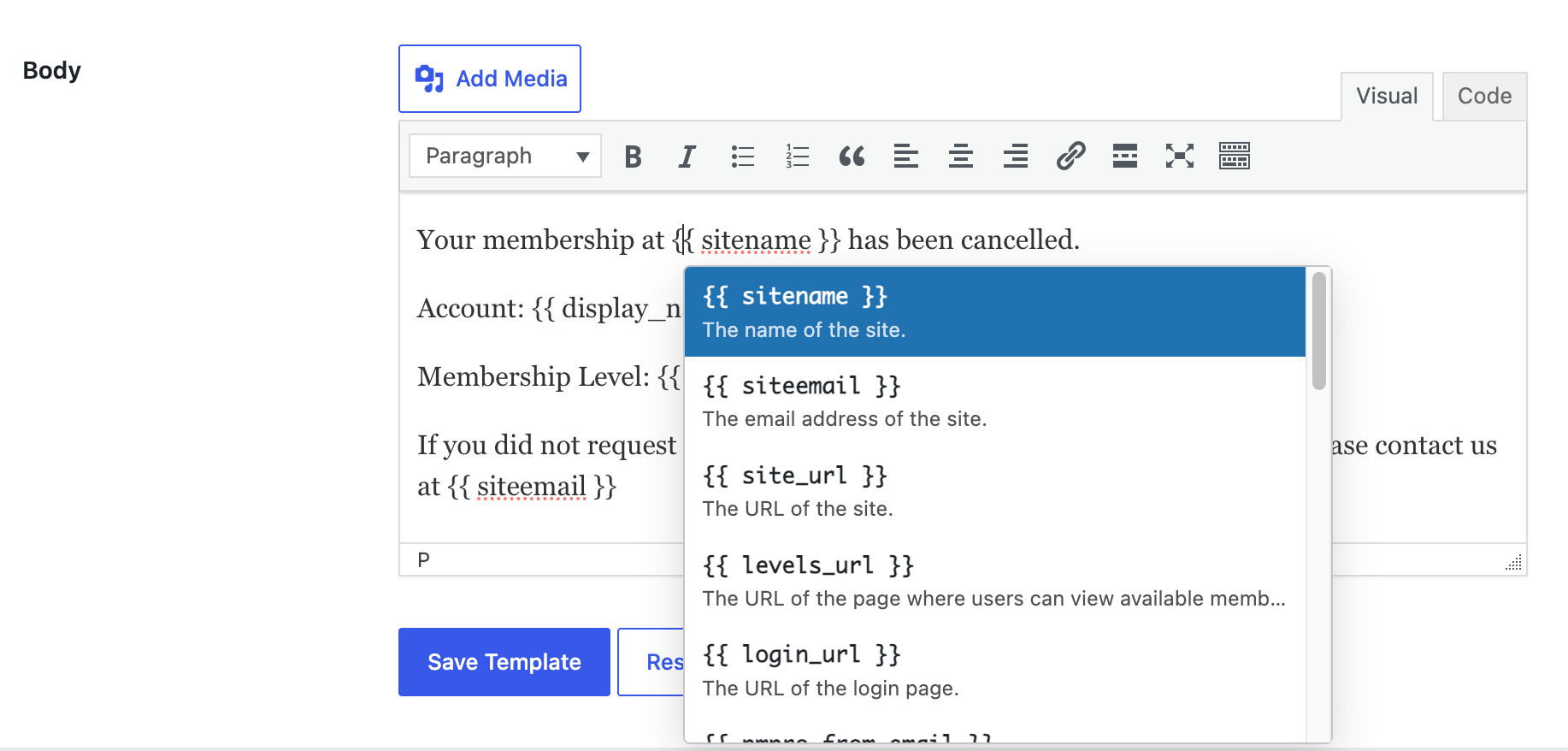
In v3.7 we introduced Liquid-style template syntax for email bodies, giving you conditional logic and formatting without writing PHP. In v3.8 we’ve upgraded the email template editor itself to the standard WordPress visual/text editor, so editing an email feels just like editing a post or page.
The biggest improvement is built-in Liquid syntax autocomplete for the email body content. As you type, the editor suggests the available variables, tags, and filters for that template, so you no longer have to memorize variable names or jump back and forth to a reference panel. This makes building conditional logic and personalized content faster and far less error-prone.
Related: Customizing Email Templates
New [pmpro_membership_level] Shortcode
PMPro v3.8 adds a new [pmpro_membership_level] shortcode for displaying a single membership level detail on any post or page. This makes it easier to build custom pricing pages, level comparison sections, and marketing copy that stays in sync with your actual level configuration.
The shortcode takes two required attributes:
- field: The level detail you want to display.
- level: The ID of the membership level to pull the detail from.
For example, to display the name of level 1:
[pmpro_membership_level field="name" level="1"]
You can display any of the following fields: name, description, initial_payment, billing_amount, cycle_number, cycle_period, billing_limit, trial_amount, trial_limit, expiration_number, expiration_period, level_cost, and checkout_url. Price fields are automatically formatted using your site’s currency settings, level_cost returns the full formatted cost text (the same string PMPro shows on your pricing pages), and checkout_url returns the direct checkout link for that level.
Both the field and level attributes are required… leave either one out and the shortcode returns a short reminder instead of output.
Divi 5 Compatibility
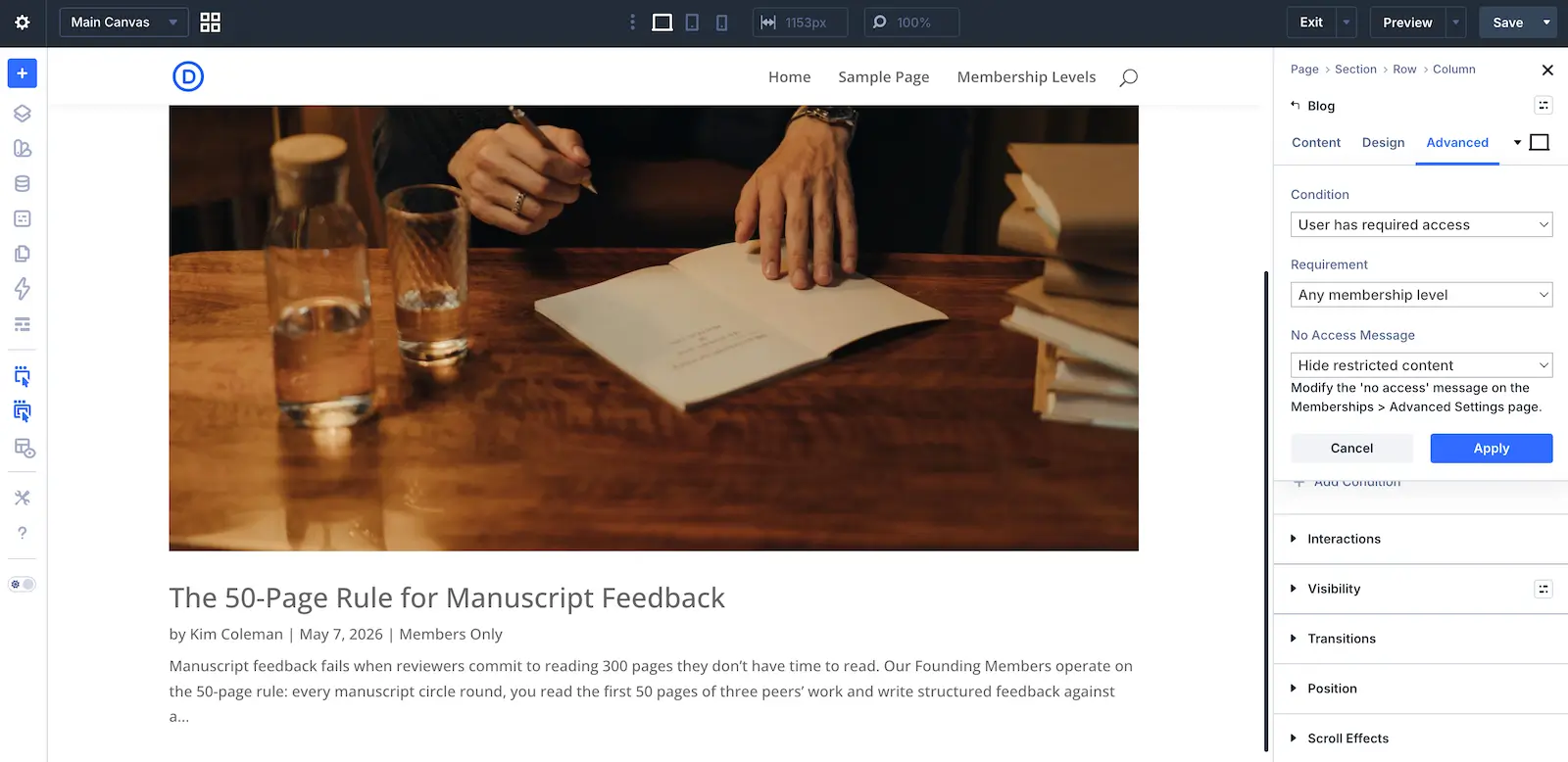
PMPro v3.8 adds Divi 5 compatibility for module-level restrictions and no-access message handling. If you build with Divi, content restriction applied at the Divi module level and the associated no-access messages now render correctly under Divi 5.
Other Enhancements and Changes
Beyond the features above, v3.8 includes several other improvements:
- New
level_group_idemail variable: Every email template class that already exposesmembership_idnow also exposes alevel_group_idvariable, giving template authors access to the level’s group in their liquid conditional logic and output tags. - Shortcodes in the account page message: The account page message now renders shortcodes, so you can embed dynamic content directly in that message, like a link to a protected download or course.
- Email logging fallback for SMTP plugins: Email logging now captures emails sent through SMTP plugins (such as Gravity SMTP) that bypass the standard
wp_mail_succeededandwp_mail_failedactions, so your email log stays complete. - Gateway-scoped trial settings: The recurring trial settings on the membership level and discount code edit pages are now hidden when the active payment gateway doesn’t support recurring trials, reducing confusion when configuring levels.
- Cleaner level deletion: Deleting a membership level now also cleans up orphaned membership level relationships, keeping your database tidy.
- Logged-out Billing page fix: Fixed a fatal error on the Membership Billing page for logged-out requests.
- Orders list on mobile: The Orders list table no longer appears blank on mobile. The order code is now the default primary column.
- Stripe card cleanup: Cleared stale card information when a recovered Stripe payment uses a non-card payment method.
- Confirmation message fix: PMPro no longer shows the membership confirmation message when an order has not actually been confirmed.
- Clearer admin hints: Removed the misleading “Advanced Settings” hint from the no-access message controls and clarified the user field meta key hint on the user field settings page.
- Code cleanup: Removed the unused
pmpro_userfields_get_groupandpmpro_userfields_get_fieldAJAX handlers.
Deprecations
- Credit Card Expiring email template: The credit card expiring email template is now deprecated.
- Membership Billing page user meta: The Membership Billing page no longer writes
pmpro_b*user meta on save, and the email field has been removed from that page.
How to Update to PMPro v3.8
You can update to PMPro v3.8 directly from the Dashboard > Updates screen in the WordPress admin or download the latest version here.
Before Updating:
- Backup Your Site: Always create a full backup before making major updates.
- Check Custom Code and Add Ons: If you have customizations or third-party integrations, test on a staging site first.
- Review the Full Changelog: See the detailed list of changes below.
This release continues our commitment to building the most flexible and powerful open source membership platform. Thanks for being part of the PMPro community. We can’t wait to see what you build next.
Providing Feedback on PMPro v3.8
Here’s how to share your feedback.
- Slack Community Members can share feedback in the
#devSlack channel. Join the Free Slack Community here. - If you do not wish to join the Slack Community, please submit your findings to us via our Contact Us page.
- Developers can open an issue and submit a pull request through our GitHub repository.
Your insights and contributions are invaluable to the improvement of PMPro.
PMPro v3.8 Full Changelog
Release Date: June 15, 2026
- FEATURE: Upgraded the email template editor to the standard WordPress visual/text editor with built-in Liquid syntax autocomplete for variables, tags, and filters.
- FEATURE: Added a new
[pmpro_membership_level]shortcode for displaying membership level details. - ENHANCEMENT: Added Divi 5 compatibility for PMPro module-level restrictions and no-access message handling.
- ENHANCEMENT: Added a new
level_group_idemail template variable to every email template class that exposesmembership_id. - ENHANCEMENT: Allowed shortcodes in the account page message.
- ENHANCEMENT: Removed the misleading “Advanced Settings” hint from the no-access message controls.
- ENHANCEMENT: Clarified the user field meta key hint on the user field settings page.
- ENHANCEMENT: Added an Add On icon for the MemberPress Migration Toolkit.
- BUG FIX/ENHANCEMENT: Now hiding the recurring trial settings on membership level and discount code edit pages when the active gateway doesn’t support recurring trials.
- BUG FIX/ENHANCEMENT: Added a fallback for email logging when SMTP plugins (e.g. Gravity SMTP) bypass the
wp_mail_succeededandwp_mail_failedactions. - BUG FIX: Cleaned up orphaned membership level relationships when a level is deleted.
- BUG FIX: No longer shows the membership confirmation message when the order has not been confirmed.
- BUG FIX: Fixed a fatal error on the Membership Billing page for logged-out requests.
- BUG FIX: Fixed the Orders list table appearing blank on mobile by setting the order code as the default primary column.
- BUG FIX: Cleared stale card information when a recovered Stripe payment uses a non-card payment method.
- REFACTOR: Removed unused
pmpro_userfields_get_groupandpmpro_userfields_get_fieldAJAX handlers. - DEPRECATED: Deprecated the credit card expiring email template.
- DEPRECATED: The Membership Billing page no longer writes
pmpro_b*user meta on save, and the email field has been removed from that page.
PMPro v3.8.1 Full Changelog
Release Date: June 29, 2026
- ENHANCEMENT: Added a new
styleattribute to the - ENHANCEMENT: Improved the HTML validity and accessibility of frontend forms and pages, including fixing duplicate
idattributes and invalid fieldset/legend markup. - ENHANCEMENT: Added a new
pmpro_restrictable_taxonomiesfilter, allowing Add Ons to register custom taxonomies whose terms can be restricted by membership level from the term edit screen. - BUG FIX: Fixed a fatal error on the Membership Billing page when a subscription’s gateway object could not be loaded.
- BUG FIX: Fixed the Members List CSV export so the exporting admin is no longer incorrectly included when exporting filtered or searched results.
- BUG FIX: Fixed a 404 error when viewing email log details in the modal on sites using Plain permalinks.
- BUG FIX: Fixed select fields overflowing the viewport on small screens.
- BUG FIX: Saving a membership level no longer clears term restrictions, such as tag restrictions, that were set from the term edit screen.
- BUG FIX: Restricted posts are now correctly hidden from searches and archives when a term’s ID and term taxonomy ID differ.
PMPro v3.8.2 Full Changelog
Release Date: July 14, 2026
- SECURITY: Restored sanitization of user field values on save, which had been inactive since v3.4.
- SECURITY: The Authorize.net Silent Post handler now requires Authorize.net API credentials to be configured on the site.
- BUG FIX: Read-only user fields are no longer saved on form submission and are now escaped when displayed. This also fixes read-only checkbox and select field values being erased on profile update.
- BUG FIX: Fixed broken CSV exports when an exported value contained a quotation mark.
- BUG FIX: Fixed checkout failures that could occur when the matching Stripe price had been archived in the Stripe dashboard.
- BUG FIX: Fixed an issue where users with the pmpro_reports capability could not view email content in the Email Log popup.
PMPro v3.8.3 Full Changelog
Release Date: July 30, 2026
- ENHANCEMENT: Site Health now detects the PMPro SMTP Add On as the site’s email sending service when a connector is configured.
- ENHANCEMENT: Added translator comments to localized strings containing placeholders so translators have context for each variable.
- ENHANCEMENT: The discount code lookup in
PMPro_Discount_Code::save()now uses$wpdb->prepare(). - BUG FIX: Multi-value user fields (multiselect, select2, and grouped checkboxes) now display correctly when their values were imported from a CSV file as a comma-separated string.
- BUG FIX: Fixed a fatal error that could occur when returning from an offsite gateway if the checkout data was missing from the order meta.
- BUG FIX: Fixed PMPro core and Add Ons never auto-updating in the background because the update hooks were only registered on
admin_init, which does not fire during WP-Cron where automatic updates run. - BUG FIX: Set
new_versiononno_updateentries so up-to-date Add Ons no longer trigger an undefined property warning in WP-CLI and other consumers of the plugin update transient. - BUG FIX: The bulk user delete confirmation screen now counts membership history for every selected user instead of only the first.
- BUG FIX: The level group selection message is no longer shown on the Membership Levels page for groups that contain only one level.
PMPro v3.8.4 Full Changelog
Release Date: August 6, 2026
- ENHANCEMENT: Added new
--pmpro--btn--border-radius,--pmpro--btn--top-bottom-padding, and--pmpro--btn--left-right-paddingCSS variables so that button styles can be customized separately from other elements that share the base variables. - BUG FIX: Fixed an issue where Stripe Checkout orders paid with delayed notification payment methods such as SEPA Direct Debit could be completed without their subscription and payment transaction IDs, which prevented membership cancellations from being sent to Stripe. An upgrade script now recovers the missing IDs for previously affected orders.
- BUG FIX: Fixed an issue where a user field could be shown at checkout even though its field group was hidden from checkout if the field overrode the group’s profile visibility setting.
- BUG FIX: Fixed an issue where duplicate recurring scheduled tasks, such as those inherited from a cloned or migrated database, would run simultaneously indefinitely. Duplicate chains are now cancelled automatically, keeping the earliest scheduled task.
PMPro v3.8.5 Full Changelog
Release Date: August 24, 2026
- SECURITY: Fixed an issue where the payment amount was not re-verified after Strong Customer Authentication (3D Secure) in the Stripe on-site checkout.
- SECURITY: Fixed an access check bypass in the
getfileservice that could allow protected files to be served throughadmin-ajax.phpwithout a membership access check. - SECURITY: Added missing capability and nonce checks to several admin AJAX and service handlers.
- ENHANCEMENT: Removed the notices on the Stripe payment settings recommending the deprecated Add PayPal Express Add On.
- BUG FIX: Guarded the
pmpro_setMessage()calls inPMPro_AddOnsso that activating Paid Memberships Pro while the Update Manager Add On is active no longer causes a fatal error.
PMPro v3.8.6 Full Changelog
Release Date: September 8, 2026
- ENHANCEMENT: Changed the “Edit Membership” button on the Edit Member memberships panel to “Update Membership” to make it clear that it saves the level change.
- ENHANCEMENT: The password visibility toggle now shows only the eye icon in the log in widget and on narrow screens so the field label and the toggle no longer wrap into each other.
- ENHANCEMENT: Wisdom tracking data now reports whether the site is running on PMPro Hosting.
- BUG FIX: Stripe Connect sites now refresh the platform publishable key from Paid Memberships Pro instead of using the key saved during the initial connection forever, so onsite checkout keeps working after the platform key is rotated.
- BUG FIX: Liquid tags that the visual email template editor wrapped in paragraph tags no longer produce empty or unbalanced paragraphs in sent emails.
- BUG FIX: The 3.8.4 upgrade script no longer fires order update hooks (e.g., Zapier) for every order whose Stripe transaction IDs were recovered.
- BUG FIX: Fixed the Stripe Connect environment lookup in
has_connect_credentials()so that Site Health checks the credentials for the active gateway environment, and avoided a PHP notice after a failed Stripe Connect disconnect response. - BUG FIX: The “Error:” prefix in Stripe Connect failure notices now renders in bold instead of as literal HTML.


