
When a recurring payment fails, many site owners expect one of two things: the member is canceled immediately, or Paid Memberships Pro retries the charge until it goes through. Neither is how the system actually works.
When a payment fails, your gateway is in charge of what happens next. The gateway retries the charge, notifies the customer, and eventually decides whether to keep trying or cancel the subscription. Paid Memberships Pro listens to those gateway decisions and updates the membership accordingly. This is the same architecture behind every successful recurring charge: the gateway is the source of truth, and PMPro is the system of record on the membership side.
Payment gateways have entire teams optimizing retry timing, fraud detection, and dunning logic. Letting them handle the failure path means your members get whatever recovery experience your chosen gateway has built, without Paid Memberships Pro needing to store or process sensitive payment information to retry charges.
If you have not yet read How Recurring Payments Work with Paid Memberships Pro, start there. This post builds on the same architecture and is worth reading first.
What Is “Dunning”?
“Dunning” is the process of methodically communicating with a customer about an outstanding or failed payment. It includes the retry attempts your gateway makes, the emails your site sends, and the final decision to cancel a subscription if nothing is recovered.
For a membership site, dunning is one of the quiet levers that affects your churn rate. Some failed payments are unavoidable. Cards expire, banks decline transactions, and members occasionally walk away on purpose. But a meaningful percentage of failed payments are recoverable if your site retries, asks the member to update their card, and gives them an easy way to do it.
The goal is not to chase every dollar. The goal is to keep your records accurate, give engaged members a chance to fix the problem, and cancel cleanly when recovery is not happening.
How Paid Memberships Pro Handles Failed Payments
Before getting into the gateway-by-gateway specifics, it helps to understand the division of labor between Paid Memberships Pro and your payment gateway.
When a member signs up, Paid Memberships Pro creates the subscription at the gateway. The gateway, not your site, charges the member each billing period. That same split applies when a payment fails:
- Your gateway is responsible for retrying the charge and deciding when to give up. The retry schedule and the maximum number of attempts are configured in your gateway account, set by the API call PMPro made when the subscription was created.
- Paid Memberships Pro listens for webhook (Stripe) or IPN (PayPal) messages from the gateway. When a payment fails, PMPro creates a failed payment order and sends a billing failure email to the member and the site admin.
- The membership level is not canceled on a single failed payment by default. PMPro waits for the gateway to exhaust its retries and send a final subscription cancellation event. Only then does PMPro cancel the member’s access and send the cancellation email.
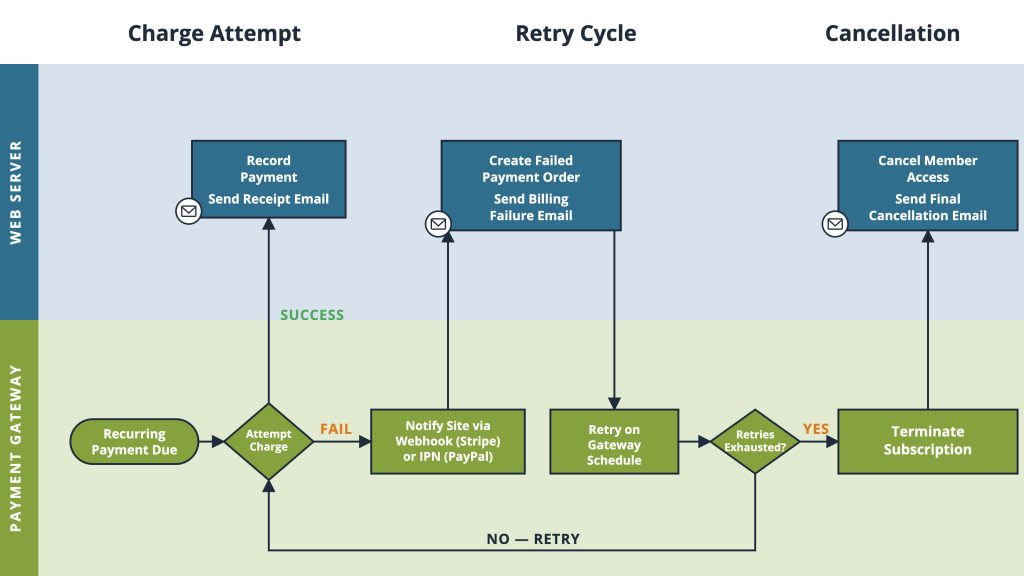
This keeps the source of truth in one place: the gateway. Canceling memberships on your site before the gateway has finalized the decision can leave the two systems out of sync — members who were charged but lost access, or members who lost access but are still being billed.
One detail worth noting: if a gateway sends several failed payment notifications in quick succession, PMPro sends only one billing failure email per order in a 24-hour window. The retries still happen at the gateway, but your member is not buried in identical emails.
Gateway-Specific Retry Behavior
Where gateways differ most is in how many times they retry and how much control you have over the schedule. Here is how the most common PMPro-supported gateways behave.
Stripe
Stripe gives you the most flexibility. To configure the retry schedule, log into your Stripe account and navigate to Dashboard > Products > Billing > Revenue Recovery > Retries. From there, you can:
- Set how many times Stripe retries a failed payment.
- Control the time between retries.
- Choose what happens after all retries fail: cancel the subscription, mark it as unpaid, or leave it past due.
- Enable Stripe’s customer emails for failed payments and payment method updates.
Most Stripe-powered membership sites use the default smart retry schedule, which spreads several retry attempts over a few weeks. If all retries fail, Stripe sends a final webhook to your site and PMPro cancels the membership.
PayPal
When Paid Memberships Pro creates a PayPal subscription, it sends MAXFAILEDPAYMENTS=1 in the API request. That value tells PayPal to cancel the subscription after the first failed payment, with no retries.
This is a deliberate choice. PayPal’s automatic retry behavior has historically been unreliable, and canceling cleanly after one failure tends to keep PMPro and PayPal in sync. The member receives the billing failure email, can return to your site to renew, and a new subscription is created at checkout when they do.
If you want PayPal to retry before canceling, the MAXFAILEDPAYMENTS value can be adjusted with the code snippet below. If you need help adjusting this behavior, our support team is here to help.
Authorize.net
Authorize.net does not have a built-in setting to automatically cancel a subscription after a failed payment. A failed payment is reported to your site, but the subscription remains open at the gateway and will continue attempting charges based on Authorize.net’s defaults.
For Authorize.net sites, the custom snippet in the next section is the recommended approach: hook into the pmpro_subscription_payment_failed action and cancel the membership on the first failed payment.
Other Gateways
Paystack, CCBill, Braintree, Payflow Pro, and the other gateways supported by Paid Memberships Pro each have their own retry rules. As a general rule:
- Check your gateway’s dashboard for a “retries,” “dunning,” or “revenue recovery” section.
- Confirm whether the gateway cancels the subscription after a set number of failures or leaves it open indefinitely.
- If the gateway does not cancel on its own, plan to add a custom rule on your site using the hook described in the next section.
Customizing the Behavior: Cancel After the First Failed Payment
Paid Memberships Pro gives you a clean place to change how failed payments are handled: the pmpro_subscription_payment_failed action. This action fires every time PMPro receives a failed payment notification from any gateway, giving you one consistent place to act regardless of which gateway you use.
When you would want this:
- You are on Authorize.net (or another gateway without native retry and cancel controls) and want PMPro to cancel the membership the moment a payment fails.
- You have made a deliberate business decision not to grant continued access after a missed payment.
- You do not want to wait through the gateway’s full retry window before the membership cancels.
When you would not want this:
- You are on Stripe or PayPal and prefer to use the gateway’s built-in retry and recovery features, which typically recover a meaningful percentage of failed payments.
- You want to give members a window to update their card before losing access.
To cancel the membership immediately after the first failed payment, add the following snippet to your site using a custom plugin or the Code Snippets plugin:
This is a one-way action. Once canceled, the member needs to re-subscribe through your normal checkout. This code snippet does not include a grace period. For the opposite approach — giving members additional time after a failed payment before losing access — the Paid Memberships Pro support team can point you to the right recipe.
Related: Recurring Payment Reminder Emails
When Your Gateway and PMPro Get Out of Sync
Even with everything wired up correctly, you will occasionally find a member whose status on your site does not match their status at the gateway. This usually happens after a missed webhook, an IPN service outage, or a manual change made directly in Stripe or PayPal.
The first place to look is Memberships > Subscriptions in the WordPress admin. From an individual subscription’s detail view, click Sync With Gateway to pull the current status from the gateway directly into PMPro.
If you find a member with an active level on your site but no active subscription at the gateway, open their Edit Member page, scroll to the Memberships section, and cancel the level associated with the inactive subscription. You can optionally send the default cancellation email and follow up with a link to your checkout page if you want to give them a chance to start a new subscription.
If this happens regularly, it is a sign of a webhook or IPN configuration issue worth investigating. Contact our support team for help.
Payment Gateways Are Designed for Payments
Payment gateways specialize in payments. That includes the messy failure paths: retry logic, dunning sequences, card-update prompts, and final cancellations. Letting them handle those details means:
- Your members get whatever recovery experience your chosen gateway has built, including smart retries, dunning emails, and self-service card updates.
- Paid Memberships Pro does not need to store or process sensitive payment information to retry charges.
- Your membership status stays in sync with reality at the gateway, automatically.
The architectural principle is consistent across the full billing lifecycle: the gateway is the source of truth, and PMPro mirrors the outcome. That makes the failure path as predictable as the initial checkout.
One detail worth noting: if you are seeing an unusually high volume of payment failures in a short period, it may not be cards expiring. See our guide to Stripe Card Testing Attacks for what to look for and how to respond.
Frequently Asked Questions
Dunning is the process of methodically communicating with customers about a failed or outstanding payment in an attempt to recover it. In a membership context, it includes the gateway’s retry attempts, the emails your site sends, and the eventual cancellation if recovery fails.
Paid Memberships Pro receives a notification from your gateway, creates a failed payment order, and sends a billing failure email to the member and the site admin. The membership level is not immediately canceled. PMPro waits for the gateway to exhaust its retries and send a final cancellation event before removing the member’s access.
That depends on your gateway’s retry schedule, not on Paid Memberships Pro. Stripe’s smart retry schedule can spread attempts over several weeks. PayPal cancels after one failed attempt by default. If you want to cancel immediately on the first failure, add the custom snippet described in this guide.
Yes. Paid Memberships Pro sends a billing failure email to the member and a copy to the site admin. To avoid duplicate messages, PMPro sends only one failure email per order in a 24-hour window, even if the gateway retries multiple times in that period.
Yes. Use the pmpro_subscription_payment_failed hook and call pmpro_cancelMembershipLevel() from there. This is especially useful for Authorize.net, which has no built-in setting for automatic cancellation after a failed payment. See the customization section above for the full snippet.
Go to Memberships > Subscriptions in the WordPress admin and use the Sync With Gateway button on the affected subscription to pull the current status from the gateway. For members whose subscription is already canceled at the gateway, manually cancel their level from the Edit Member page.

Free Download: The AI-Powered Membership Site Blueprint
Download the free guide: Learn how to plan, build, and grow a membership site using AI as your strategic partner: from buyer persona to launch and beyond.