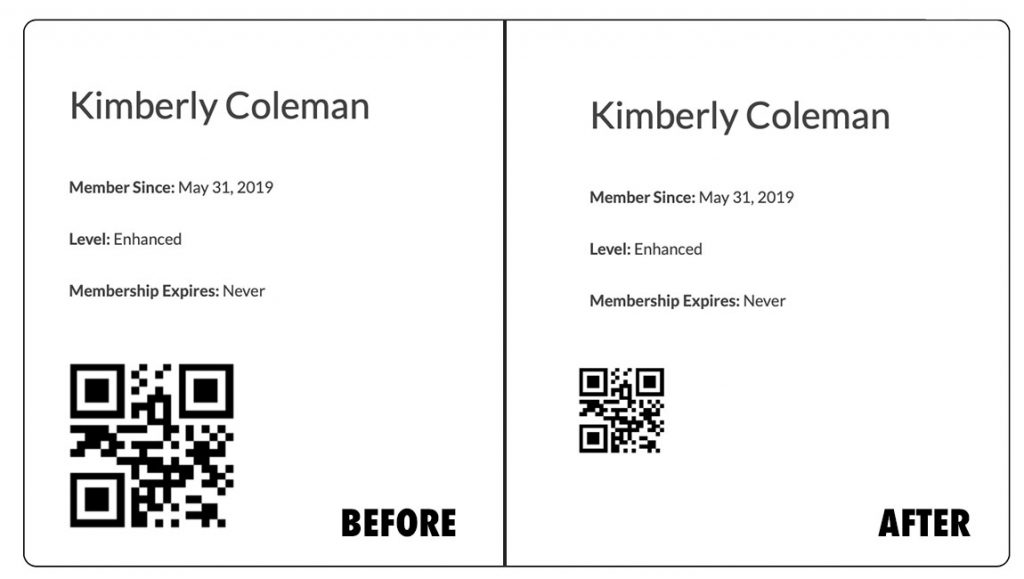
This code recipe will allow you to adjust the QR code on your Paid Memberships Pro Membership Card to a specific size. This comes in handy if you want a more minimalistic-looking membership card or if you would like a more visible QR code.

About the Code Recipe
QR Codes are becoming increasingly popular with membership cards. It allows you to keep track of information about your members like the number of times they visited your establishment, entry to special members-only events, and validating their membership. This code recipe will allow you to adjust the size of your code, allowing you to match the style or function you’re hoping to achieve.
The Code Recipe
Adding the Recipe to Your Website
You can add this recipe to your site by creating a custom plugin or using the Code Snippets plugin, available for free in the WordPress repository. Read this companion article for step-by-step directions on either method.
Want to tweak this recipe? An AI coding assistant can help you adjust the code to fit your exact needs, or even add it to your site for you. Always test changes on a staging site first and keep a backup.
Rather have us handle it? With PMPro Max, you can submit a Do It For Me request, and our team will review it and, when possible, add or customize this recipe directly on your site.

Get Support From Our Team of Experts
Have a question about how to use this feature? Our Support Page outlines three ways to get support.
Our Max plans include hands-on help customizing your membership site and implementing new features. Upgrade to PMPro Max now »