If your membership includes an upsell you handle personally, you already have more information about your leads than you are using. Every checkout answer, every visit to your pricing or checkout page, and every membership status sitting in your WordPress database can tell you who is close to buying and who still needs a nudge.
This code recipe turns that information into your own CRM, a system for tracking leads and where they stand in your sales pipeline. It gets built right into your WordPress admin, with no separate tool to buy or connect.
Do You Need This Recipe?
This recipe is a good fit if:
- Your membership includes an upsell you handle personally, like one-on-one coaching, consulting calls, or a premium tier you sell yourself.
- You want a simple way to see which members are closest to buying, based on what they told you and what they have done on your site.
- You do not want to pay for or connect to a separate CRM just to get this kind of visibility.
If you already send member data to a CRM like Salesforce, HubSpot, or ActiveCampaign, for example, through an integration like WP Fusion, this recipe will not conflict with it. Everything here stays in your WordPress user meta and does not sync anywhere. It would likely be redundant, though, so this recipe is best suited to sites that do not already have that kind of tool in place.
Before You Start
This recipe requires:
- A list of the pages on your site you consider high-intent: Your pricing page or checkout page, along with their page slugs, are some examples.
- Two User Fields created under Memberships > Settings > User Fields: One text field to collect a phone number, and one select field asking members where they are in their buying decision, with your own answer options.
- The “Name” you set for each field: The unique
meta_keyWordPress uses to store it. You will match these to the snippet’s configuration.
About the Code Recipe
This recipe has four moving parts that work together.
Profile Answers: A User Fields select field asks members where they are in their buying decision. Each answer is worth a set number of points, defined in the pmprocrm_stages() function. The snippet ships with example answers and scores. You will replace these with your own in the Customize section.
Behavior Tracking: The snippet watches for logged-in members visiting pages you flag as high-intent. It hooks template_redirect to log each visit, and adds that page’s assigned weight to the member’s score.
Score Calculation: The pmprocrm_calculate_lead_score() function combines the profile answer, page-view activity, whether a phone number is on file, and whether the member already holds a paid membership level, into a single number. It recalculates on the pmpro_after_checkout and profile_update hooks, so the score stays current as members act.
Pipeline Report: Paid Memberships Pro renders custom reports with a standard pattern: register a report slug in the $pmpro_reports global, then define a widget function for the reports dashboard, and a page function for the full report. This recipe registers a “Lead Scoring” report under Memberships > Reports, listing every active member ranked by score with a status dropdown next to each one (Unassigned, Qualified, Contacted, Converted, Disqualified, Stale). Choosing a new status saves the change on admin_init, after checking a nonce and a capability so only admins can update it.
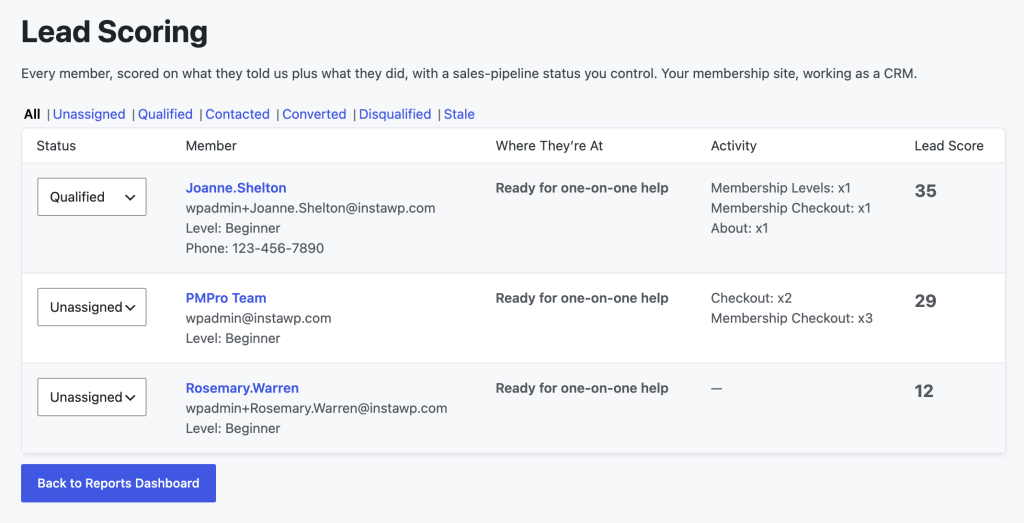
The report queries your members’ table directly and caps results at 200, ordered by score. On a site with more than 200 active members, only the top 200 scores will show.
The Code Recipe
Adding the Recipe to Your Website
You can add this recipe to your site by creating a custom plugin or using the Code Snippets plugin available for free in the WordPress repository. Read this companion article for step-by-step directions on either method.
How To Customize This Code Recipe
This snippet ships with example configuration for a demo site. Replace these placeholders with your own before using it:
- Field Names (lines 24-25): The two constants,
PMPROCRM_PHONE_METAandPMPROCRM_STAGE_META, point tophoneanddog_stage. Change these to match the “Name” you set for each of the two User Fields you created in the Before You Start section. - Stage answers and scores (lines 34-53): The
pmprocrm_stages()function lists example buying-stage answers, like “Ready for one-on-one help,” and a score for each. Replace the array keys with your select field’s answer values, and set your own scores based on how close each answer is to a sale. - Tracked pages and weights (lines 64-66): The
pmprocrm_tracked_pages()function lists example high-intent pages by their page slugs and their point values. Replace these with the page slugs you identified in Before You Start, along with how many points each is worth. Again, you do not need to change themembership-checkoutslug as that one is automatically detected usingpmpro_is_checkout().
Other ways to customize this recipe:
- Score membership level differently: Line 174 gives a flat 10 points to any active paid level. If you have multiple levels and want higher tiers to score higher, check the member’s specific level ID here instead.
- Raise the 200-member limit: Line 296 caps the report at 200 members. If your site has more active members than that, you can raise this number, but a much higher limit means a much heavier query on every page load of the report. Pagination is the safer fix for a large membership site. It is more involved to build than changing one number, so this is a good place to bring in a developer if you are not comfortable writing it yourself.

Get Support From Our Team of Experts
Have a question about how to use this feature? Our Support Page outlines three ways to get support.
Our Max plans include hands-on help customizing your membership site and implementing new features. Upgrade to PMPro Max now »


