
By default, Paid Memberships Pro sends admin notification emails to the email address set in your WordPress settings or your email template. If you manage a membership site for a client, run support out of a shared inbox, or just want those notifications somewhere else, you may want to redirect all of PMPro’s admin emails to a different address.
This code recipe lets you change the email recipient for all PMPro admin emails.
Do You Need This Recipe?
This recipe is the right fit if:
- You want PMPro admin notifications sent to a shared inbox instead of the site admin’s personal email address.
- You manage membership sites for clients and need admin emails routed to yourself or your team instead of the client’s inbox.
- You run more than one PMPro site and want a consistent admin notification address across all of them.
If you need to add a recipient without replacing the original one, use the BCC recipe instead.
Best Practices and Considerations
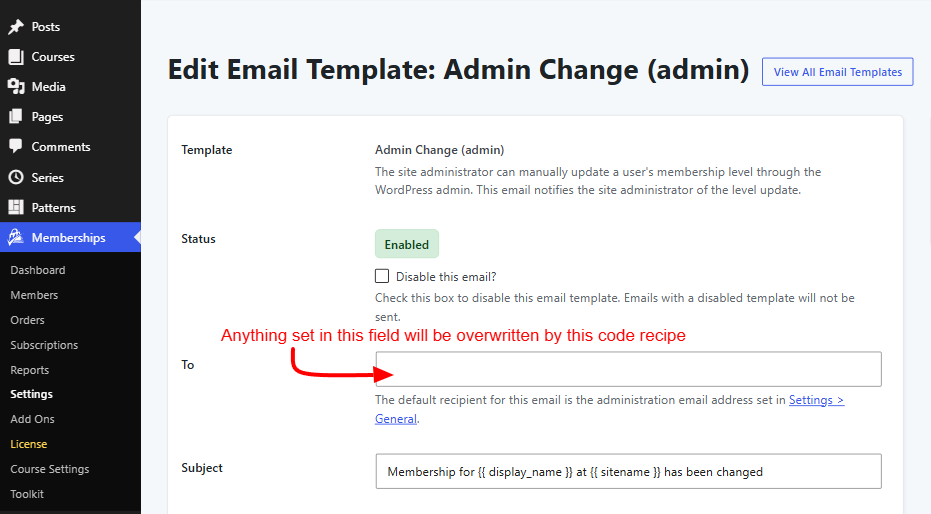
Once this code snippet is active, it overrides any recipient address configured elsewhere. That includes the “To” fields in admin email templates under Memberships > Settings > Email Templates, and the general “Administration Email Address” email field under Settings > General.
About the Code Recipe
This recipe uses the filter pmpro_email_recipient which accepts a single email address as a string. Paid Memberships Pro passes every outgoing email through this filter before sending it, along with an $email object.
Admin-facing email templates, such as checkout notifications and cancellation alerts, include _admin in their template name. The snippet checks for that string in $email->template and only changes the email’s recipient when it finds a match. Member-facing emails will remain unaffected.
The Code Recipe
Adding the Recipe to Your Website
You can add this recipe to your site by creating a custom plugin or using the Code Snippets plugin available for free in the WordPress repository. Read this companion article for step-by-step directions on either method.
How To Customize This Code Recipe
- Update the email address in the code recipe: Change the
'memberadmin@someemail.co'part on line 18 with the email address that you want your admin emails to go to. - Only redirect specific admin emails: If you want to target a specific email template rather than all admin templates, you can use
$email->templateto check for that template. For example, replace thestrpos( $email->template, "_admin" ) !== falsepart on line 17 with$email->template === 'billing_failure_adminto only reroute the admin email for billing failures.
Related: List of PMPro Email Templates

Get Support From Our Team of Experts
Have a question about how to use this feature? Our Support Page outlines three ways to get support.
Our Max plans include hands-on help customizing your membership site and implementing new features. Upgrade to PMPro Max now »


