You didn’t start your membership site so you could one day shut it down. But here you are, looking at a slowing renewal report, an inbox you can’t keep up with, or a calendar that doesn’t have room for one more “content batch” weekend. Closing the business is on the table, and you want to do it the right way.
A clean wind-down protects three things at once: your members, your finances, and your future self. Rush it and you’ll deal with chargebacks, angry emails, and a tax-time scramble. Walk through it with a plan and you finish with goodwill, clean books, and the freedom to start the next thing.
This guide is the playbook. We’ll help you confirm the decision, communicate it well, handle active subscriptions and refunds, deal with content and member data, square away legal and financial obligations, and run the Paid Memberships Pro mechanics step by step.

Table of contents
- Should You Actually Close?
- Your Wind-Down Timeline
- Webinar with Jason
- Tell Your Members First
- Handle Active Subscriptions and Refunds
- Decide What Happens to Your Content and Data
- Square Away Legal and Financial Obligations
- The PMPro Wind-Down: Step by Step
- After the Lights Go Out
- Frequently Asked Questions
- Conclusion
Should You Actually Close?
Before we talk mechanics, take one honest pass at the alternatives. Even if you relaunch later, you’ll be starting from scratch with a much smaller audience. It’s worth a few minutes here.
Close, Pause, or One More Try?
There are four options on the table. Pick the one that actually solves what is wrong.
- Keep going as is: The work is bearable, and the boredom you’re feeling is just a slow stretch. Take a real vacation before deciding anything.
- One more try: There is one specific change you haven’t tested… a new pricing model, a smaller scope, an annual plan, or a content schedule you can actually sustain. Give yourself a 90-day window with a defined success metric.
- Pause: If the issue is temporary (a move, a health event, a season of caregiving), pausing is often better than closing. We wrote a full guide on how to pause subscriptions at the gateway.
- Close: The numbers don’t work, the work doesn’t fit your life anymore, or the audience has moved on. The decision is made and what you need is a clean exit.
Five Questions Before You Pull the Trigger
Ask yourself these out loud. If you answer “no” to most of them, you’re not ready to close. You’re tired.
- Have I taken at least two weeks fully away from the site recently?
- Have I tried one substantive change in the last six months?
- Do I know exactly which costs and which hours are pushing me out?
- If a buyer offered me a fair price for the site tomorrow, would I take it?
- Can I explain my decision to my members in one or two sentences without flinching?
If most of those land as “yes,” the decision is real. The rest of this guide is for you.
Closing a business you built feels heavy, and a membership business more than most. The people you’re saying goodbye to aren’t just customers. They’re community. They learned from you, relied on you, and some of them have been with you for years. You’ll feel things during this process that aren’t strictly business decisions. That’s normal, and it doesn’t mean you’re making the wrong call. This guide helps you execute clearly anyway.
Your Wind-Down Timeline
A reasonable wind-down for a membership site takes 60 to 90 days from decision to closure. Faster is possible but tends to create chargeback risk and member resentment. Slower is fine if you have the runway.
A representative timeline:
- Day 0 (Decision day): Internal decisions only. Don’t tell members yet.
- Days 1 to 7: Make your private decisions. Settle on your refund policy, content plan, billing cutoff date, and final close date. Don’t tell members yet.
- Days 7 to 10: Disable new signups quietly, before any announcement. This stops new people from paying for access they’re about to lose, without alarming existing members.
- Days 10 to 14: Communicate to members. Honest, clear, with a specific date and a plan.
- Days 14 to 60: Wind-down period. Members have access. You’re processing cancellations, issuing refunds where applicable, and handing off content.
- Day 60+: Final close. Subscriptions cancelled, content archived or removed, site decommissioned or repurposed.
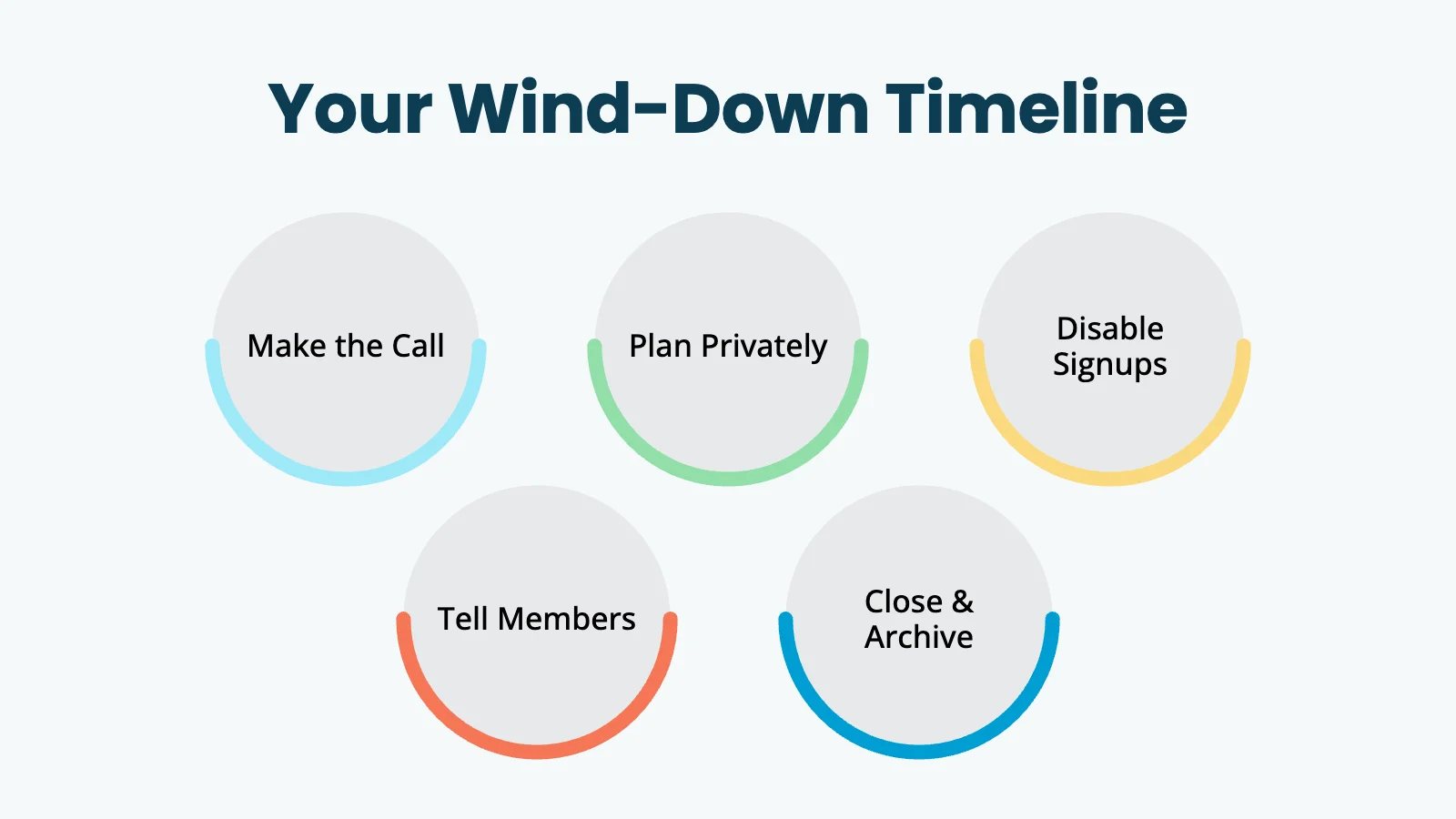
The sections below map to each phase. Read through once before you take action: the order matters.
Webinar with Jason
Tell Your Members First
Once you’re sure, the very next move is to tell members. Do this before you cancel a single subscription, take a page down, or announce on social. Members who hear it from you first stay loyal. Members who find out their access vanished overnight dispute charges.
A simple two-stage rollout works well:
- 30 days out: Send one clear email titled “Important update about your membership.” State what’s happening, when access ends, what they’ll lose, what they get to keep, and how refunds will be handled. Pin the same message to a banner on the site.
- 7 days out: Send a friendly reminder. Include any final downloads or replacement recommendations. Confirm the exact date everything goes dark.
Keep the tone honest and short. Vague language (“after careful consideration, we have decided to evolve our offerings”) reads as corporate and erodes trust. “I’m closing the membership at the end of June so I can focus on…” reads as human.
Send this from your business email, not a marketing tool with a “no-reply” sender. Read every reply. That’s where you’ll catch outliers, like an annual member who just paid last week and is owed a prorated refund.
Handle Active Subscriptions and Refunds
The single biggest source of chargebacks during a wind-down is members who keep getting billed after the site is “closed.” Stop that from happening on day one of your announcement. Your job here is two-fold: stop future charges, and decide what to do about money already collected.
Stop Future Charges
For every active member with a recurring subscription, you need to cancel the subscription at the payment gateway. You have three ways to do this in Paid Memberships Pro:
- One at a time: Go to Memberships > Members > Edit Member > Memberships and click Cancel. Choose “Cancel payment subscription” to tell the gateway to stop billing. This is fine for very small lists.
- In bulk by level: Install the Developer’s Toolkit Add On, navigate to Memberships > Toolkit > Database Scripts, and run the “Cancel Membership” script. It cancels every active member at a given level and their recurring subscriptions.
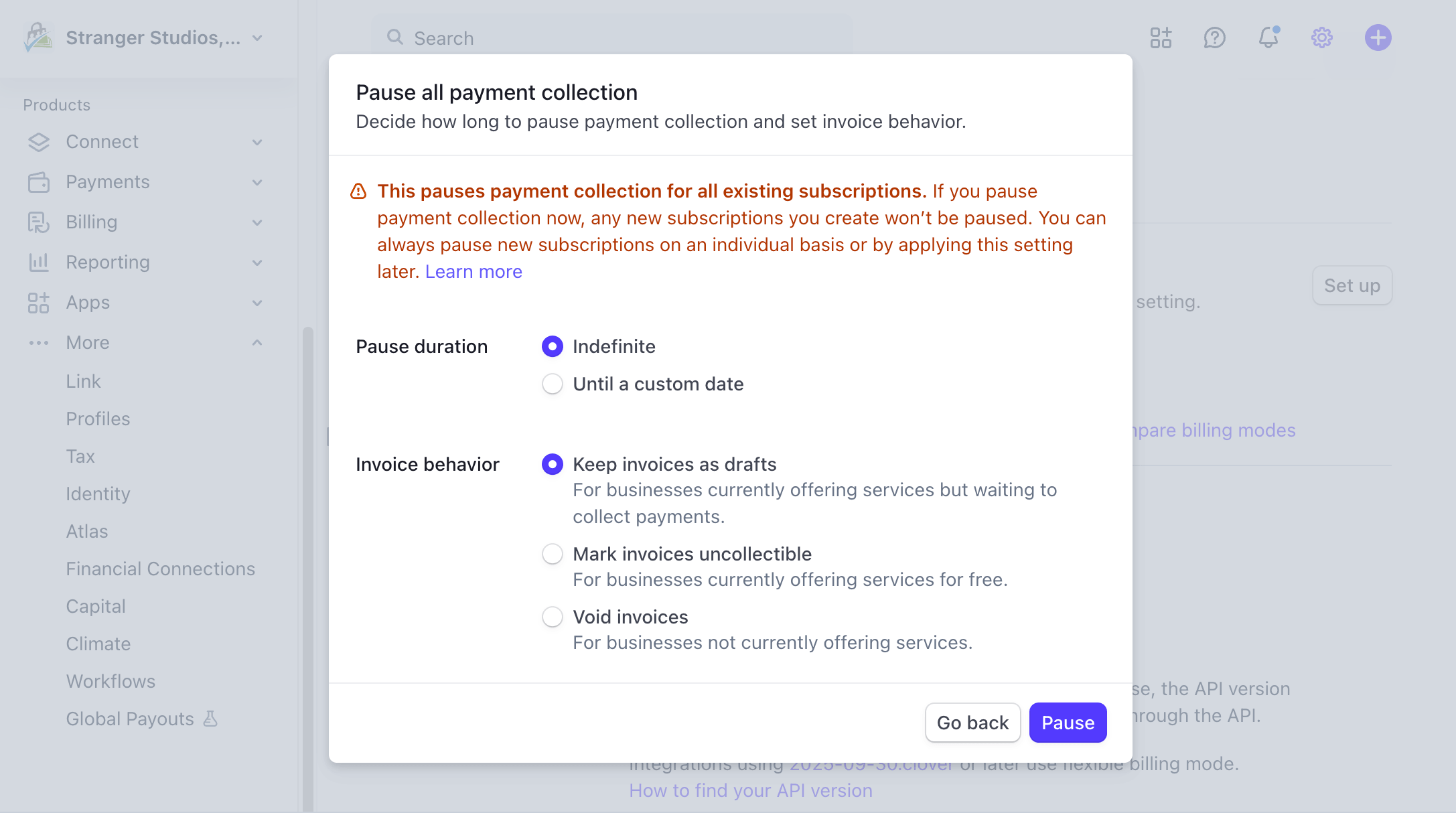
- At the gateway: Log in to Stripe, PayPal, or your other gateway and review the recurring profiles directly. Stripe has a “Pause payment collection” toggle under Settings > Billing > Subscriptions and Emails that gives you a soft “stop everything” while you finish other tasks.
Decide on Refunds
Be thoughtful here. The goodwill cost of denying a small prorated refund is almost always higher than the dollar amount.
- Monthly members: No refund needed if access continues through the end of the current paid period.
- Annual members: Refund the unused months on a prorated basis if access ends before their renewal date.
- Lifetime or one-time purchases: Refund the most recent purchase only if it was made within a defined window (60 to 90 days of the announcement). Honor any documented guarantee.
Publish your refund policy in the announcement email so members don’t have to ask. Process refunds promptly. If you wait, members will dispute the charge instead, and you’ll pay a chargeback fee on top. Our guide on how to respond to a chargeback or dispute walks through the process if one comes in anyway. For a breakdown of chargeback fees by gateway, see Comparing Payment Gateways.
While you’re at it, disable membership emails for transactions that no longer apply. One stray “Your subscription will renew” email after the announcement is enough to spark a wave of replies.
Related: How to Process a Refund
Decide What Happens to Your Content and Data
Your members trusted you with their email address, their custom field data, and the time they spent on your content. Both deserve a plan.
Content
Decide for each piece what should happen when the lights go out:
- Open it up: Drop the paywall on the final day and leave the content public as a parting gift. Generous, and good for SEO if you keep the domain.
- Hand it off: Package the most valuable pieces and email them to members as downloads. This becomes the “thank you” gift in your goodbye email.
- Take it down: Coaching call recordings, private community archives, or time-sensitive material shouldn’t live publicly. Export, then delete.
- Sell or transfer: If your membership has a buyer-worthy audience or content library, consider selling the site or the content before you close. Even modest five-figure exits happen for small membership sites.
Member Data
Export everything you might need before you uninstall anything:
- Use the Export to CSV button at Memberships > Members. This exports your members list with default data and any custom columns you have added.
- Export your orders the same way from Memberships > Orders.
- Save a full database backup.
- Double-check that any custom user fields you used appear in the exported CSV.
Keep these exports somewhere durable and private. You may need them for taxes, for support questions that arrive months later, or for a future relaunch.
Square Away Legal and Financial Obligations
This side of a wind-down is boring and important. None of this is legal or tax advice. It is a checklist of the things people forget.
- Record retention: Most jurisdictions require you to keep financial records for 5 to 7 years. Your exported orders CSV plus your gateway records are usually enough. Confirm the rule for your country and state.
- Sales tax, VAT, and GST: If you collected tax on memberships, you still have one final filing to do. Cancel any sales tax permits you no longer need so they don’t auto-renew.
- Final business taxes: If the membership runs through a separate LLC or corporation, plan the dissolution with your accountant. A sole-prop wind-down still has a final year of income to report.
- Privacy laws: Under GDPR, CCPA, and similar regulations, you may have an obligation to delete personal data on request after closing. Document what data you retained and for how long. Update your privacy policy if the site stays live.
- Recurring vendor costs: Cancel email marketing, video hosting, plugin licenses, Zoom, and hosting upgrades. These auto-renew with no warning. Don’t cancel hosting until the site is actually offline.
- Money owed to you: Get final invoices out and final payments in.
Spend a focused half day on this list. It’s far easier to handle now than to chase down six months later.
The PMPro Wind-Down: Step by Step
Once the announcement is out and the refund policy is set, here’s the actual sequence inside Paid Memberships Pro. Do these in order. The order matters.
- Disable new checkouts: Edit the membership levels page and replace it with a “We are no longer accepting new members” message. This stops new signups while you wind down.
- Disable transactional emails that no longer make sense: Use the steps in our guide to disabling PMPro emails to turn off renewal reminders, payment receipts, and other automated messages.
- Export your data: Members, orders, custom fields. Save a full database backup. Do not skip this.
- Cancel subscriptions in bulk: Install the Developer’s Toolkit Add On, then go to Memberships > Toolkit > Database Scripts and run Cancel Membership for each active level. This cancels the membership for every user at that level and tells the gateway to stop billing. Do this after the final billing date you communicated to members, not before.
- Confirm at the gateway: Spot-check that subscriptions are actually showing as canceled in Stripe or PayPal. PMPro tells the gateway to cancel, but subscriptions are managed at the gateway and it’s worth a manual check. A 10-minute check now prevents a chargeback later.
- Process any outstanding refunds: Use Memberships > Orders to find the original order, then issue the refund at the gateway. Our refund walkthrough has the gateway-by-gateway steps.
- Decide on PMPro itself: If you’re keeping the site online as a static archive, leave Paid Memberships Pro installed. If you’re uninstalling, follow the Uninstall Paid Memberships Pro guide. By default, deleting the plugin only removes the plugin files. Your member database, orders, and levels stay in place. To remove all PMPro data, enable “Uninstall PMPro on deletion?” under Memberships > Settings > Advanced before you deactivate. Back up first.
That last point is worth a second look. There is no “undo” once you flip the uninstall toggle and delete the plugin. If you might ever come back, don’t enable that setting. Keep the data and just turn the lights off.
After the Lights Go Out
A few small things to handle in the first month after closing:
- Renew the domain for at least another year. Letting it expire opens the door to squatters and impersonators.
- Set up a simple landing page: A one-pager that says “Thank you for being part of [Site Name]. The membership closed on [date]. You can reach me at [email].” catches stragglers and keeps the door open for future projects.
- Stay reachable: Members will email you for months. Reply to all of them. It protects your reputation for whatever you do next.
- Take stock when you’re ready: Write down what worked, what didn’t, and what you’d do differently.
The email list you built is still an asset. If a future relaunch is on the table, our guide on reengaging past members with a win-back campaign is a good place to start.
Frequently Asked Questions
Pause if the issue is temporary and you know roughly when you can come back. Close if the decision is permanent. Pausing keeps subscriptions and member access intact at the gateway. Closing ends both.
Thirty days is a fair default. It’s enough time for members to download content, request refunds, and adjust. Less than two weeks tends to feel abrupt and leads to chargebacks.
You aren’t always legally required to, but for annual or longer-term plans it’s the right move and prevents disputes. For monthly plans, letting access run out at the end of the current paid month is usually fair.
By default, deactivating and deleting Paid Memberships Pro removes only the plugin files. Members, orders, and level data stay in the WordPress database. To fully remove PMPro data, enable “Uninstall PMPro on deletion?” under Memberships > Settings > Advanced before you delete the plugin. See the Uninstall Paid Memberships Pro doc for details.
Often, yes. Small membership sites with engaged audiences and stable revenue do change hands on marketplaces, through brokers, or in private deals. Even at a modest price, a sale is usually better than a shutdown if you have a buyer.
Conclusion
Closing a membership business isn’t a failure. It’s a transition, and one you can make with integrity. Founders who communicate clearly, handle the money honestly, and give their community a proper goodbye tend to build better things next. Not because they’re earning future goodwill, but because that’s just who they are.
The short version: confirm the decision, tell your members first with 30 days notice and a clear refund policy, stop future charges in Paid Memberships Pro and confirm at the gateway, export your data, square away the legal and financial side, and run the PMPro wind-down steps in order.
If you get stuck on any of the Paid Memberships Pro mechanics, our support team has helped owners through this exact process. Take it one step at a time, and finish proud of how you closed.

Free Download: The AI-Powered Membership Site Blueprint
Download the free guide: Learn how to plan, build, and grow a membership site using AI as your strategic partner: from buyer persona to launch and beyond.