Give a member a package without a purchase, take access away, set packages to expire after a number of days, or let some levels view every package for free.
Give or Remove a Package for a Member
Administrators can manage a member’s packages from the WordPress Edit User screen.
- Navigate to Users > All Users in the WordPress admin.
- Hover over the user and click Edit.
- Scroll to the Purchased Addon Packages section. It lists each package the user has access to.
- To give a package, enter its post or page ID in the Give this User a Package field. Click + Add Another to add more than one.
- To take a package away, click remove next to it. The title is crossed out.
- Click Update User to save.
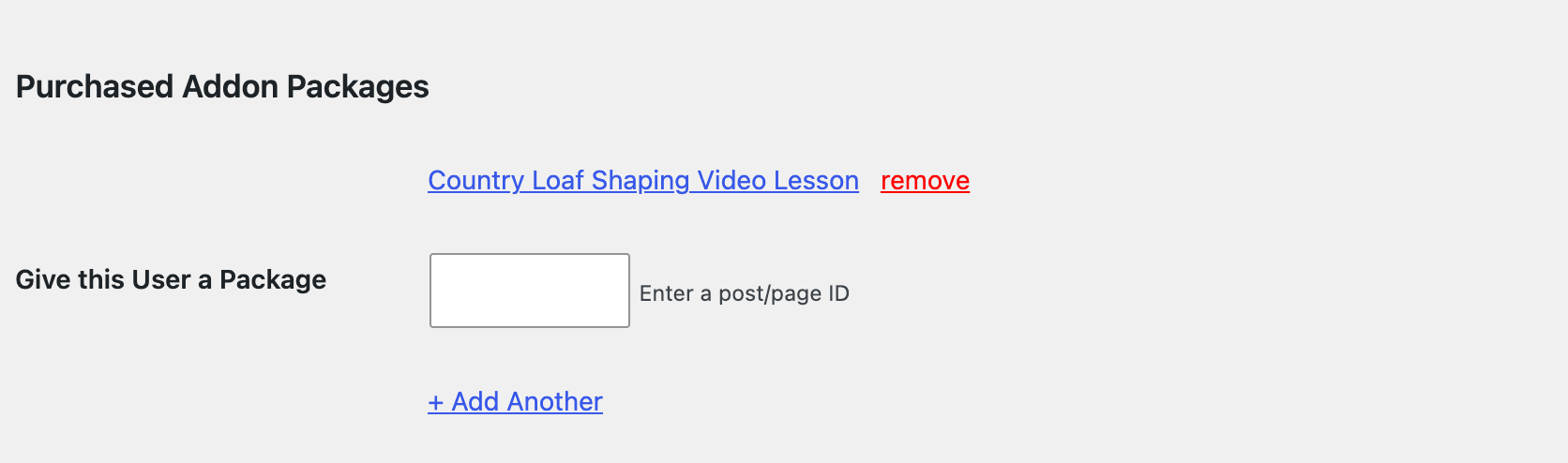
Only users with the Administrator role see this section. Giving a package doesn’t create an order or charge the member. The member still needs one of the package’s required levels to view it.
Set an Expiration for Package Access
By default, package access never expires. To make access end a set number of days after a member gets it, add the PMPROAP_EXP_DAYS constant to your site’s wp-config.php file. This example ends access 30 days after purchase:
define( 'PMPROAP_EXP_DAYS', 30 );
- Applies to Every Package: The constant is site-wide. You can’t set a different term per package.
- When the Clock Starts: The expiration date is set each time a member is given the package, whether they buy it or you give it to them from the Edit User screen.
- What Members See: The Member Links section of the Membership Account page shows “(Access expires on [date])” next to the package, and the member’s order for the package shows “Expires on [date]”.
- After It Expires: The next time the Add On checks the member’s access, such as when they view the package, their access is removed. They can buy it again to get a new expiration date.
Give Some Levels Free Access to All Packages
You can let members of certain levels view every package without paying, for example a premium tier that includes everything. This takes a small code snippet that uses the pmproap_all_access_levels filter. See our tutorial on how to give specific membership levels free access to all Addon Packages.
An all access level must also be checked in each package’s Require Membership settings. The Add On only grants access to members who already pass the post’s level restriction. Once all access levels are set, visitors without access see the free option in the Purchase Required message.
Check Package Access in Custom Code
To check whether a user has bought a package in a theme template or custom plugin, use the pmproap_hasAccess() function. It works like the core pmpro_hasMembershipLevel() function, but for a single package.
Get Support From Our Team of Experts
Have a question about how to use this feature? Our Support Page outlines three ways to get support.
Our Max plans include hands-on help customizing your membership site and implementing new features. Upgrade to PMPro Max now »
Last updated on November 19, 2026