The [bbp-user-activity] shortcode shows a list of the topics or replies a member has posted. Add it to the Membership Account page or a member dashboard so members can get back to their recent forum conversations.
Table of contents
Add the Shortcode to a Page
Add a Shortcode block to any page or post and enter the shortcode. With no attributes, it lists the current user’s five most recent topics under the title “My Recent Activity.”
[bbp-user-activity]
Each item links to the topic or reply and shows the topic’s title. For replies, that’s the title of the topic the member replied to. If there’s nothing to show, the shortcode displays nothing, including the title.
The list only includes topics and replies in forums the person viewing the page can access. Logged-out visitors see nothing unless you set bbp_user_id. In that case, they see that user’s activity in forums that don’t require a membership level.
Shortcode Attributes
| Attribute | Accepted Values | Default | Description |
|---|---|---|---|
activity_type | topic, reply | topic | Whether to list the topics or the replies the user created. |
bbp_user_id | Any user ID | The current user | Show activity for a specific user instead of the logged-in user. |
count | Any number | 5 | The number of entries to show. |
show_date | true, false | false | Show how long ago each entry was posted (for example, “2 days ago”). |
show_excerpt | true, false | false | Show a 50-character excerpt before each entry’s link. |
title | Any text | My Recent Activity | The heading shown above the list. |
Examples
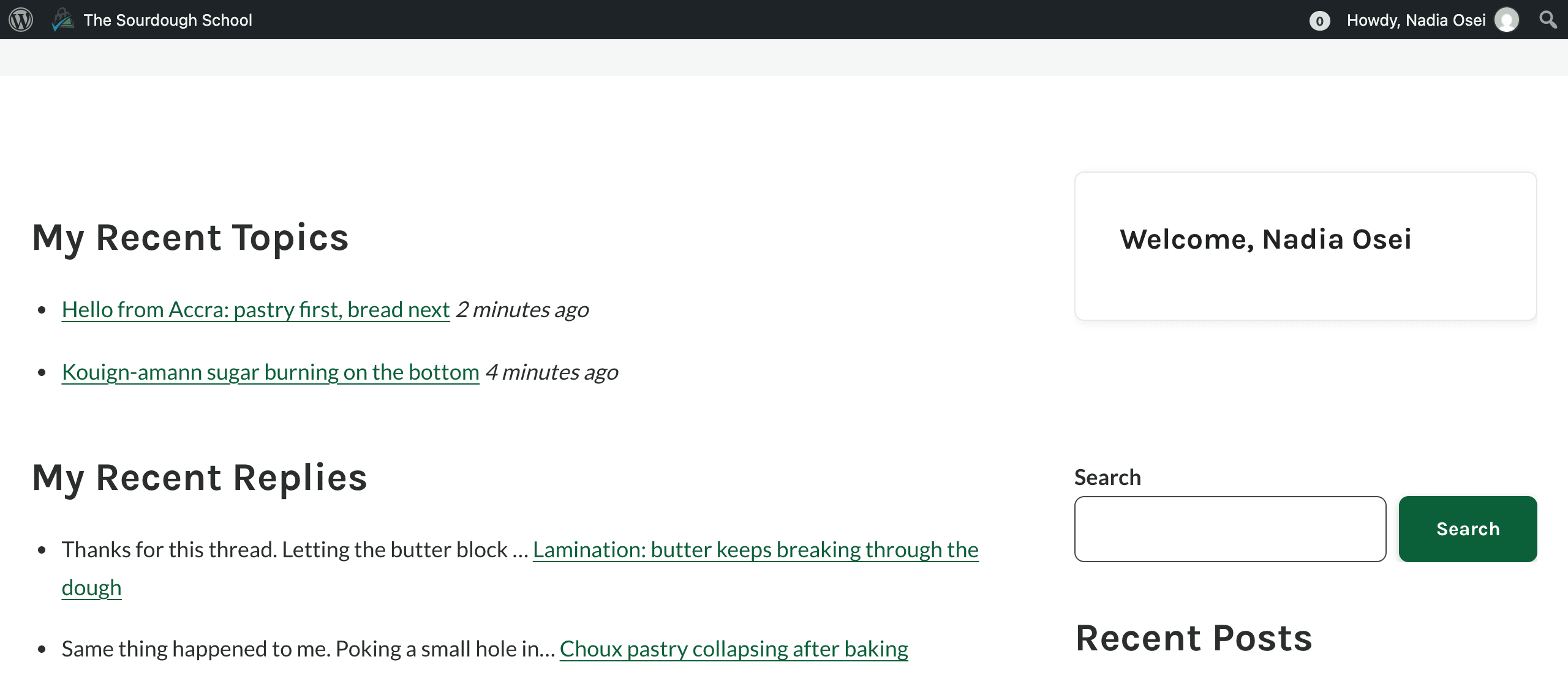
Show the current user’s three most recent topics with the date and a custom title:
[bbp-user-activity activity_type="topic" count="3" show_date="true" title="My Recent Topics"]
Show the current user’s ten most recent replies with an excerpt:
[bbp-user-activity activity_type="reply" count="10" show_excerpt="true" title="My Recent Replies"]
Here’s how a member sees both examples on the same page:
Get Support From Our Team of Experts
Have a question about how to use this feature? Our Support Page outlines three ways to get support.
Our Max plans include hands-on help customizing your membership site and implementing new features. Upgrade to PMPro Max now »
Last updated on November 13, 2026

