Paid Memberships Pro 3.9 adds a set of wp pmpro WP-CLI commands for looking up and managing memberships, members, levels, orders, and subscriptions from the command line. The commands are thin wrappers around PMPro functions, so they run the same code and fire the same hooks as the equivalent actions in the admin.
Before You Start
The commands are available as of PMPro 3.9. PMPro loads them only when WP-CLI is running, so they add nothing to normal page loads. Run them from your WordPress root, or pass --path to point WP-CLI at the site.
Use wp help pmpro to list the commands on your site, or add a command name for its built-in help, for example wp help pmpro order list.
How These Commands Relate to the Developer’s Toolkit Commands
The Developer’s Toolkit Add On also has WP-CLI commands, but they live under a different command name: wp pmpro-toolkit. The two sets coexist and do not overlap. The core commands on this page are for reading data and changing individual memberships, while the Toolkit commands run bulk database operations such as deleting test orders or moving every member from one level to another. You can use both on the same site.
Options Used by Many Commands
| Option | Used by | Description |
|---|---|---|
--format=<format> | List and get commands | Output format. The default is table. Other values are csv, json, and yaml. List commands for levels, orders, and subscriptions also accept ids, and every list command accepts count. The ids format is not supported for membership list, because each row is a user and level pair. |
--fields=<fields> | List and get commands | Comma-separated list of columns to show. Each command section below lists the available fields. |
--number=<n> | List commands | Maximum number of rows to return. Default: 100. Must be a positive integer. |
--page=<n> | List commands | Page of results to return, based on --number. Default: 1. |
--dry-run | Commands that change data | Prints what the command would do and makes no changes. |
--yes | Commands that change data | Skips the confirmation prompt. Without it, WP-CLI asks you to confirm before changing anything. |
Membership Commands
wp pmpro membership list
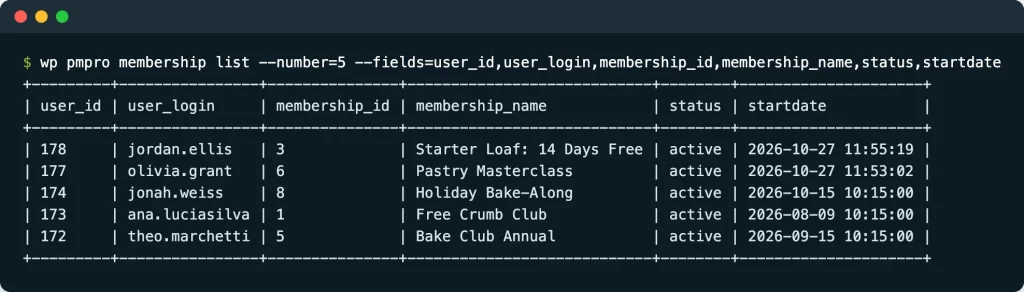
Lists memberships, with one row for each user and level pair. A member who holds three levels appears three times.
| Option | Description |
|---|---|
--level=<ids> | Only list memberships for these level IDs. Comma-separated. |
--status=<statuses> | Membership status or statuses to match, comma-separated, or all for any status. Default: active. |
--search=<term> | Match users by login, email address, or display name. |
--orderby=<column> | One of id, user_login, user_email, display_name, membership_id, startdate, enddate, or joindate. Default: id (the user ID). |
--order=<order> | ASC or DESC. Default: DESC. |
--number, --page, --fields, --format | See the common options above. |
Default columns: user_id, user_login, user_email, display_name, membership_id, membership_name, status, startdate, enddate.
wp pmpro membership list --level=2 --status=active
wp pmpro membership list --search=jane --format=json
wp pmpro membership list --status=all --orderby=enddate --order=ASC --number=50 --page=2
wp pmpro membership list --level=2 --fields=user_id --format=csv
Member Commands
These commands work on a single user. The user ID is a required argument and must belong to an existing user.
wp pmpro member get
Shows the memberships held by one user.
wp pmpro member get <user_id> [--include-inactive] [--fields=<fields>] [--format=<format>]
<user_id>: the user ID.--include-inactive: also show inactive, cancelled, and expired memberships.
Columns: membership_id, name, status, startdate, enddate. Dates are shown in UTC. If the user has no memberships, the command prints a message instead of a table.
wp pmpro member get 42
wp pmpro member get 42 --include-inactive --format=json
wp pmpro member add-level
Gives a user a membership level. The change is made directly, without running checkout. Other levels in the same exclusive group may be cancelled, and levels in other groups are kept. If the user already has the level, nothing changes and the expiration date is not updated.
wp pmpro member add-level <user_id> --level=<id> [--dry-run] [--yes]
wp pmpro member add-level 42 --level=2
wp pmpro member add-level 42 --level=2 --dry-run
wp pmpro member remove-level
Removes one level from a user. If the user does not have the level, nothing changes. Cancelling a level also tries to cancel the member’s active subscription for that level at the payment gateway, unless the pmpro_cancel_previous_subscriptions filter returns false.
wp pmpro member remove-level <user_id> --level=<id> [--dry-run] [--yes]
wp pmpro member remove-level 42 --level=2
wp pmpro member change-level
Works like add-level, except that --level=0 removes all of the member’s levels.
wp pmpro member change-level <user_id> --level=<id> [--dry-run] [--yes]
wp pmpro member change-level 42 --level=2
wp pmpro member change-level 42 --level=0 --yes
wp pmpro member cancel
Removes one level, or all of the user’s levels if you leave out --level. With --level, it does the same thing as remove-level.
wp pmpro member cancel <user_id> [--level=<id>] [--dry-run] [--yes]
wp pmpro member cancel 42
wp pmpro member cancel 42 --level=2
Level Commands
wp pmpro level list
Lists membership levels. Use --include-hidden to include levels that are not shown on the Membership Levels page.
Default columns: id, name, initial_payment, billing_amount, cycle_number, cycle_period, billing_limit, expiration_number, expiration_period, allow_signups. You can also request description, trial_amount, and trial_limit with --fields.
wp pmpro level list
wp pmpro level list --include-hidden --format=json
wp pmpro level get
Shows one level with all of the columns above.
wp pmpro level get 2
Order Commands
wp pmpro order list
| Option | Description |
|---|---|
--user_id=<id> | Only list orders for this user. |
--level=<ids> | Only list orders for these level IDs. Comma-separated. |
--status=<statuses> | Only list orders with these statuses. Comma-separated. |
--gateway=<gateway> | Only list orders for this gateway. |
--number, --page, --fields, --format | See the common options above. |
Default columns: id, code, user_id, membership_id, status, gateway, total, timestamp. Other available fields are gateway_environment, subtotal, tax, payment_transaction_id, subscription_transaction_id. Orders are sorted by date, newest first. The commands never output billing addresses or card details.
wp pmpro order list --status=success --number=20
wp pmpro order list --user_id=42
wp pmpro order get
Shows one order. Pass the order ID or the order code. A value that is only digits is treated as an order ID.
wp pmpro order get 123
wp pmpro order get abc123def
Subscription Commands
wp pmpro subscription list
| Option | Description |
|---|---|
--user_id=<id> | Only list subscriptions for this user. |
--level=<ids> | Only list subscriptions for these level IDs. Comma-separated. |
--status=<statuses> | Only list subscriptions with these statuses. Comma-separated. |
--gateway=<gateway> | Only list subscriptions for this gateway. |
--number, --page, --fields, --format | See the common options above. |
Default columns: id, user_id, membership_level_id, status, gateway, billing_amount, cycle_number, cycle_period, startdate, next_payment_date. You can also request subscription_transaction_id and enddate.
wp pmpro subscription list --status=active
wp pmpro subscription list --user_id=42
wp pmpro subscription get
Shows one subscription by its subscription ID.
wp pmpro subscription get 55
wp pmpro subscription sync
Pulls the latest subscription information from the payment gateway and saves it on the site. Pass one or more subscription IDs, or gateway subscription IDs such as sub_XXXX. If a gateway ID matches more than one subscription, the command stops and asks for the local ID. If the gateway reports an error, the command saves the subscription, shows a warning, and stores the error in the subscription’s sync_error meta.
wp pmpro subscription sync <id>... [--dry-run] [--yes]
wp pmpro subscription sync 55
wp pmpro subscription sync sub_1RXa2b3C4d
wp pmpro subscription sync 55 56 57 --yes
Registering Your Own Commands
PMPro fires the pmpro_cli_init action after it registers the core commands, so an Add On or custom plugin can add its own commands under the same pmpro name. The action runs on WP-CLI’s cli_init hook, so hook into it from your plugin’s main file or on plugins_loaded. Hooking it on init or later is too late.
function my_pmpro_register_cli_commands() {
	WP_CLI::add_command( 'pmpro my-command', 'My_PMPro_CLI_Command' );
}
add_action( 'pmpro_cli_init', 'my_pmpro_register_cli_commands' );
Get Support From Our Team of Experts
Have a question about how to use this feature? Our Support Page outlines three ways to get support.
Our Max plans include hands-on help customizing your membership site and implementing new features. Upgrade to PMPro Max now »
Last updated on October 28, 2026

