The Memberships > Settings > Advanced admin page allows you to control other customization settings for your Paid Memberships Pro site and any Add Ons that add their settings to this page.
From the dashboard, go to Memberships > Settings and select Advanced.
Restrict Dashboard Access
- WordPress Dashboard: Choose whether to block all users with the Subscriber role from accessing the Dashboard.
- WordPress Toolbar: Choose to hide the Toolbar from all users with the Subscriber role.

Message Settings
If you had previously customized your messages, you can continue to edit them in Advanced Settings. You can also choose to start using the smart message to ensure your site is compatible with other Add Ons and optimized for conversions. Learn more about the legacy settings for protected content messages here.
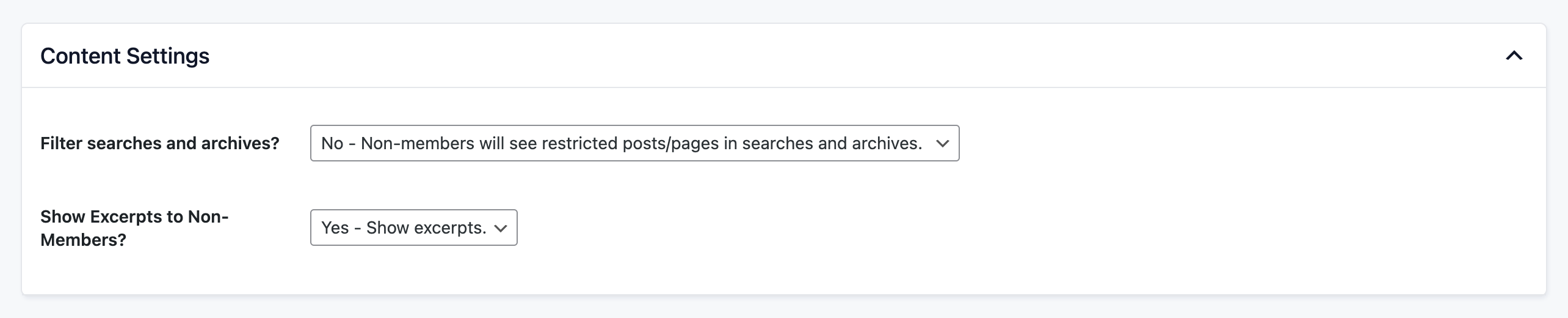
Content Settings
- Filter searches and archives? Optionally hide members-only content, including PMPro pages, from appearing in archive views (category, tag, author, etc.) or in search results. This ensures that restricted content remains exclusive to members.
- Show Excerpts to Non-Members? Select whether to show or hide excerpts to logged out visitors or non-members. It’s a good idea to show excerpts on member pages as a teaser for new members to sign up and keep reading or for SEO to index a portion of your content.
Business Settings
- Enter your business name and address to show business information to members on the Membership Orders page and Orders in the print view.

Communication Settings
- Notifications: Notifications are occasionally shown on the Paid Memberships Pro settings pages. You can set this to show all notifications or only security notifications.
- Activity Email Frequency: Specify how often you would like to receive sales and revenue updates from this site to the administration email address. You can use the recipe in this article to send an additional email at a custom interval.

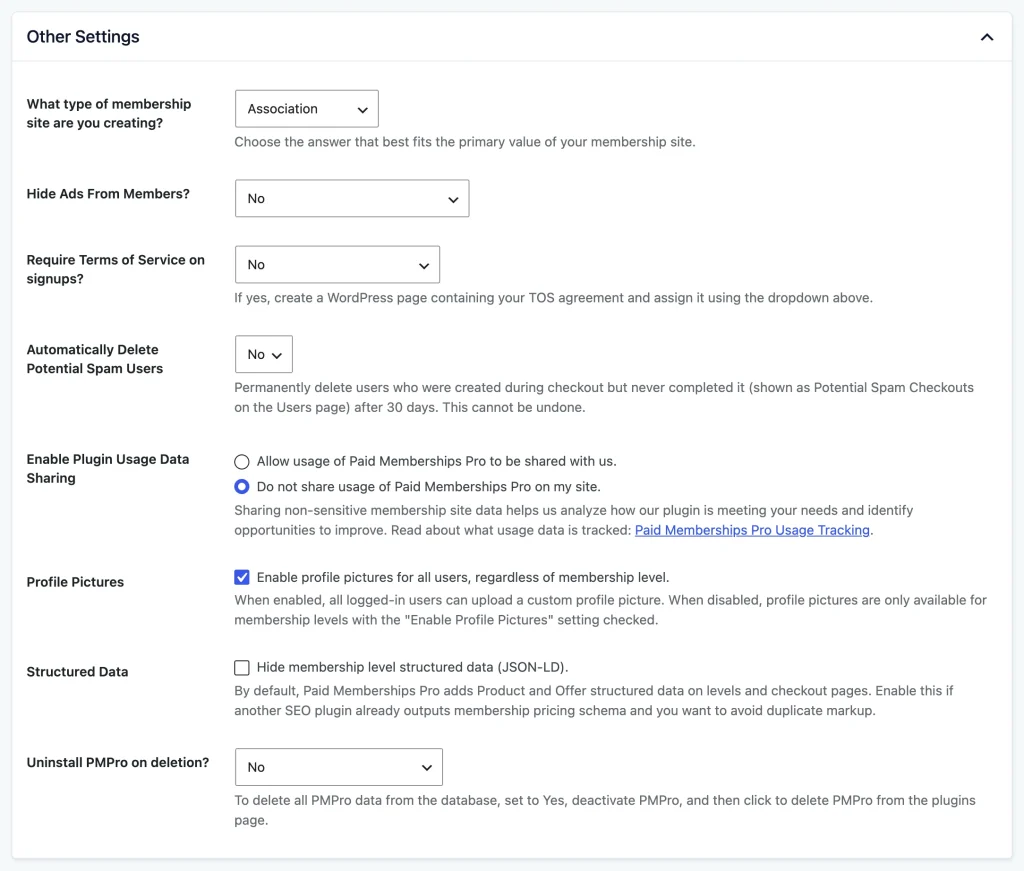
Other Settings
- Hide Ads From Members? If you are running ads on your site, you can hide them for members (note that this requires additional configuration). Read more about hiding advertising from members here.
- Require Terms of Service on signups? Choose whether of not you would like new members to agree to Terms of Service at signup/checkout. If you would like members to agree, create a WordPress page containing your TOS agreement and assign the page using the dropdown. When the assigned page is published, edit page and view page buttons appear next to the dropdown. Read more about creating a TOS agreement.
- Automatically Delete Potential Spam Users: Choose Yes to permanently delete users who were created during checkout but never completed it. These users appear under Potential Spam Checkouts on the Users page. A daily scheduled task deletes them 30 days after they registered. This cannot be undone. The default is No.
- Users with any membership history, users who can edit posts (Contributors and above), and users who have written posts are never deleted.
- On multisite, users are removed from the current site only.
- Developers can change the 30-day period with the
pmpro_abandoned_signup_deletion_daysfilter.
- Enable Plugin Usage Data Sharing: When allowed, non-sensitive membership site data is shared to help us analyze how our plugin is meeting your needs and identify opportunities to improve. Read our Usage Tracking Policy here. You can toggle to not allow tracking.
- Profile Picture: Check to enable profile pictures for all users, regardless of membership level. This setting only appears when the WordPress Show Avatars option is enabled in Settings > Discussion.
- When enabled, all logged-in users can upload a custom profile picture from their Membership Account page. The profile picture replaces the default Gravatar and appears anywhere WordPress displays an avatar.
- When this setting is disabled, profile pictures are only available for membership levels that have the “Enable Profile Pictures” setting checked in their level configuration.
- Structured Data: By default, PMPro adds Product and Offer structured data (JSON-LD) for your membership levels on the Membership Levels page, the Membership Checkout page, and pages that use the Single Membership Level block. Check Hide membership level structured data (JSON-LD) if another SEO plugin already outputs membership pricing schema and you want to avoid duplicate markup. Learn more about membership level structured data.
- Uninstall PMPro on deletion? Choose whether deleting the Paid Memberships Pro plugin will also delete all database tables used by the plugin. Deleting all data will also cancel all memberships and active subscriptions at the connected gateway.
- Note: Any settings added by other plugins will be added here.

Video Tutorial
Get Support From Our Team of Experts
Have a question about how to use this feature? Our Support Page outlines three ways to get support.
Our Max plans include hands-on help customizing your membership site and implementing new features. Upgrade to PMPro Max now »
Last updated on October 30, 2026