Use the Streamlined Compatibility Mode to connect Paid Memberships Pro and LifterLMS. This mode allows Paid Memberships Pro to exclusively manage course access and restrictions, simplifying the membership management process.
Installation
Streamlined Compatibility Mode is built into Paid Memberships Pro 2.12 and later. It adds the Require Membership settings to LifterLMS courses and enrolls members for you, so you don’t need to enable the LifterLMS module in Memberships > Course Settings to use it.
- Install the LifterLMS Plugin via the WordPress Repository or Plugins > Add new in the WordPress dashboard.
- Activate the plugin through the Plugins menu in WordPress.
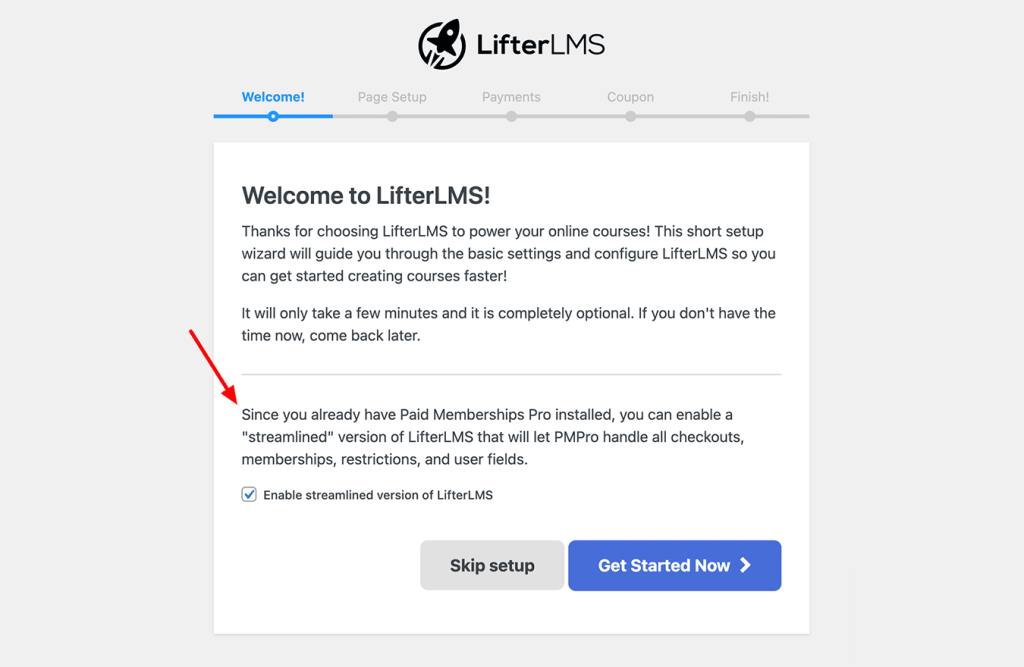
- In the LifterLMS Setup Wizard, check the box to “Enable streamlined version of LifterLMS.” You can also turn the streamline on or off in Memberships > Settings > Advanced with the Streamline LifterLMS setting.
Video Demo: PMPro + LifterLMS Streamlined
How to Restrict Courses with PMPro
A new member is automatically enrolled in all courses for their level upon checkout. If a member changes their level, they are also unenrolled from courses not included in their updated level.
- Edit your LifterLMS course. Locate the “Require Membership” metabox. Check any memberships levels that you want to allow access for this course. Then, save and update your course.
- Recommendation: Disable the Basic and Email Enrollment notifications. Navigate to LifterLMS > Settings > Notifications page in the WordPress admin and disable Basic and Email Enrollment notifications for students.
If a user viewing your course does not have the correct membership level, they will see the protected content message.
Existing Course Enrollments
When you change the Require Membership levels on a LifterLMS course, Paid Memberships Pro 3.6 and later updates course enrollments for all existing users in the background:
- Users with one of the course’s levels are enrolled in the course.
- Users without one of the course’s levels are unenrolled from it.
Courses that don’t require a membership level are left alone, so enrollments you manage in LifterLMS for those courses don’t change. On sites with many users, the update can take a few minutes to finish.
Frequently Asked Questions
Streamlined Compatibility Mode
Streamlined Compatibility Mode is a feature that connects Paid Memberships Pro and LifterLMS. This mode allows Paid Memberships Pro to exclusively manage course access and restrictions, simplifying the membership management process.
In Streamlined Compatibility Mode, Paid Memberships Pro manages the enrollments in courses. Upon checking out a membership level, the system automatically enrolls the user in courses available for that membership level.
In this mode, LifterLMS disables some of its native membership features to prevent conflicts and streamline the user experience. The primary limitation is that Paid Memberships Pro exclusively handles course access and restrictions, not LifterLMS.
Switching between different integration methods (e.g., from the Courses for Membership Add On to Streamlined Compatibility Mode) is possible but requires careful planning. It’s important to consider the implications for existing users and content before making such a change.
Other Related Questions
If you have been using the Courses for Membership Add On for integration, you can continue to do so. This Add On allows for membership requirements on LifterLMS courses but operates differently from the native streamlined compatibility mode. For those that do not wish to switch to the streamline, it’s a viable option.
Yes, it’s possible to switch from LifterLMS’s membership features to Paid Memberships Pro. This process involves migrating membership data and setting up Paid Memberships Pro to handle course access. However, this transition might require some manual adjustments to ensure data integrity and consistent user experience.
Yes, you can use LifterLMS’s membership features independently of Paid Memberships Pro. For detailed information on LifterLMS’s membership capabilities, refer to their official documentation. This option is suitable for users who prefer the native membership management system of LifterLMS.
For support, refer to the official websites of Paid Memberships Pro and LifterLMS. They provide comprehensive guides, support forums, and customer service for troubleshooting and queries.
Get Support From Our Team of Experts
Have a question about how to use this feature? Our Support Page outlines three ways to get support.
Our Max plans include hands-on help customizing your membership site and implementing new features. Upgrade to PMPro Max now »
Last updated on November 12, 2026