WELCOME TO THE
Blog and News Hub
Here you’ll find all of the best resources we have to help you create and monetize your blog or news site with WordPress and Paid Memberships Pro.
Blog and News Learning Materials
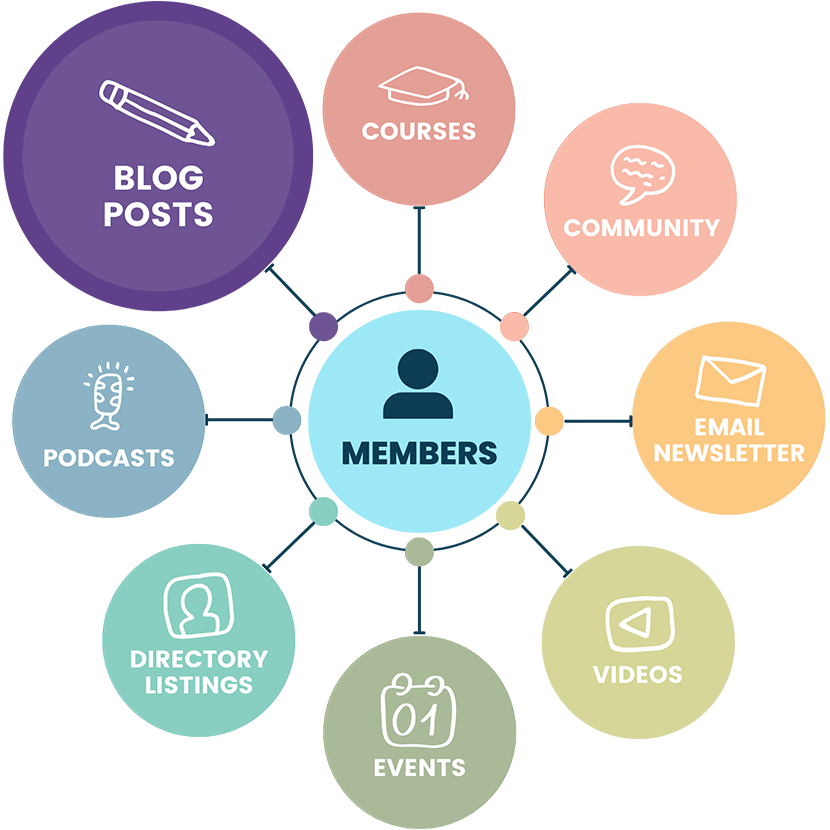
Get started by reading our guide on how to restrict access to anything with WordPress and Paid Memberships Pro. This guide covers 28 unique content types you can publish and restrict, with links to specific docs on each type—from blog posts to videos.
Whether you’re starting a brand new online publishing business or adding memberships as a new revenue stream, the rest of this hub is here to guide you through decision making and next steps.
Launch a Demo Site
You can create a temporary site on InstaWP that gives you instant access to demo a complete membership site with levels, protected content, a directory, pre-built courses, and more. Your site will be a clone of the demo at the base demo here.
1. Choose Your Tools
The core Paid Memberships Pro plugin has everything you need to set up membership levels, restrict posts and pages, and integrate your payment gateway so you can charge for access to your content.
With PMPro, you can run your entire online presence with no-coding required: create landing pages, publish articles organized by category or tag, and allow subscribers to register a free or paid account.
In fact, with Paid Memberships Pro you can get your blog or news website up and running 100% free. Plus, we offer a variety of free and paid Add Ons that are perfectly suited to online publishers.
Other Software Recommendations
Paid Memberships Pro integrates with several popular tools and plugins to help you grow and monetize your blog or news site.
- Email Marketing Integrations: Integrate with ActiveCampaign, Mailchimp, MailPoet, or Kit (formerly ConvertKit) to manage subscriber lists and campaigns. These integrations allow you to send targeted newsletters, updates, and promotions to your subscribers, helping you to keep them engaged and informed.
- Limit Post Views: Inspired by news publishers like Harvard Business Review and The New York Times, this Add On limits visitors to a specific number of article views before redirecting them to a paywall. Give visitors a sample of your content and encourage them to subscribe for unlimited access.
- Print Version: Use our Shipping and Mailing Address Add On to offer a print version of your content. While totally optional, some publishers may need to collect shipping addresses from your subscribers and manage the distribution of physical copies of your content.
- Integrations for Communities: If you want to offer community features, like discussion forums or comments, check out the Communities Hub to explore PMPro’s community features more deeply.
Choosing the right set of online tools will help you bring your publishing business to life—and help you manage it down the line, no matter how much your subscriber base grows.
2. Create and Publish Your Content
Once you’ve decided which tools you’re going to use to build your online publishing business, it’s time to start creating.
In order to actually generate revenue from your blog, you’ll need a way to restrict your content and charge people for access to it. Our initial setup guide will walk you through all essential steps to setting up things like content restrictions and recurring payments with PMPro.
Refer back to our guide on the 28 most popular content types you can create and protect with PMPro and WordPress as you complete the setup, just in case you need any additional plugins or PMPro Add Ons for your content types.
Also take a moment to decide whether you want to let non-members see an excerpt or “teaser” of your premium content. This can be a simple and smart way to let the quality of your content drive sales.
One Author or Multiple Contributors
PMPro includes support for unlimited authors that contribute to your blog or news site. This feature allows you to collaborate with other writers and expand the range of content available to your subscribers.
Read our guide on WordPress User Roles and Membership Levels to set up your authors with the right permissions. They need to write and publish articles, but they do not need administrator access to your entire backend. A basic understanding of core WordPress user capabilities and the capabilities in PMPro will help you make the right decisions related to team access.
3. Price Your Content and Subscriptions
If you’re going to sell subscriptions, you’ll need to have a membership pricing structure in place. But figuring out what to charge can be challenging.
👉 Start with our post about how to price your membership site to get some ideas. Want to have various pricing options for your content? Check out our post on tiered pricing.
You might even decide to offer your content for free or use a paid ads model. Starting your online blog or news site with just free content can help you build your audience and have direct contact with your most loyal readers.
Then, once you have a substantial mailing list, there are many ways to monetize your subscribers later on.
4. Attract and Retain Subscribers
So, you’ve set up your online content business using Paid Memberships Pro. Now what? To grow your readership, you’ll need strategies to attract new subscribers.
👉 We put together two resources on marketing strategies and ways to promote a membership site. Use these guides to learn different methods you can use to market your content.
As for retention, leverage the email marketing and community features mentioned earlier in this hub. These systems are aimed at keeping your audience engaged. By sending regular updates and creating a sense of community, you can build a loyal subscriber base that continues to support your blog or news site.
Mail & Guardian: News Publisher Case Study
Looking for some inspiration? This case study provides valuable insights into how a leading news organization successfully transitioned to a digital subscription model using PMPro.
Read “Going Digital: How the Mail & Guardian Modernized Their Subscription Model With PMPro” now.
Other Resources
- The Basics of Running a Drip Content Membership Site: Learn how content dripping can reduce the burden of constantly creating fresh content.
- Membership Sites for Thought Leaders: Get Paid For Your Expertise: This guide outlines a path to profit from your thought leadership (a premium content site!) without relying on sponsorships, speaking engagements, or guest appearances.
- Events for Members Only Add On: For local news publishers, check out this guide on ways to list public or members-only events using popular events plugins and Paid Memberships Pro.
- Import Members From CSV Add On: If you are migrating from another platform or offline subscription tool, use this Add On to import your members and assign their membership levels.
Click here to read our blog posts tagged with “blog and news“.

