Table of contents
WELCOME TO THE
Communities Hub
Here you’ll find all of the best resources we have to help you sell access to your online community with WordPress and Paid Memberships Pro.
Online Community Learning Materials
Get started by reading our guide Building an Online Community: 5 Obstacles You May Face. This will give you an overview of the most common obstacles you’ll encounter when starting an online community, as well as some strategies you can use to overcome them.
This post also links to all of our communities-related content and downloads.
It’s roughly a 14-minute read, but it’s worth it…especially if you’re just getting started and you need an introductory education on building an online community business.
Whether you’re starting a brand new online community or you want to add a community element to your existing business, these resources will help to simplify the process and guide you through all of the fundamental steps you need to take.
Launch a Community Demo Site
You can create a temporary site on InstaWP that gives you instant access to demo a complete community membership site with membership levels, protected content, a member directory, forums, and more. Your site will be a clone of the demo at the base communities demo here.
1. Design Your Community Structure
Creating a well-thought-out community structure is crucial for the success of your online community. The structure should align with your overall business goals and cater to the needs and interests of your target audience.
Think about the interactions you want your members to have with each other and your content. This will inform all kinds of other decisions, from the tools you use, to your community guidelines and pricing.
Here are a few steps to go through when designing your community structure:
- Identify Key Features. Decide on the features that will define your community’s structure and engagement. For instance, you could include discussion forums, private messaging, content sharing capabilities, or member profiles. Think about what your members will value and how they will engage with these features.
- Get Organized. Depending on the nature of your community, a well thought out structure can be key in helping members easily find the content they’re interested in. This can mean using categories and subcategories in your blog, creating different topic-driven forums, or other discussion rooms that narrow in on one conversation only. As an example, a fitness community might have categories like “Meal Planning”, “Workouts”, and “Success Stories”, with respective subcategories like “Vegan Diet”, “Strength Training”, and “Goal Setting”.
- Establish Community Rules. To ensure a positive, respectful environment for all community members, establish clear community rules and guidelines from the start. These could include policies about spam, self-promotion, and harassment. Make sure these rules are easily accessible to all members.
- Define User Roles and Permissions. User roles and permissions are an integral part of your community structure. These can be simple, like “admin”, “moderator”, and “member”, or more complex, with tiers of membership offering access to different parts of the site. This can also tie into your monetization strategy.
- Create a Moderation Plan. Part of designing your community structure involves deciding how it will be moderated. You might choose to have community members step up as volunteer moderators, hire a professional moderation team, or use automated moderation tools. A well-moderated community will ensure that discussions stay productive and rules are respected.
- Planning for Scalability. Remember that your community might grow significantly over time. Plan for this growth by choosing a platform and designing a community structure that can handle an increasing number of members and discussions without losing performance or becoming unwieldy.
A well-designed community can greatly enhance member satisfaction and engagement, provide a clear roadmap for how your community will function and grow, and help to establish expectations for your members.
Now, let’s talk about how to build the community environment you’ve envisioned.
2. Choose Your Tools
The member experience is at the heart of any online community. That’s why the tools you choose should help you provide enjoyable features and seamless interactions with your site.
Because not all online community platforms are the same, and there are so many options, choosing one can feel intimidating. We wrote a whole post about How to Choose the Right Online Community Platform for Your Business, so check that out if you’re unsure.
Remember: Your community’s purpose should guide you in choosing a primary channel that best supports your goals and target audience. It’s ok if you need to take some time so you can make an informed decision.
Software Recommendations
At Paid Memberships Pro, we stress the importance of owning the land your business is built on. So, we think that using WordPress with PMPro is the best choice for running an online community.
The core Paid Memberships Pro plugin has everything you need to set up membership levels, restrict all different types of content, and integrate your payment gateway so you can charge for access to your online community.
In fact, with Paid Memberships Pro you can get your community website up and running 100% free. Plus, we offer a variety of free and paid Add Ons that are perfectly suited to running an online community.
Here are just a few online community platforms we integrate with:
- WordPress community plugins like bbPress, BuddyPress, and BuddyBoss
- Discussion tools like live chat with ArrowChat, iFlyChat, WiseChat and Zopim
- Zapier to integrate with third-party platforms like Facebook and Slack
- Built-in Profile Pictures to allow custom member profile pictures
Once you decide which platform or collection of platforms you will use, check out the linked guides above. Each page has the specific documentation on how to set up these community features.
Looking for a specific Add On? You can now filter Add Ons on the Memberships > Add Ons Screen in the WordPress Admin by Use Case. Start typing the term, like “Community”, and the corresponding Add Ons will populate for you.
Personalize the Member Experience
Regular member engagement is hugely important if you want your online community to be successful. One of the best ways to boost this engagement is through personalization.
Check out the User Fields features of PMPro to create custom profile fields you’ll collect at checkout, on the user’s profile, or for administrative view only.
For example, if you want to run an online fitness community, you could add a dropdown (select) field for users to indicate fitness level and a free text field for them to enter their favorite workout method.
Profile fields can be shown on a members directory or added to the member’s byline when posting in the community. This personalization is key to helping community members and admins get to know each other and better understand someone’s basic interests and demographics.
Read more in our documentation on how to add user fields.
3. Build Your Online Community Website
This hub is focused on sites that use WordPress and Paid Memberships Pro to create and sell access to an online community. We recommend having a WordPress site whether your community features are the major benefit of membership, or if the community is a component of a larger subscription website business.
Here’s how to create your online community website with WordPress and PMPro:
- Set Up Your WordPress website on your preferred hosting platform. We recommend PMPro Max!
- Download and Install Paid Memberships Pro
- Complete the PMPro Initial Setup
Your WordPress site is the primary place subscribers can:
- Access your exclusive community, paywalled content, and interact with other members
- Manage their membership account: view payment history and update billing information
- Update profile information like avatar, display name, email address, bio, and any additional user fields you collect.
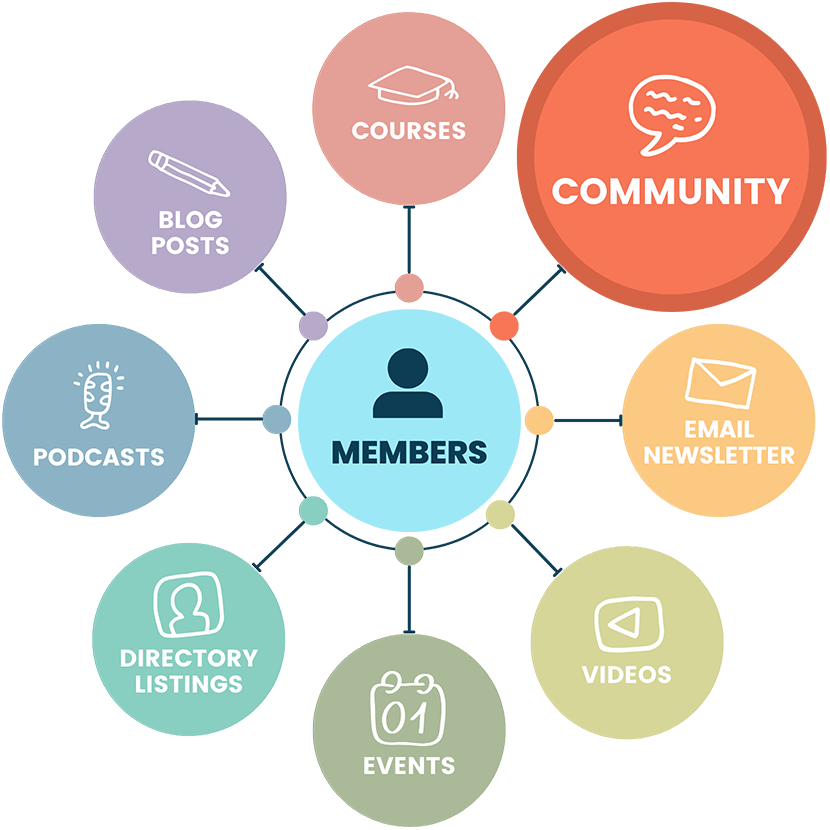
- Get bonus content like courses, private videos, newsletters, and events
We also recommend integrating an email marketing platform. With your email tool of choice, you as the admin can:
- Contact your subscribers directly (outside of the online community platform you choose).
- Initiate new broadcasts, create sequences, and manage automations
- View reports on open rates, click-throughs, and email deliverability
4. Restrict Access to Your Online Community
In order to actually generate revenue for your online community, you’ll need a way to restrict your content and charge people for access to it. Our initial setup guide will walk you through all essential steps to setting up things like content restrictions and recurring payments with PMPro.
Restricting community features is a whole other world of protections and setup depending on which community features you add.
Use the companion documentation on setting up restrictions, including adding or removing people from platforms when their membership changes. Here are those platform links:




We also integrate with several live chat platforms including Arrowchat, iFlyChat, Wise Chat, Zopim.
Browse other community tools in our Add Ons library for Community Sites here.
5. Find Your Audience
Before you can make money with your online community, you need an audience that wants to pay for membership.
You might already have a prime target audience through:
- Lots of followers on your favorite social media channel
- Your most engaged YouTube channel viewers and subscribers
- An existing audience that consumes your content somewhere else
But what if you don’t have an audience at all?
Building a New Audience for Your Online Community
It’s hard to introduce yourself to potential subscribers if the only thing you offer is a paid product. So, consider offering free content first. This can be shorter samples of your full-length content, or fewer full-length blog posts, podcasts, or videos, for example.
You can even offer just a few free digital downloads, or start with free access to a limited discussion forum or Telegram channel. Or, offer a free webinar series, which you technically don’t even have to do before launching your online community.
Starting with something free gives people a taste of your content. And people who’ve had a taste are much more inclined to sign up for your paid community.
The type of paywall you choose will depend on your business model, the type of content you offer, and your goals for generating revenue from your website. Check out our post What is Paywall Content? to figure out which one is right for your online community business.
Pricing Your Online Community Membership
If you’re going to sell memberships to an online community, you’ll need to have a membership pricing structure in place. But figuring out what to charge can be challenging.
Start with our post about how to price your membership site to get some ideas. Want to have various pricing options for your online community? Check out our post on tiered pricing.
You might even decide to offer your content for free. After all, an online community membership site based around free content can help you build your audience and have direct contact with your most loyal fans.
Once you have a substantial mailing list, there are many ways to introduce paid products and services to your subscribers.
You can also monetize exclusive content without asking the community to pay. For example, consider offering a paid sponsorship for brands or thought leaders to gain access to your community discussions.
Just know that having sponsored content within your community can be off-putting, especially if you plan on asking community members to pay for access later.
6. Market Your Online Community Website
Once your community site is ready to accept membership signups, link to it everywhere:
- Link directly to the landing page on your website that accepts signups and payment.
- Include links in your existing content, including blog posts, newsletters, podcasts, and videos
- Add a link to your membership pricing or checkout page in all of your social media bios and descriptions
- Insert a prominent link in the main menu of your website or at the top right section of your site’s header area
- Add a signup form within your blog post content or in a sidebar
The same strategies that work for marketing any membership site work for an online community. In this case, we often see online community memberships being sold as an upgrade by individual content creators. What better way to take loyal fans of your free content “behind the scenes” than a private community?
For this reason, many online community marketing strategies are unique to who you are as an individual. Embracing this and showing your target audience your authentic self will help you attract members to your online community.
Other Resources
Is there something we don’t have that you’d like to see here? Get in touch and let us know!
- 7 Ways Creating an Online Community Can Benefit Your Membership Business: This post talks about seven compelling reasons to invest in building an online community for your membership site.
- 10 Popular Pricing Models for Membership Sites: This post covers the different structures you might decide to use when pricing your private video membership site.
- How to Name Your Membership Levels or Subscription Options: Not sure what to name your members-only video site? This post should help spark your imagination.
- Build a Members-Only BuddyBoss Membership Site: This article outlines the top features for sites using PMPro as their BuddyBoss membership plugin.
- Build a Video Membership Site With Free Video Hosting On YouTube: Learn how to leverage YouTube as an easy (and free) way to add members-only video in your WordPress membership site.
- How to Build a Community for Your Membership: Guidance on the basics of getting started building a community, what the benefits are, and how to engage it to propel your business ahead.
- How to Build a Membership Business as a Company of One: This post talks about choosing the right membership business model for you, finding the tools that make it easier, and outsourcing the work others can do for you.
- Approvals Add On: Set up a unique approval or application process for your community, giving site administrators the ability to approve or deny members.
- Add Name to Checkout Add On: Adds “First Name” and “Last Name” fields to the “Account Information” section of the Membership Checkout page when using Paid Memberships Pro.
- Profile Pictures: Members can upload a custom profile picture from your site, built into Paid Memberships Pro.
- Import Members From CSV Add On: Bring existing members over from another platform or an offline list by importing a CSV file, with their membership levels assigned on import.
- Member Directory and Profile Pages Add On: Create public or members-only searchable directories and customizable member profile pages.
- Social Login Add On: Allow Members to quickly complete checkout by logging in via your configured social networks.
- How to Accept Member-Submitted Content on Your Membership Site (And Whether You Should): A strategic guide to accepting member-submitted content on your community site — covering what actually happens after launch and the structural decisions that make UGC work.
- Lead Magnets and Free Tiers: How to Use Free Content to Grow Your Membership Site: Wondering how to convert curious visitors into paying community members? This post walks through using a free tier or lead magnet to do exactly that.
- Add Gamification to Your Membership Site: Looking for ways to keep your community active between events? This post covers how points, badges, leaderboards, and progress mechanics can drive participation and reward your most engaged members.
Click here to read our blog posts tagged with “Use Case: Communities”.

