We’re excited to announce the release of Memberlite 7.1: the first feature release built on top of the modern foundation we shipped in 7.0.
This version introduces a brand new block-based variation system for headers and footers, two new custom blocks (Nav Menu and Member Info), bundled starter patterns, a streamlined Customizer experience, and a long list of polish items across the theme. You can finally design, save, and assign multiple header and footer layouts (globally or per page) all from inside the block editor.
Read on for a full overview of what’s new in Memberlite 7.1, how to upgrade, and what’s coming next.
Key Features and Enhancements in Memberlite 7.1
Block-Based Header Variations
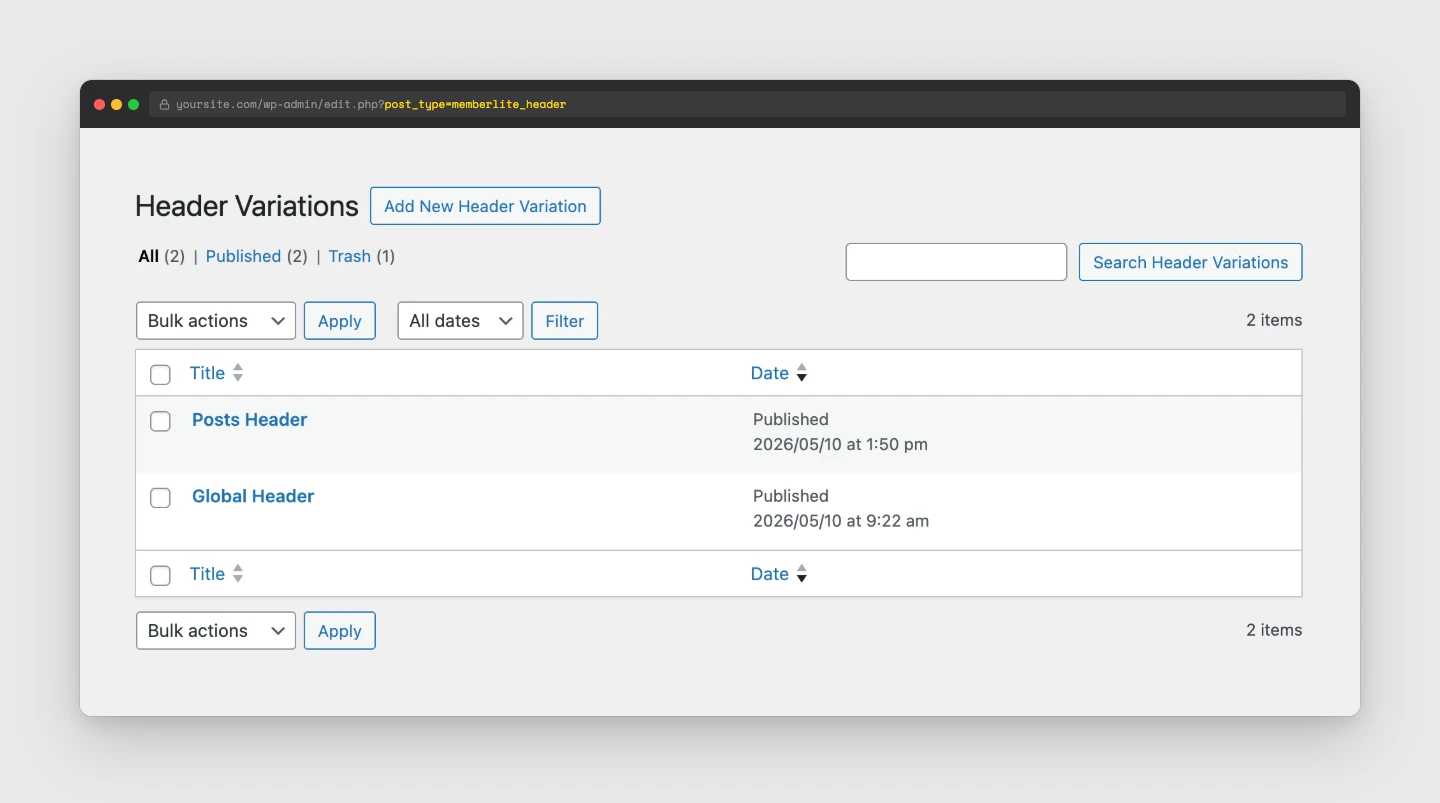
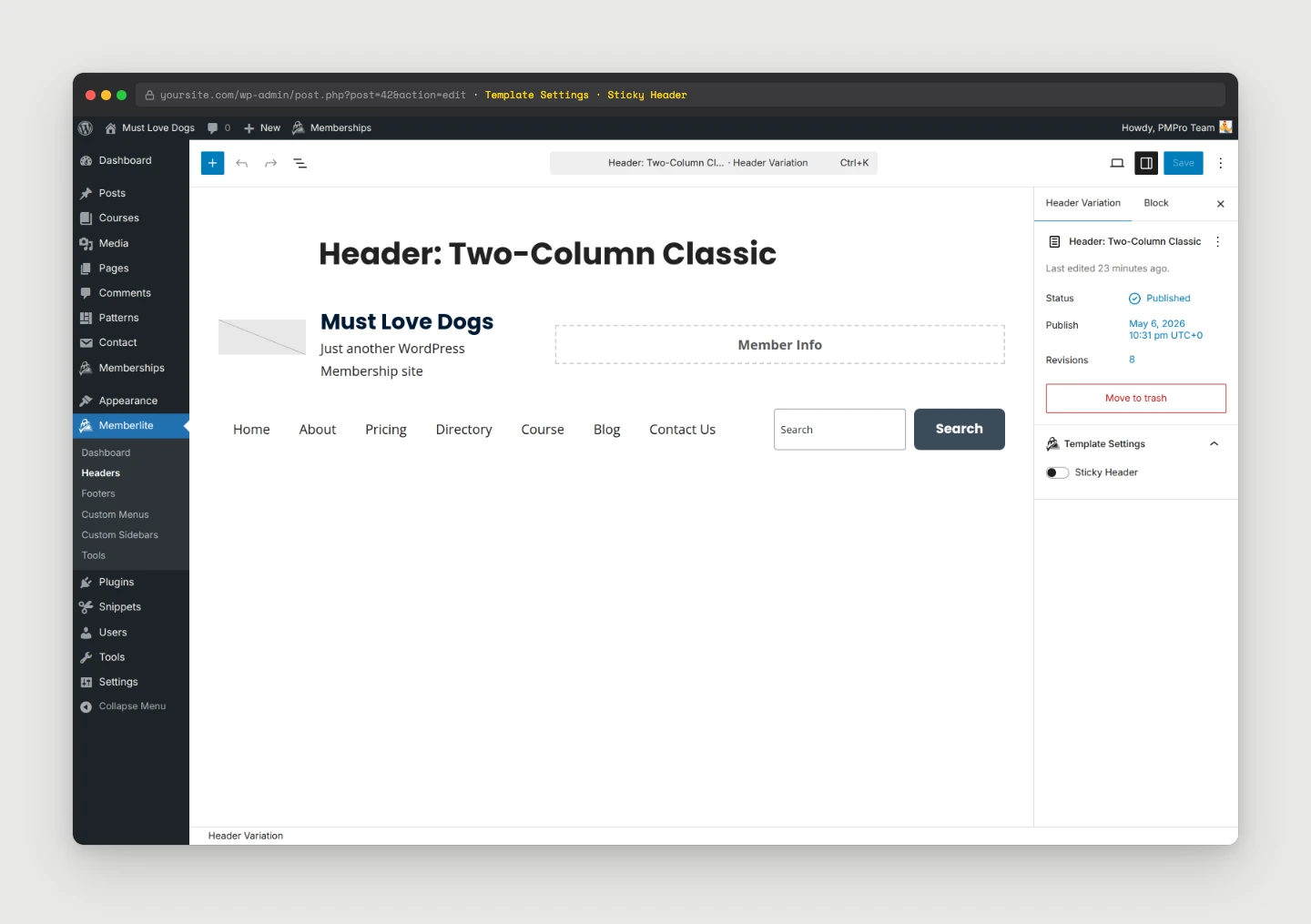
Headers in Memberlite are now their own custom post type, memberlite_header, that you build, save, and reuse from inside the block editor.
Go to Memberlite > Headers, create a new header post, drop in the blocks you want, and that header is now an option you can assign to your site.
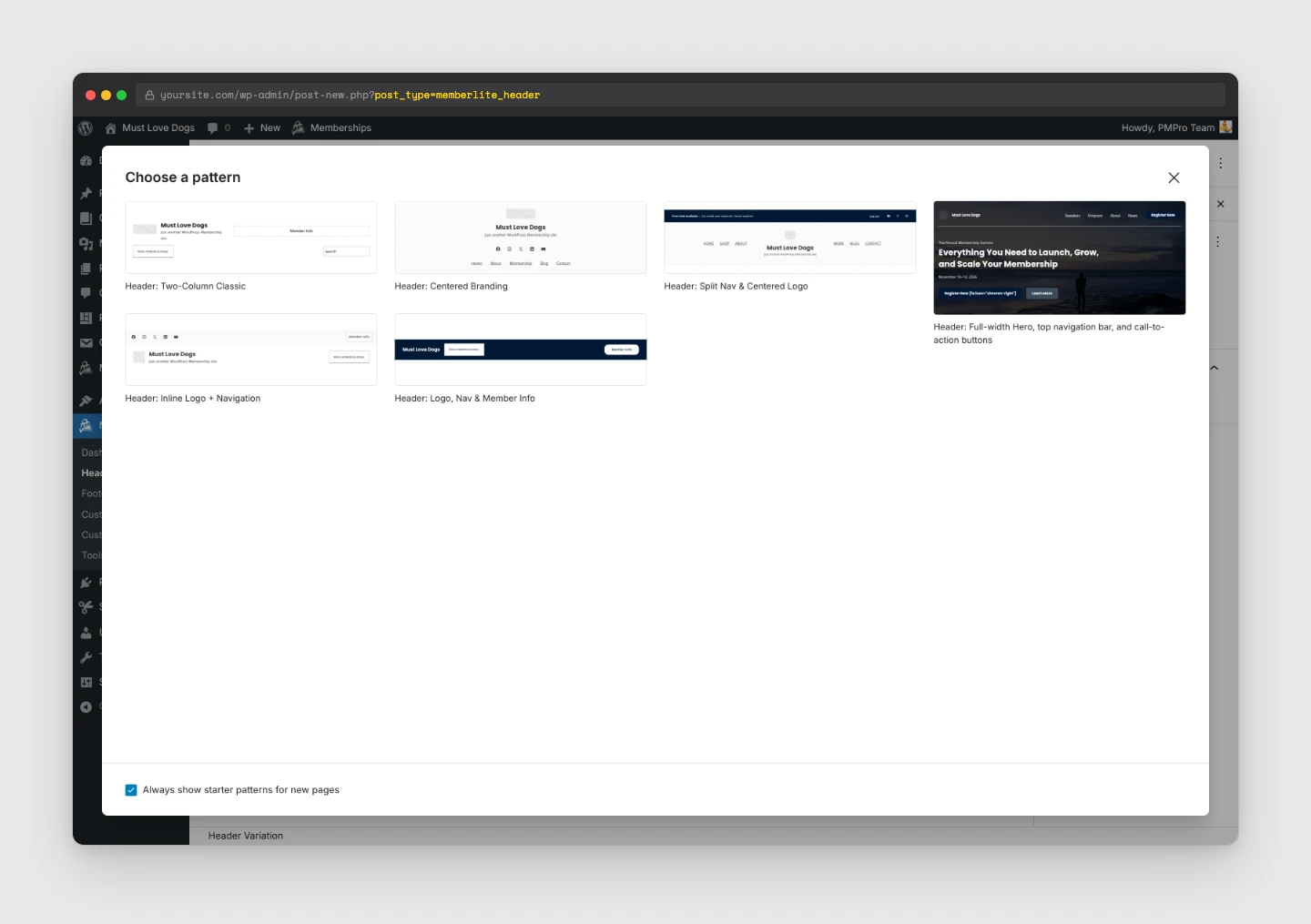
When you create a new (or empty) header post, a starter template dialog pops up so you can pick from one of the 6 header patterns bundled with 7.1, or close it and design from scratch.
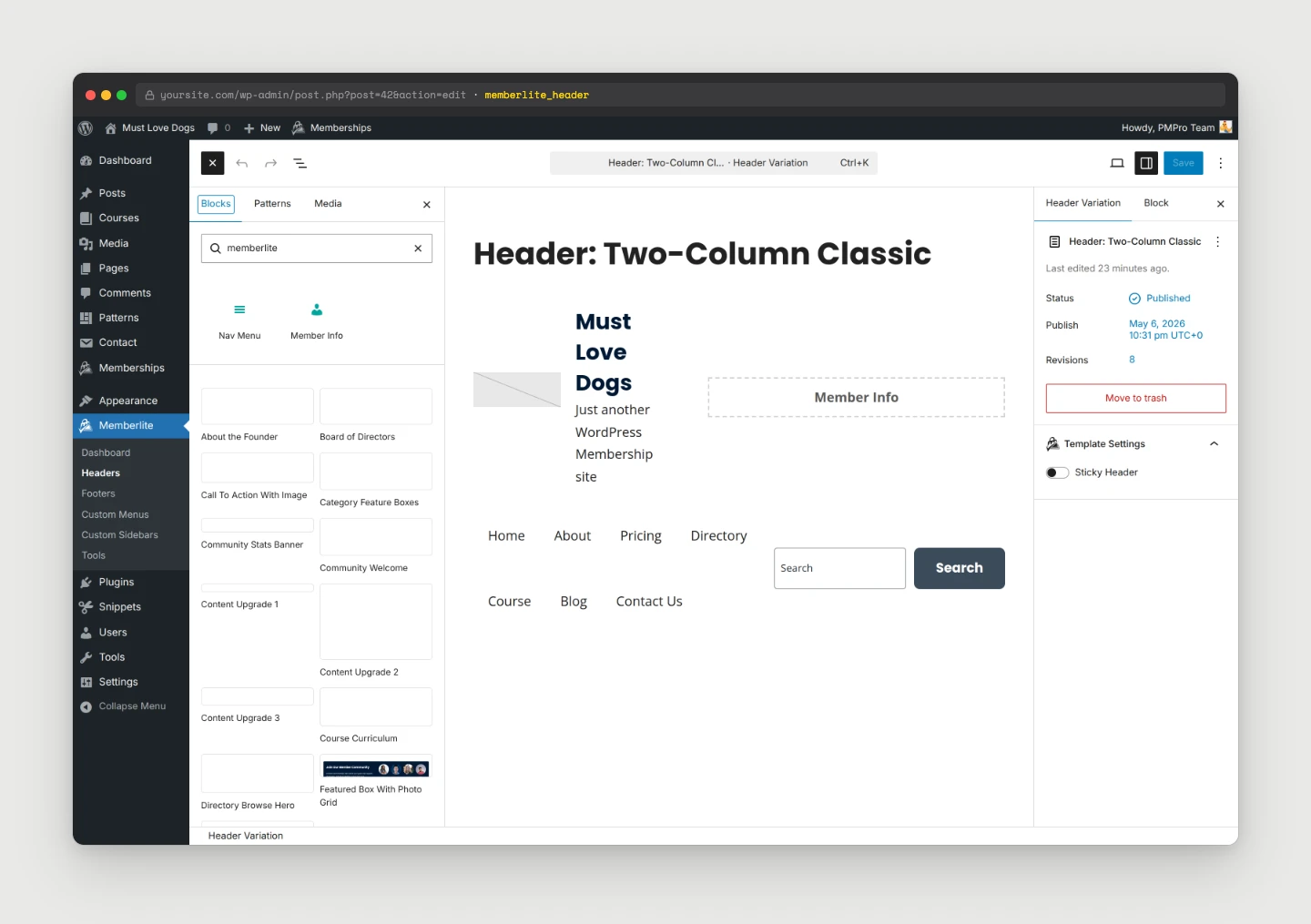
From there, you’re in the block editor with the new Memberlite block collection available in the inserter. Drop in the blocks you want, including our two new custom blocks – Nav Menu and Member Info, and design your header.
Once you’ve designed a header, head to the Customizer to set it as the active header for your entire site.
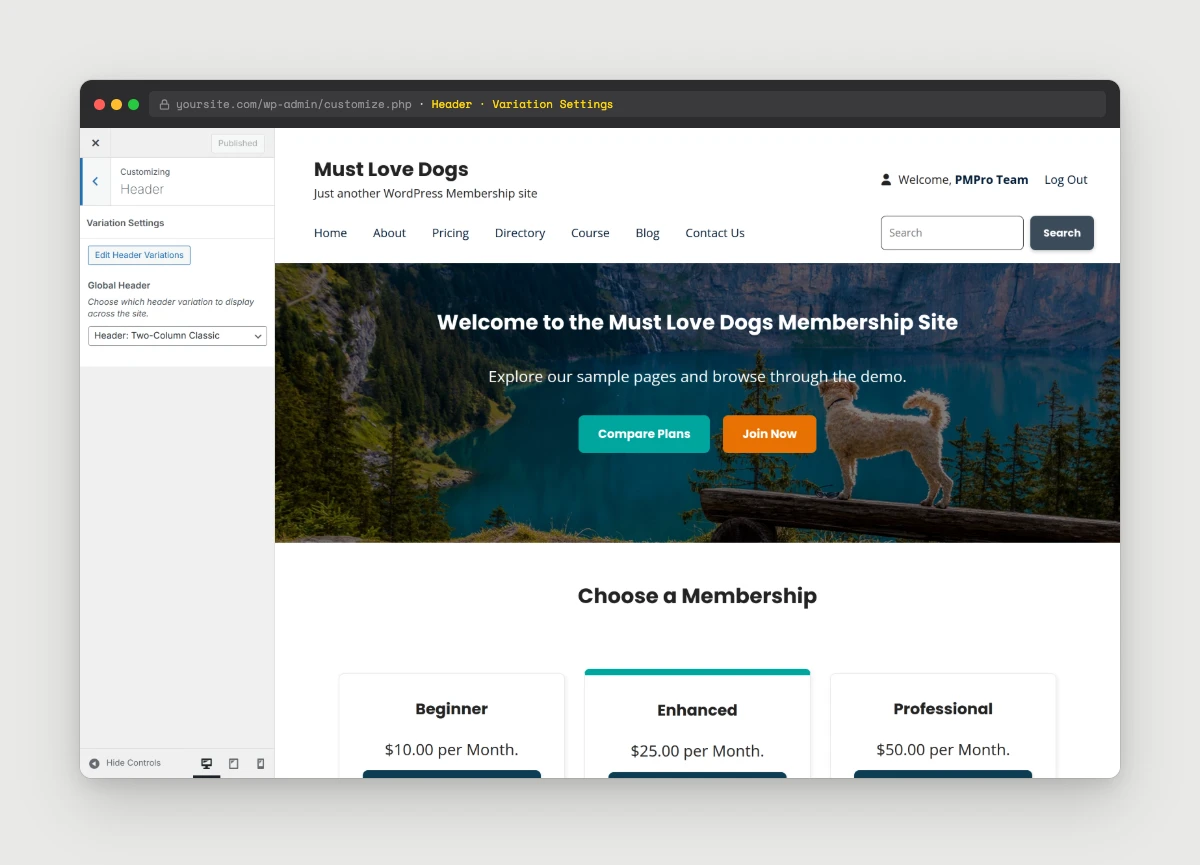
There’s also a per-header Sticky Header option, which makes the entire header pattern stick to the top of the page when active, not just the navigation row.
Block-Based Footer Variations
The same system applies to footers. Memberlite 7.1 adds a memberlite_footer custom post type, accessible under Memberlite > Footers. Build any number of footer designs as block-based posts, then assign one as the global footer in the Customizer.
7.1 ships with 8 footer patterns out of the box, covering everything from a simple branded footer to multi-column layouts with menus and member info.
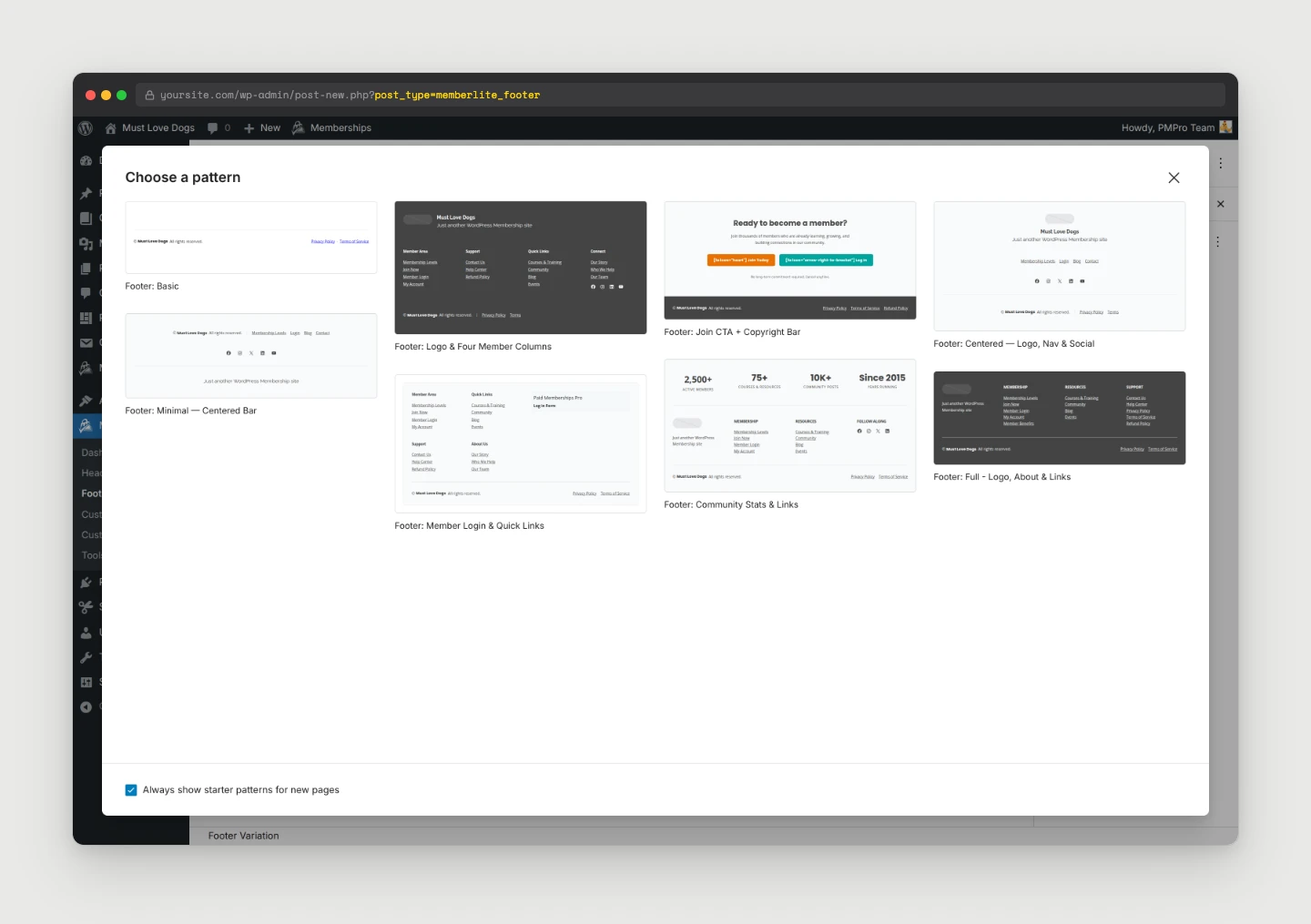
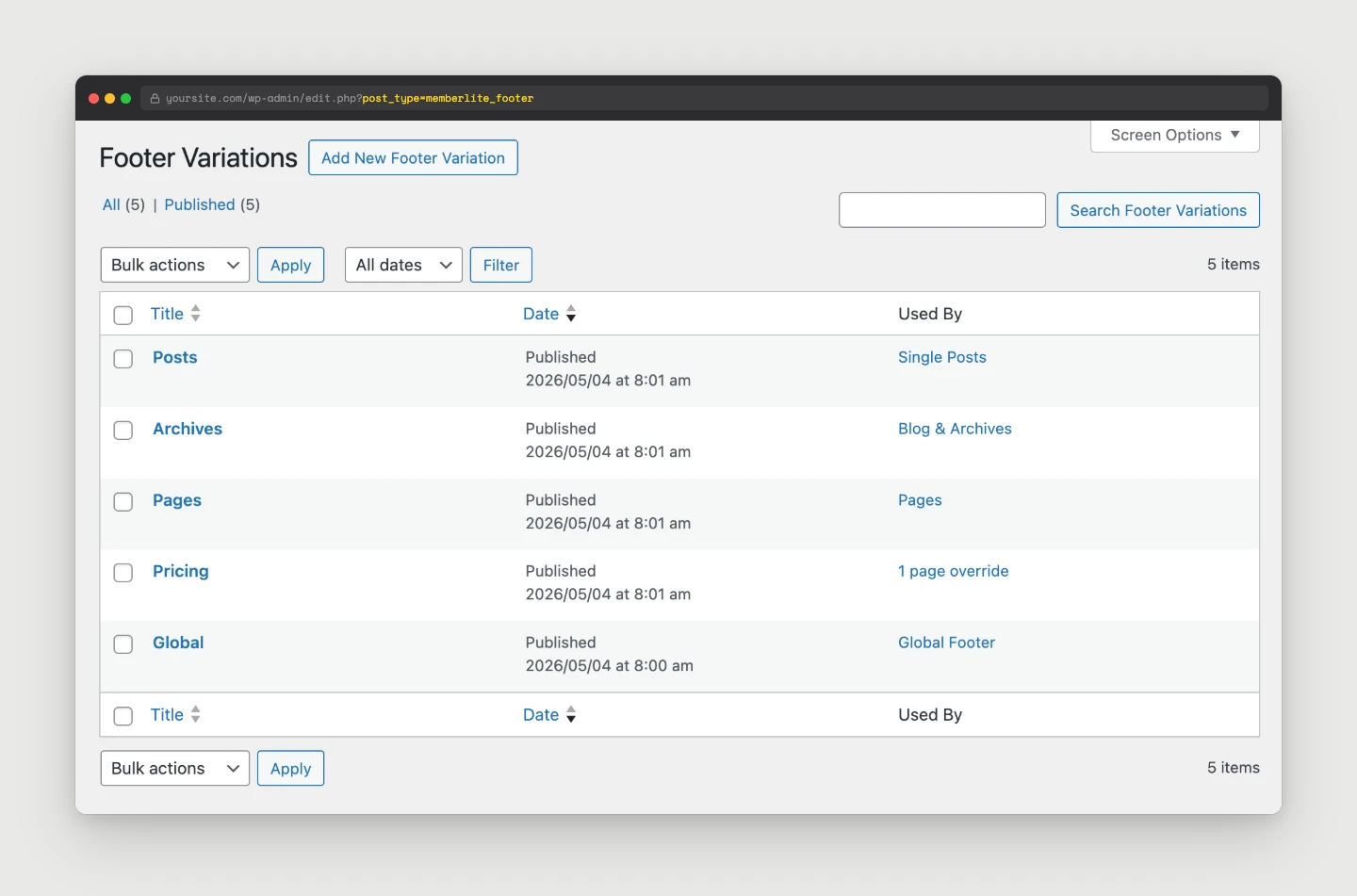
In the Customizer, you can assign a Global Footer for the entire site, plus distinct footer variations for blog/archives, single posts, or pages.
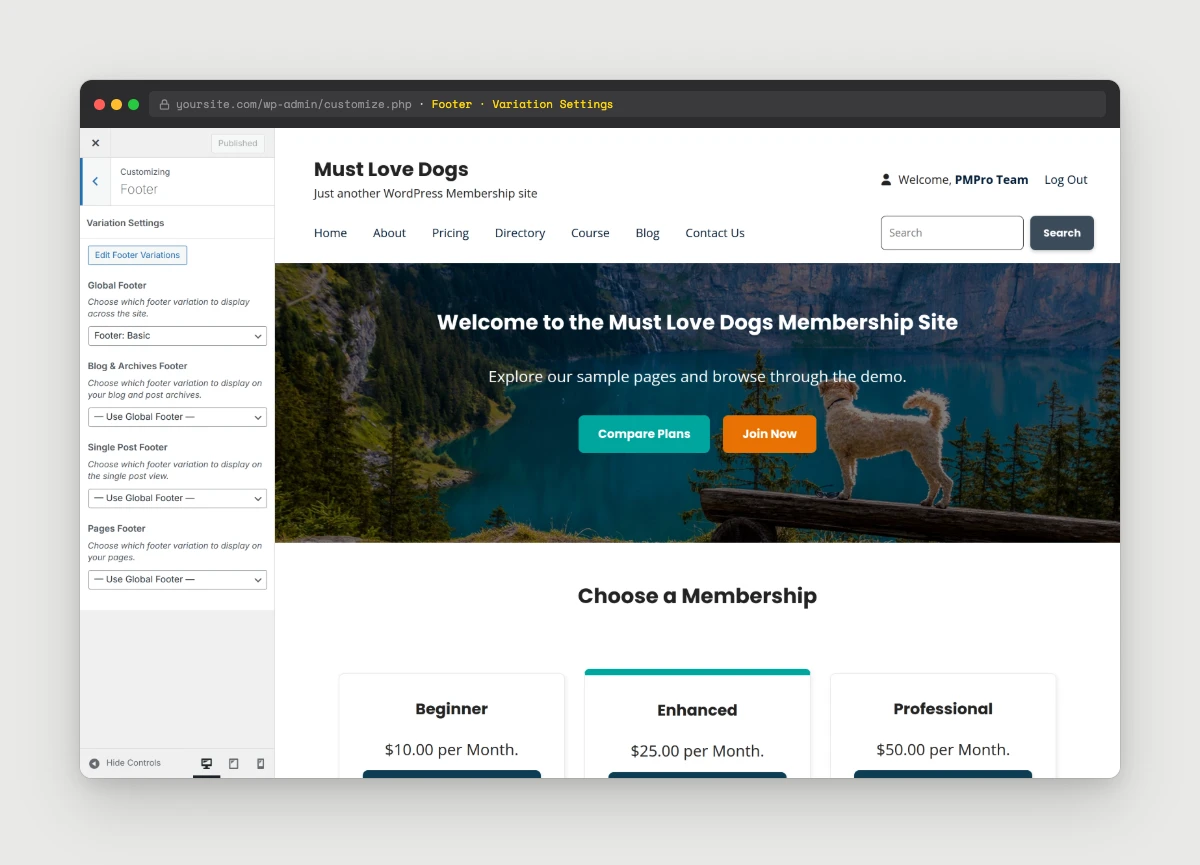
The legacy footer settings (columns ratio, copyright text, footer widget areas) are still available and supported, but they automatically hide whenever a footer variation is active. The footer widget area under Appearance > Widgets > Footer Widgets is now considered legacy and only renders inside the default footer.
New Nav Menu and Member Info Blocks
To make header and footer variations actually useful for membership sites, we built two custom blocks specifically for use inside header and footer posts:
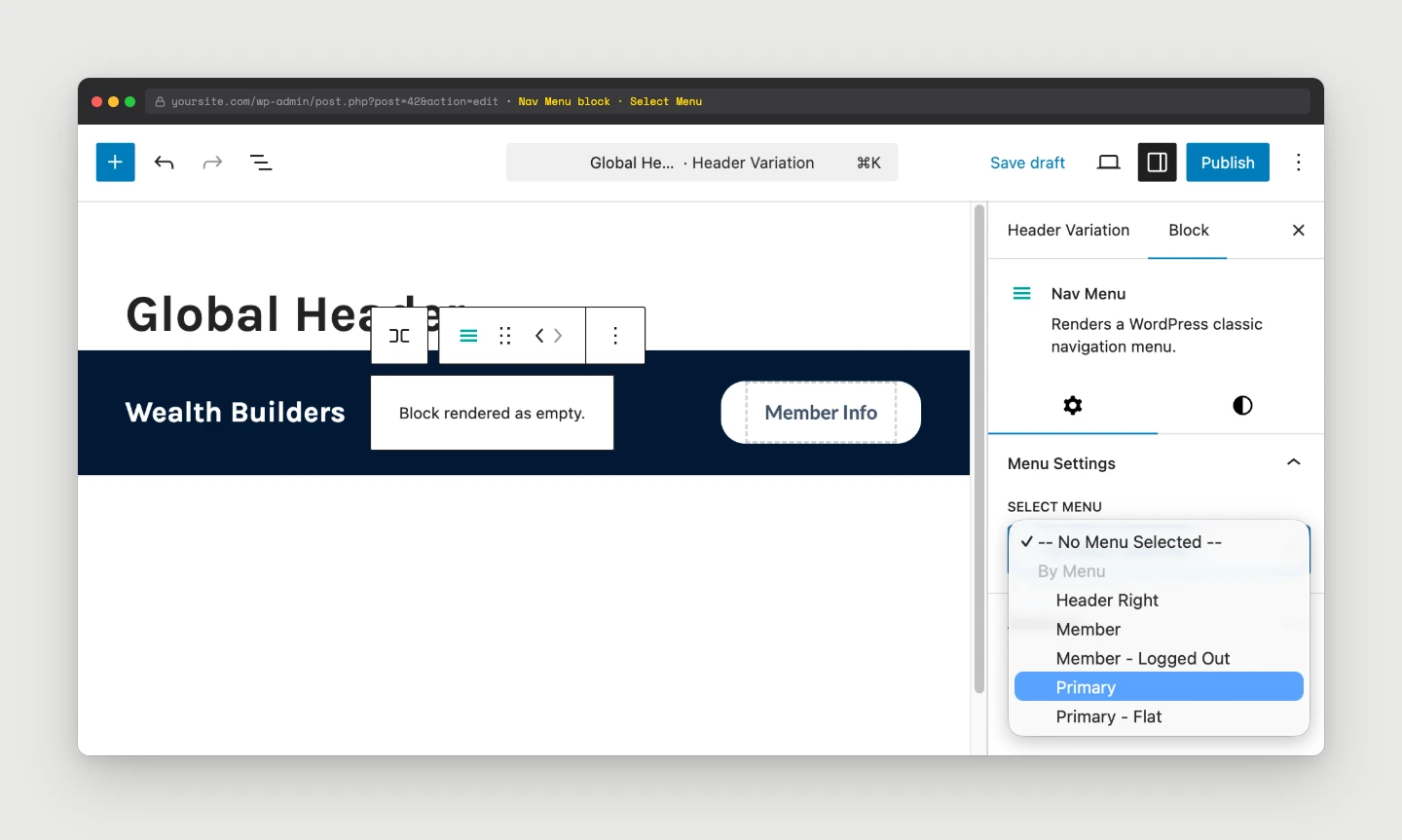
Nav Menu Block
A Memberlite-native alternative to the core Navigation block. It pulls from the Classic menus you’ve already set up under Appearance > Menus, including support for menu locations when the Paid Memberships Pro Nav Menus Add On is active. Drop the block in, then choose your menu (or menu location) from the block settings sidebar.
Member Info Block
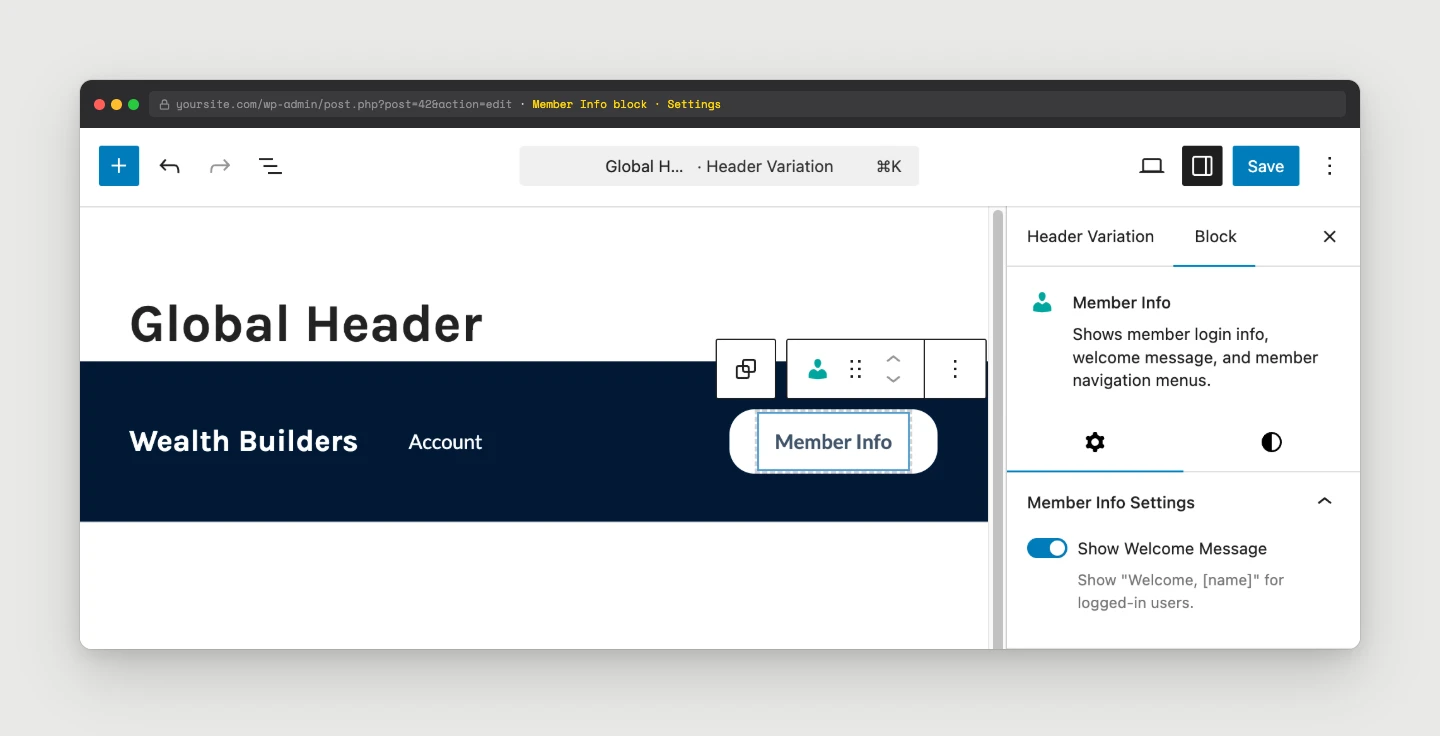
Renders the same login / member info area you know from the legacy header, but as a block you can place anywhere inside a header or footer pattern.
They both ship with the new Memberlite block collection, so they’re easy to find when you’re designing a header or footer.
Bundled Header and Footer Patterns
We’ve added two new pattern categories to the block editor: Memberlite – Header Variations and Memberlite – Footer Variations. These show up in the Patterns tab when you’re editing a header or footer post.
The bundled patterns are designed to give you a strong starting point, whether you want a clean centered logo header, a header with member info on the right, a multi-column footer with menus and a newsletter signup, or anything in between.
Per-Page Header and Footer Overrides
Most sites will set one global header and one global footer in the Customizer and call it done. But for landing pages, sales pages, or any layout that needs to break the rules, you can override the header and footer on any page from the existing Template Settings panel in the Block Editor sidebar.
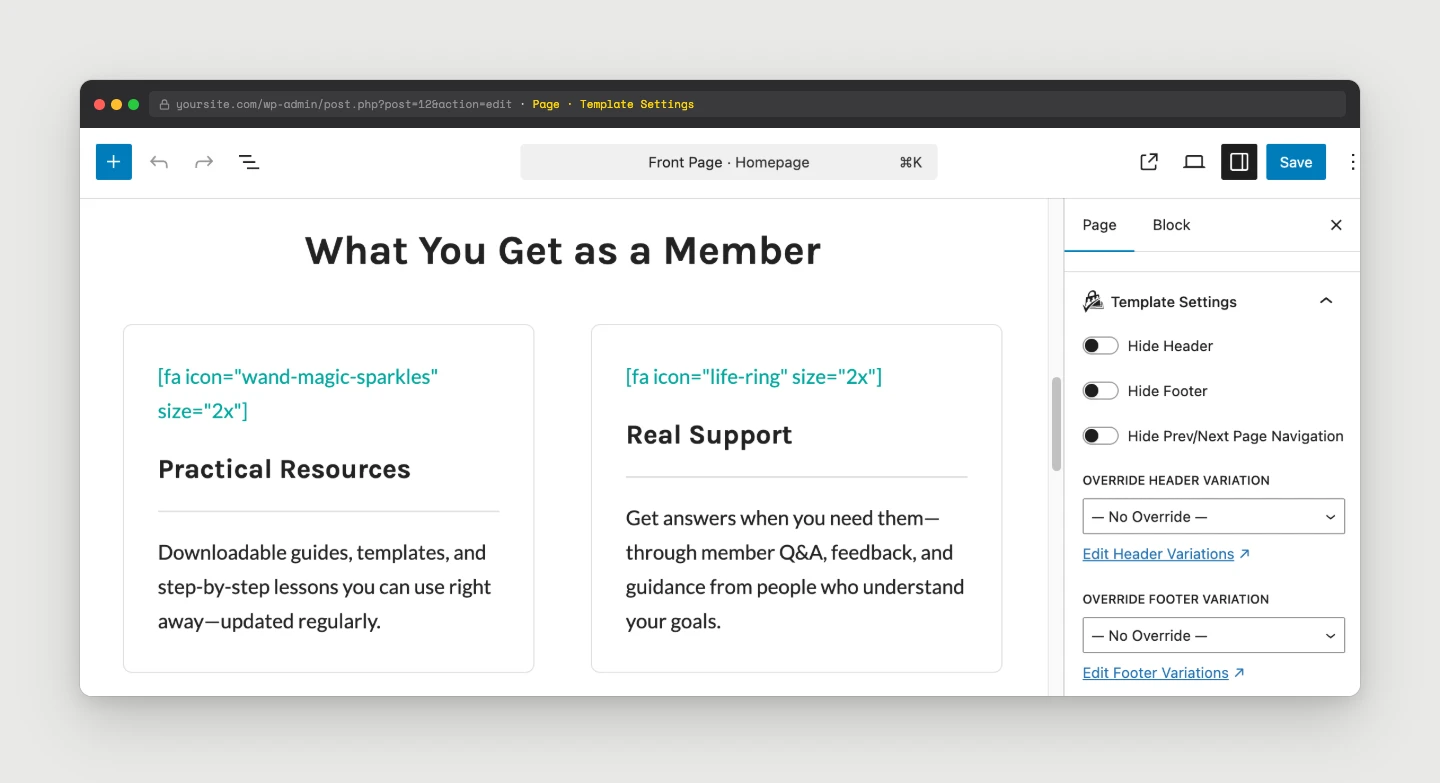
This pairs perfectly with the per-page Hide Header / Hide Footer settings that shipped in 7.0. Together they give you complete control over what the top and bottom of any page look like, without touching code or creating a custom template.
Customizer Updates and Floating Back to Top
We reorganized a few Customizer settings to make room for the new variation system and to clean up some long-standing inconsistencies:
- New “General” section: The “Show Back to Top Link” setting that used to live under “Footer” now lives in a new General section.
- New “Back to Top Style” option: Choose between the classic in-footer link (legacy footer only) or a new Floating button style that works with footer variations and any page.
- Header and Footer panels: These now contain the new variation assignment settings. Legacy settings (columns ratio, sticky header toggle, copyright text, etc.) automatically hide when the variation system is in use.
- New “Other Post Types” panel: When compatible post types are detected, new settings will appear under this panel. Each custom post type will have it’s own section where you can control settings for “Archive Layout”, “Sidebar Location”, and “Columns Ratio”. By default, custom post types will inherit settings from the Posts & Archives panel. You can also use the new
memberlite_customizer_cptsfilter to enable Customizer settings for your own custom post types.
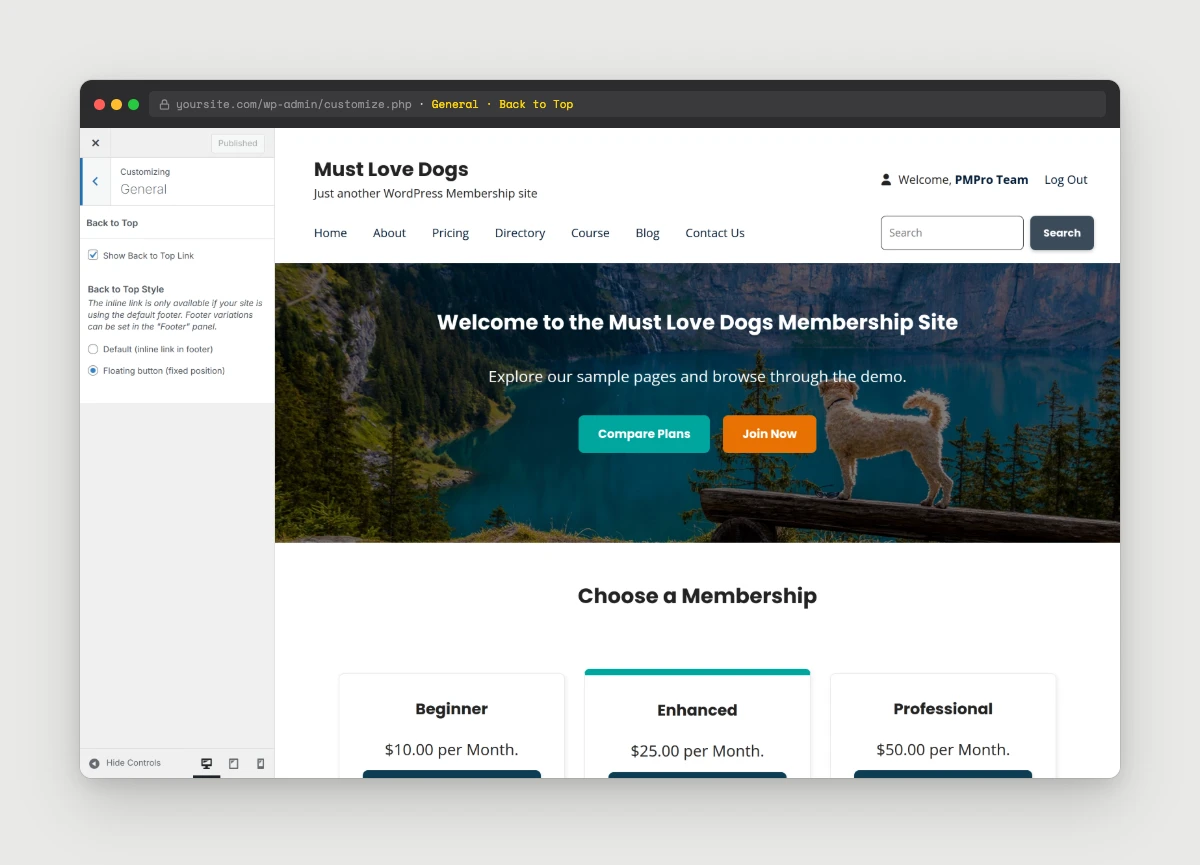
Switch to the Floating button style and a small Back to Top button appears in the bottom-right corner of every page, independent of whichever footer is active.
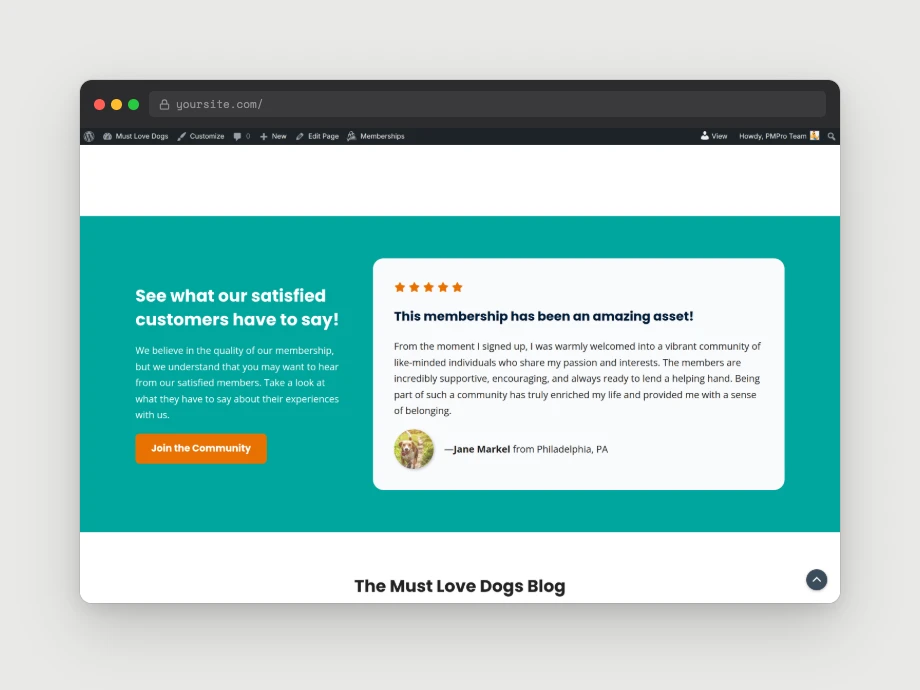
The migration is automatic. If you were already using the legacy header and footer, nothing changes on the front-end of your site after upgrading. You’ll only see changes once you start using the new variation system.
bbPress Color Scheme Support
If you run bbPress on a Memberlite site, your forums now inherit colors directly from your active Memberlite color scheme and Customizer color pickers.
If you’ve been maintaining custom CSS to fix bbPress colors, especially on dark schemes, you can likely remove most of those overrides in 7.1. You’re still free to layer in custom CSS for fine-tuning, but the baseline now respects your theme colors out of the box.
Front-End Edit Header and Edit Footer Tooltips
When a header or footer variation is active and you’re logged in as an admin (or any role with permission to edit those posts), you’ll see new “Edit Header” and “Edit Footer” tooltips on hover on the front-end of your site. Click either one to jump straight to the corresponding header or footer post in the editor.
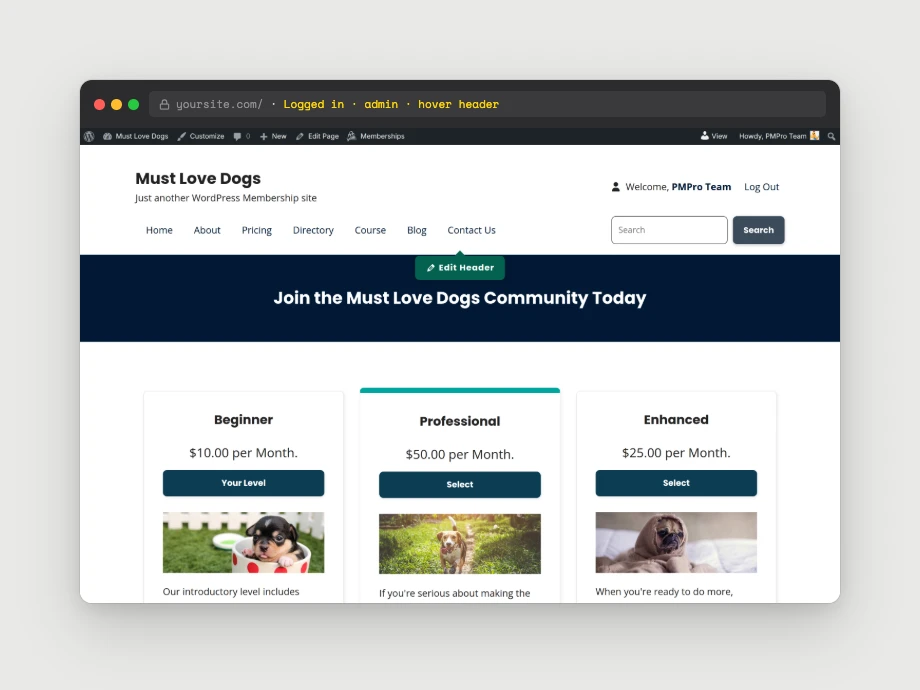
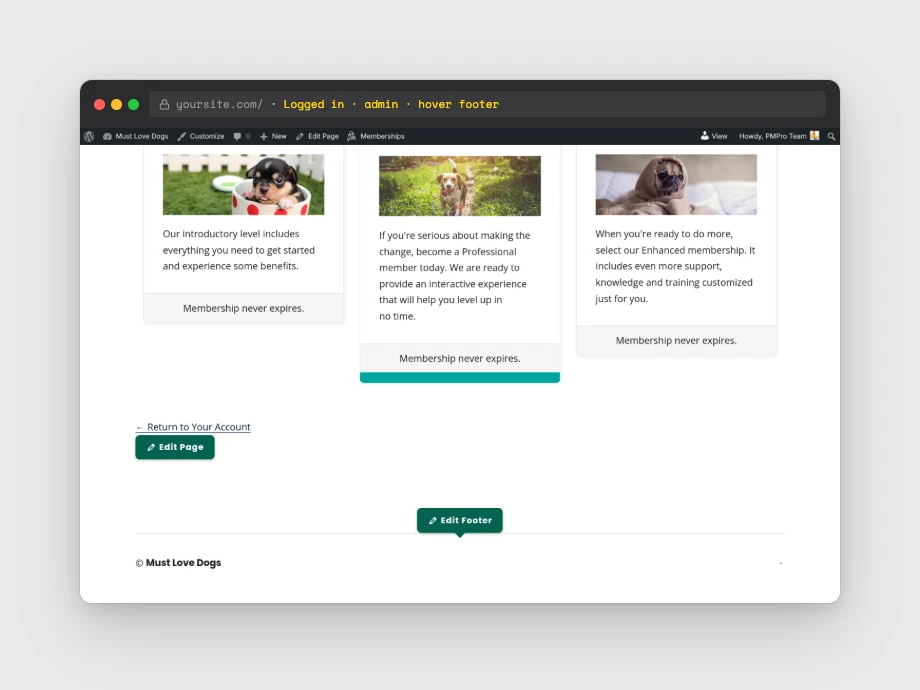
Edit links across the front-end have also been made more prominent and Memberlite-branded for admins. They’re still hidden from regular site visitors.
Mobile Menus
Mobile menus continue to use the fixed/classic mobile navigation introduced in 7.0. They’re not affected by header variations. You’ll still manage mobile menu content under Appearance > Widgets > Mobile Menu Widgets.
Developer Improvements
For theme developers and child theme authors:
- New custom post types:
memberlite_headerandmemberlite_footer, registered ininc/custom-post-types.php. - Variation system: All variation-related functionality lives in
inc/variations.php. Developers can hook into this to register additional patterns or filter starter template options. - Custom blocks: Two new blocks (Nav Menu, Member Info), with all block-related functionality consolidated in
inc/blocks.php. - Memberlite block collection: Memberlite now uses a block collection instead of a block category. Any block whose
block.jsonname starts withmemberlite/is automatically registered to the collection. No manual registration required. - New Customizer helpers:
add_memberlite_link_controlandadd_memberlite_notice_controlininc/customizer.phpfor adding link or notice rows between settings. - New template helper:
memberlite_output_edit_link()outputs branded edit links with SVG icons and post type names from template files. - Updated print styles: Print stylesheet has been refreshed and restructured for this release.
- New filter: The
memberlite_customizer_cptsfilter has been added so third-party and child theme custom post types can be passed. For each compatible or passed post type, new layout settings under Appearance > Other Post Types will appear. By default, without this filter, custom post types will inherit “Archive Layout”, “Sidebar Location”, and “Columns Ratio” settings from the existing Posts & Archives panel.
How to Download and Update Memberlite
You can download the latest version directly from our downloads page here at the Paid Memberships Pro website.
Update Option 1: If You’re Using the PMPro Update Manager Plugin
If you have the PMPro Update Manager plugin active, Memberlite 7.1 can be updated automatically from the Appearance > Themes screen in the WordPress admin.
Update Option 2: Manual Update via .zip File
If you’re not using the PMPro Update Manager, you should install and activate this free Add On so that Memberlite, PMPro, and any PMPro Add Ons can be updated without the need to handle updates via .zip files. Once you install and activate the Update Manager Add On, you can upgrade Memberlite following the steps in Option 1 above.
If you need assistance upgrading or have questions about how 7.1 affects your site, we’re here to help. Find out how to get support for Memberlite here.
Upgrading: What You Need to Know
For most sites, the upgrade to 7.1 is completely seamless. Your existing header and footer continue to render exactly as they did in 7.0, the new variation system is entirely opt-in. You won’t see any front-end change until you create a header or footer variation and assign it from the Customizer.
A few things to know:
- Legacy header/footer settings still work. They automatically hide in the Customizer when a variation is active, and reappear if you switch back.
- Footer widget areas are now legacy. The footer widget area under Appearance > Widgets > Footer Widgets is only supported in the default footer. If you want widget-style content in a footer variation, build it directly in the block editor.
- Mobile menus are unchanged. Mobile menus remain fixed/classic and are not affected by header variations.
- Test child themes on staging first. If you have a child theme that overrides header or footer templates, test on a staging site before updating production.
Deprecated in 7.1
memberlite_get_variation(): the function still exists for backward compatibility, but now always returns the default footer template part. The new variation system supersedes it.
Looking Ahead
Memberlite 7.0 rebuilt the foundation. Memberlite 7.1 turns that foundation into something you can actually design with: directly inside the block editor, with full visual control.
Here’s what’s coming next:
- Whole-page block patterns for common membership site pages (landing pages, pricing, member dashboards).
- Wizards to guide new site owners through setting up headers, footers, and key pages without staring at a blank canvas.
- More bundled header and footer patterns as we continue to design alongside real membership sites.
- Deeper integration with PMPro Add Ons so design decisions inside Memberlite carry into checkout, account pages, and emails.
We’re committed to making Memberlite the best theme for membership sites, and 7.1 is a big step toward design flexibility without complexity.
Memberlite 7.1 Full Changelog
- FEATURE: Added a new block-based footer variation system. Create and manage multiple footer designs as posts in a new Footer Variations CPT (
memberlite_footer). Assign them globally or per location via the Customizer. Optional post-meta override available on pages. - FEATURE: Added a new block-based header variation system. Create and manage multiple header designs as posts in a new Header Variations CPT (
memberlite_header). Assign a global header via the Customizer. Optional post-meta override available on pages. Includes a sticky header option configurable per header post. - FEATURE: Added functionality to delete header/footer theme mods when a post has been permanently deleted. Customizer JS handles posts that are trashed but not deleted to prevent “blank” options in header/footer settings.
- FEATURE: Added a custom Nav Menu block and Member Info block. The Nav Menu block dynamically pulls registered WordPress menus and menu locations (with support for the Paid Memberships Pro – Nav Menus Add On) for use in header and footer patterns. The Nav Menu and Member Info blocks are restricted to the block inserter for header or footer CPT posts.
- ENHANCEMENT: Added a new helper
memberlite_output_edit_link()to output edit links with SVG icons andpost_typenames in template output. - ENHANCEMENT: Updated print styles and structure for this release.
- ENHANCEMENT: Re-labeled existing shortcut links to CPTs to “Edit Header/Footer Variations.” Added notices to the “Colors” section in Customizer. Added a new
add_memberlite_notice_controlandadd_memberlite_link_controlfunction ininc/customizer.phpfor adding notices/links between settings. - ENHANCEMENT: Updated bbPress styles. bbPress now inherits colors from Memberlite’s color schemes and color pickers in Customizer.
- ENHANCEMENT: Added tooltip styling with a new SCSS mixin, Memberlite brand colors, improved color contrast, and refined icon sizing.
- ENHANCEMENT: Updated block build styles to use WordPress color presets instead of hardcoded CSS values.
- ENHANCEMENT: Added colored PMPro icons to custom Memberlite blocks and replaced the block category with a block collection for better block inserter organization.
- ENHANCEMENT: Added new pattern categories: “Memberlite – Header Variations” and “Memberlite – Footer Variations.”
- ENHANCEMENT: Moved “Back to Top” settings from the “Footer” section to the newly added “General” section. Added a new “Floating button” style for “Back to Top” style.
- BUG FIX: Fixed block styles not being enqueued on the front-end.
- BUG FIX: Removed type hinting on
memberlite_allowed_blocksthat caused fatal errors on sites with no registered menus. - BUG FIX: Fixed submenu background color to correctly use the parent block’s background color for the Nav Menu and Member Info blocks.
- DEPRECATED: Deprecated
memberlite_get_variation(). It now always returns the default footer template part.
Memberlite 7.1.1 Full Changelog
- BUG FIX: Fixed incorrect comment counts and comments not displaying when comments are closed.
- BUG FIX: Removed Memberlite’s
allowed_block_types_allfilter that attempted to scope thememberlite/nav-menuandmemberlite/member-infoblocks to thememberlite_header/memberlite_footerCPTs, resolving the reported compatibility issue where JS-only (client-registered) third-party blocks disappeared from the inserter.
Memberlite 7.1.2 Full Changelog
- FEATURE: Added new Customizer layout settings for “Other Post Types”, including support for inheriting “Posts & Archives” settings by default.
- ENHANCEMENT: Wrapped the text attribute in the
memberlite_btnshortcode withesc_htmlto prevent XSS. - ENHANCEMENT: Improved custom post type layout support across archives and single views, including sidebar, column ratio, archive layout and safer fallback behavior.
- ENHANCEMENT: Added support for exporting and importing more site identity settings, and improved help text in the import/export tool.
- ENHANCEMENT: Added one-time copying of parent theme mods when activating a Memberlite child theme.
- ENHANCEMENT: Outline button styling and 16:9 image handling improvements.
- ENHANCEMENT: Adjusted footer pattern 04 link color contrast in dark color schemes.
- ENHANCEMENT: Resolved accessibility issue where the
aria-labelledby="page-title"was tied to the banner instead of the post/page title. - ENHANCEMENT: Added admin column helper functions for header variation management.
- BUG FIX: Fixed bbPress search/sidebar inheritance behavior.
- BUG FIX: Fixed banner display and removed the hyperlink wrapping the banner.
- BUG FIX: Fixed footer variation handling for custom post type single views.
- BUG FIX: Fixed third-party JS-only blocks being removed from allowed blocks when we tried to restrict the “Nav Menu” and “Member Info” blocks to header and footer variation posts.
- REFACTOR: Make
.entry-titlea global style with zero margin. This ensures the CPT archive’s two-column layout is horizontally aligned under the banner/masthead. - REFACTOR: The
memberlite_footer_add_used_by_columnfunction released in 7.1 has been renamed tomemberlite_variation_add_used_by_columnso that it’s more generic. Used by both the header and footer variations internally. - REFACTOR: Refactored banner/masthead functionality so we’re only calling them once in the
header.phpand using helpers that determine when/if they should render. The functionality itself is unchanged. Added two new helpers:memberlite_get_banner_post_idandmemberlite_should_masthead_render
Questions or Feedback?
We’d love to hear how 7.1 is working for you. If you run into any issues or have suggestions for future improvements, reach out through our support channels or join the conversation in the PMPro Slack Community.


