In late August, a small number of sites using Paid Memberships Pro with Stripe Connect were disconnected through a gap on our Connect server. That broke the live Stripe link for those sites until they reconnected. The gap is fixed on our side and did not require a plugin update. Sites using their own restricted API keys were not affected.
What Happened
A vulnerability in our Stripe Connect server was discovered and abused to disconnect about 200 sites. We quickly patched the vulnerability, which only required an update on our server.
Without getting into too many details, when you click to “Connect” to Stripe in the PMPro gateway settings, it links you over to our server which performs an OAuth handshake with Stripe, creates a public and secret key for your site, and then sends those keys back to your site to use to integrate with Stripe.
The disconnect link would send your Stripe account ID to our server, then we would disconnect the account and redirect back to your admin. This disconnect route was only secured by the assumption that (a) Stripe account ID was a relatively secret, hard-to-guess value and (b) no one would have a reason to disconnect random Stripe accounts on our server.
Both of those assumptions were not true. There are a number of ways to find out someone’s Stripe account ID, including viewing the source of their website if it is using PMPro’s onsite checkout, PMPro’s update billing page, or even other WP plugins integrated to the same Stripe account. And malicious actors might disconnect sites just to disrupt them or as part of a phishing attack attempting to gain control of your Stripe account through stolen keys.
Who Was Affected
A small number (less than 0.5%) of sites using PMPro with “Stripe Connect” were affected by this. If you were using your own restricted keys to connect to Stripe, your site would not have been affected.
If you were one of the sites inadvertently disconnected, you would notice unusual Stripe errors on your site, some of which show as “expired keys” or “invalid keys”.
We didn’t previously log connect and disconnect attempts, but we were able to figure out from regular web logs the domains that were potentially impacted by the disconnects. There may also be valid disconnect requests in the same logs, but it looks like about 200 accounts were affected by this. It seems that most of these sites have already reconnected.
Which sites were hit seems random. An attacker may have triggered the disconnects as the first step in a “phishing” scheme: contact the affected sites, then trick them into reconnecting through a malicious URL that would send the new Stripe keys to the attacker once you clicked it and authorized your Stripe account.
We are trying to cross-reference these sites vs. users on our site, and if we have an email address on hand, we will reach out to those users to let them know about this issue.
Separately, sites that were never disconnected may still have seen “expired” or “invalid” publishable key errors on the onsite checkout and update billing pages after we rotated the platform publishable key. See the update at the top of this post. Updating to Paid Memberships Pro 3.8.6 resolves this without reconnecting.
What We Fixed
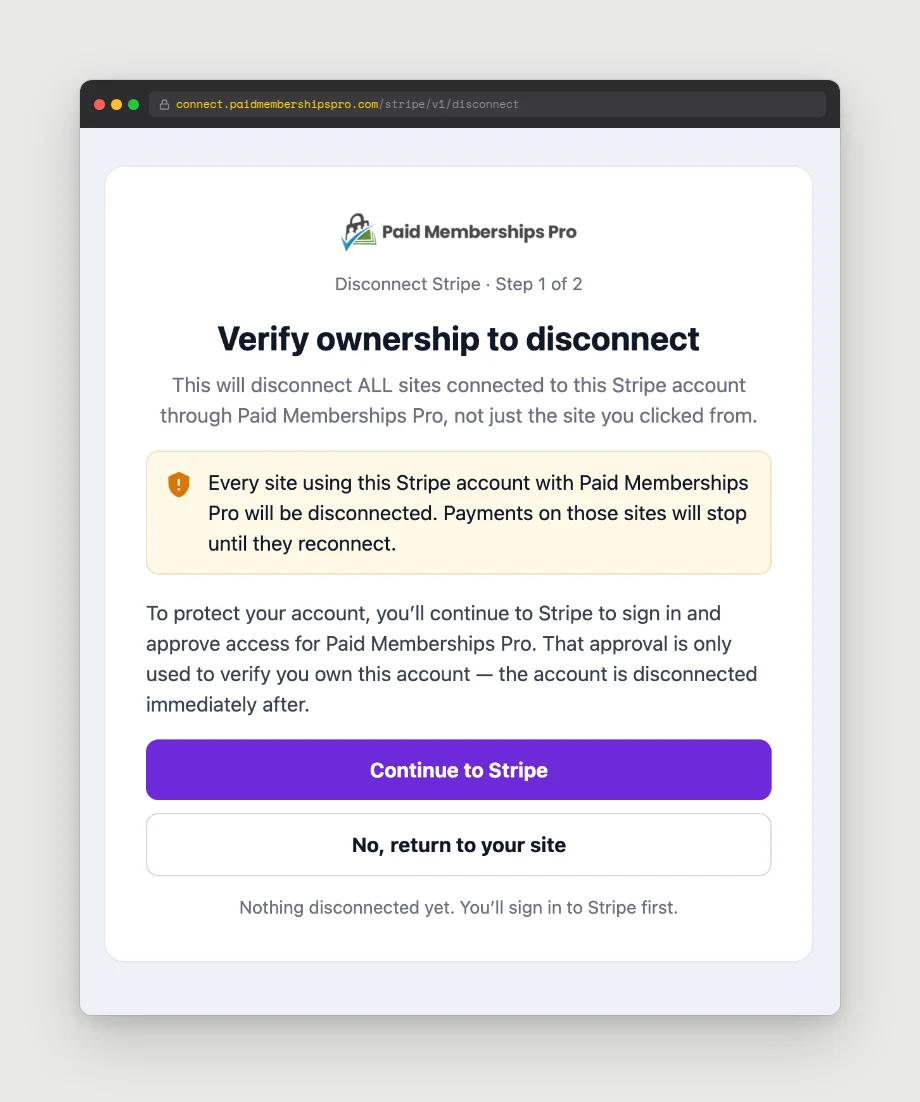
The unauthorized disconnect was fixed on our server by requiring a login and account selection in Stripe before processing the disconnect. This ensures that the person disconnecting the account has access to that account.
We also added interstitial pages to both connect and disconnect attempts. These pages help to combat phishing attempts by showing the return_url and other values passed into the attempts so you can confirm you are taking the action you expect.
We are also now tracking all connect and disconnect attempts. We save the IP, account ID, and URL of the site being connected. We do not save the keys generated by the connection process, but we do save a one-way hash of the secret key. This would allow future versions of PMPro to generate the same hash from the Stripe secret key so we can confirm that a key was generated by a certain connect attempt. The secret key cannot be derived from the hash, and the hash can’t be used to affect your Stripe account.
How to Reconnect Stripe
Before reconnecting, update Paid Memberships Pro to version 3.8.6 or later. If the only problem was an expired publishable key, the update fixes it on its own. If you believe your site was disconnected, you can reconnect to Stripe by going to Memberships > Settings > Payments > Stripe > Edit Settings, then click on the button to “Disconnect”. Authorize the disconnect, then return to the settings page and click the button to Connect. Authorize the connection. This will generate new keys for your site.
What’s Shipping in PMPro
The automatic publishable key refresh described above is in Paid Memberships Pro 3.8.6. We are also working on a plugin update that detects when Stripe is rejecting your saved credentials and shows a clear notice in the WordPress dashboard with a one-click option to reconnect, without disconnecting first. Handling notices like this without false positives is tricky work, so that one is coming a little later.
You can also use our PMPro Toolkit Add On to enable a “checkout error report” which will track all issues at checkout and optionally email you about them. Paying members can download the Add On from our site here. Other folks can get the full official Add On at GitHub.
Need Help?
If reconnecting does not clear up your errors, or you are unsure whether your site was impacted by this issue, you can reach out through our contact form and we will help you any way we can. Please include as much information as possible in your initial contact request, including the site’s URL, error messages, roughly when the errors occurred, and whether more than one site is connected through your Stripe account.
We are very sorry to the sites that were impacted by this issue. We know disruptions like this are stressful, and we appreciate your patience while you reconnect. The vulnerability that allowed random disconnects is closed, and the publishable key issue is fixed in the plugin. Our team is ready to help if you need a hand getting back online.

Free Download: The AI-Powered Membership Site Blueprint
Download the free guide: Learn how to plan, build, and grow a membership site using AI as your strategic partner: from buyer persona to launch and beyond.