Max Credits measure the hands-on work included with your PMPro Max membership. You use them for Do It For Me (DIFM) development requests and for running AI Skills. Your balance shows exactly how much included work you have available, and every credit you earn or spend is listed alongside what it was for.
What is a credit worth?
One credit is worth about $10 of market-rate development work.
That makes it easy to see the value of your membership. The 25 credits you receive each month represent about $250 of development and implementation work. Your 100 welcome credits represent about $1,000 of help getting your site launched and set up the way you want.
Your credits card shows this dollar value next to your balance.
How you earn credits
Welcome credits
You receive 100 welcome credits when your credits account starts. Your account starts the first time you open your Max dashboard or run an AI Skill.
Monthly credits
You receive 25 credits every month while you are a Max member. Monthly credits arrive on the same day each month, counted from the day you received your welcome credits. Your credits card shows the date of your next deposit.
Rollover
Unused credits roll over from month to month, up to a balance of 300 credits. If your balance is already at 300, your monthly deposit tops you back up to 300 instead of adding the full 25.
Credits by plan
| Plan | Welcome credits | Monthly credits | Rollover cap |
|---|---|---|---|
| PMPro Max | 100 | 25 | 300 |
| PMPro Max 2x | 200 | 50 | 600 |
| PMPro Max 4x | 400 | 100 | 1,200 |
Welcome credits are a one-time gift the first time you join PMPro Max.
Not using PMPro Hosting?
PMPro Max comes with hosting. If your server is not set up yet or you choose to not use the hosting portion of your membership, your monthly credits are doubled.
Since only hosted sites can have DIFM work one, these credits can only be banked or used for AI skills.
If you feel you are not receiving the number of credits you should be, contact us and we will double check for you.
How you use credits
Do It For Me requests
Every DIFM request is quoted in credits before we start. We review your request, confirm the scope with you, and give you a credit quote. You decide whether to go ahead.
Here are the typical ranges by type of work:
| Type of work | Typical credits |
|---|---|
| Content or email update | 5–15 credits |
| Fix | 10–25 credits |
| Setup / configuration | 10–25 credits |
| Design update | 15–40 credits |
| Connect a plugin or service | 25–50 credits |
| New feature or workflow | 25–80 credits |
| Migration or site move | Starts at 50 credits (quoted per project) |
A few things to know about how we charge:
- Submitting a request and getting a quote is free. Credits are only used when the work is done.
- We charge credits when the work is complete, not when you submit the request.
- You never pay more than the quote. If the job takes longer than we estimated, that’s on us.
- If the job turns out simpler than expected, we may charge less than the quote.
- If you ask for something new partway through, we’ll talk with you about it and quote the extra work separately.
Completed work appears in your credit history as “Completed work.”
AI Skills
Running an AI Skill on your AI Tools page costs 1 credit per run.
- The credit is used when the run starts.
- If a run fails, the credit is refunded to your balance automatically. You’ll see a “Refund (run failed)” entry in your history.
- Each run appears in your credit history as “AI skill run” with the name of the skill.
Where to see your balance
Your Max Credits card is on your Membership Account page. It shows:
- Your current balance and its approximate dollar value
- The date your next monthly credits arrive
- The typical credit ranges for DIFM work
- Your recent credit history: the date, the number of credits added or used, and what each entry was for
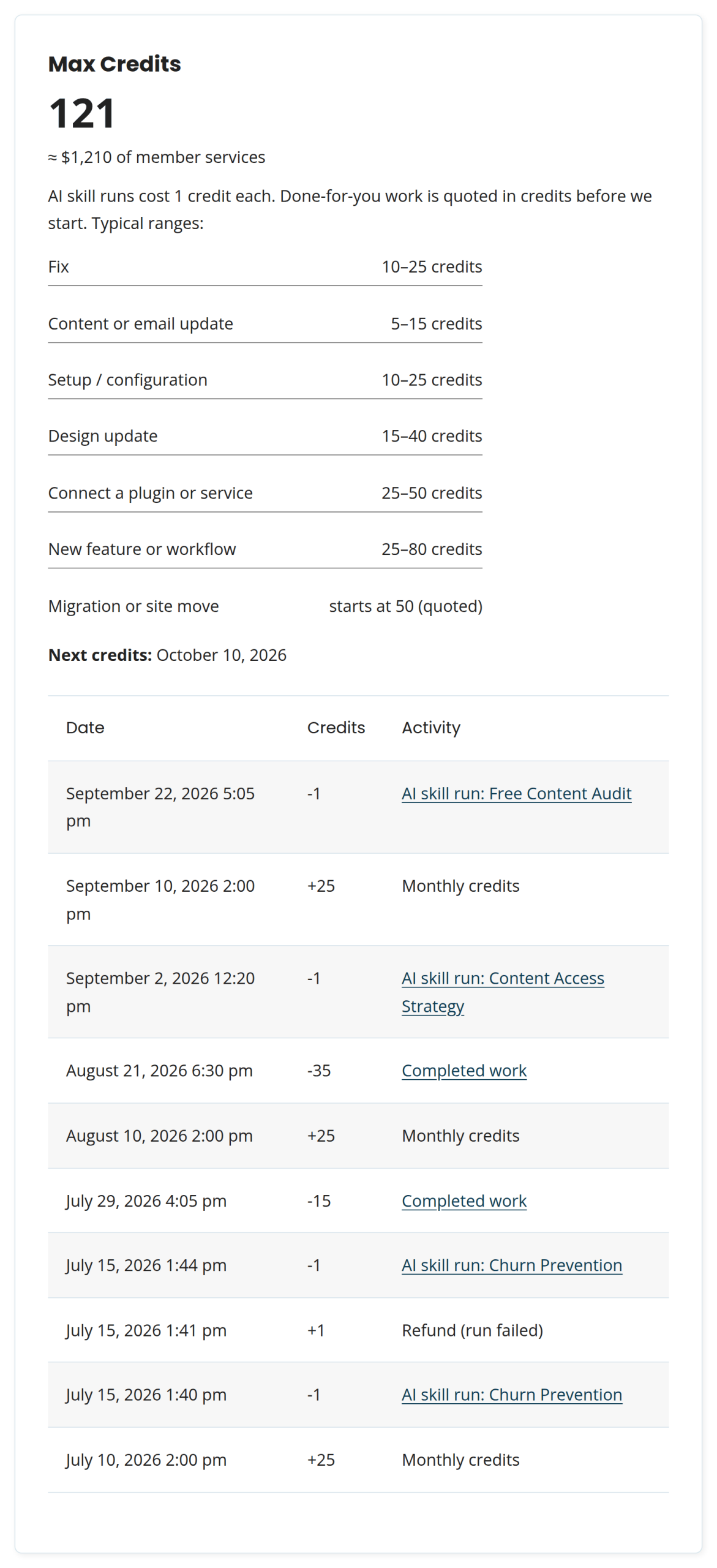
Entries you might see in your history:
| Entry | What it means |
|---|---|
| Welcome credits | Your 100-credit starting balance |
| Monthly credits | Your monthly deposit |
| AI skill run | Credits used to run an AI Skill (links to the skill) |
| Refund (run failed) | A skill run credit returned after a failed run |
| Completed work | Credits used for a finished DIFM request |
| Adjustment | Credits added or removed by our team |
| Correction | A fix to an earlier entry. The original entry stays in your history, and the correction is added so your balance is right. |
| Credits expired (membership ended) | Your balance was cleared when your Max membership ended |
| Welcome back | Your credits restarted when you rejoined Max |
What happens if you run out
Running out of credits doesn’t lock you out of anything mid-stream.
- AI Skills: you need a positive balance to start a new AI Skill run. At zero, you’ll see a message with the date your next credits arrive.
- DIFM work in progress: work we’ve already quoted and started is always finished. If completing it takes your balance below zero, your card shows “Borrowed against next month,” and your next monthly credits cover the difference. Your balance can go as low as −25 credits (one month’s deposit).
- Need more credits? Buying credits is coming soon. For now, contact us and ask.
- Need something now? Open a support ticket and we’ll sort it out with you.
Frequently asked questions
Do credits expire?
Credits roll over month to month, up to 300, while your Max membership is active. Credits are part of an active PMPro Max membership: if your membership ends, your credits expire and monthly credits stop.
What happens if I come back to Max later?
Your monthly credits start again on the day you rejoin, and you get that month’s credits right away. You don’t earn credits for the months you were away, and welcome credits are only given the first time you join.
If you were away for less than a month, contact us and we’ll reinstate your previous balance.
Does asking questions in support use credits?
No. Technical support is included with Max and does not use credits. Credits are only used for DIFM development work and AI Skill runs.
Does it cost credits to get a DIFM quote?
No. Submitting a request, having us review your site, and receiving a quote are all free. Credits are used only when we complete the work.
Can I use AI Skills in my own AI tool without using credits?
Yes. Credits are only used when you run a skill on paidmembershipspro.com. Copying a skill to use in your own AI tool doesn’t use credits.
Can I buy more credits?
Not yet, but it’s coming soon. For now, if you need more credits, contact us and ask.
What if I think an entry in my history is wrong?
Open a support ticket and let us know which entry. We’ll review it and add a correction if needed.
Get Support From Our Team of Experts
Have a question about how to use this feature? Our Support Page outlines three ways to get support.
Our Max plans include hands-on help customizing your membership site and implementing new features. Upgrade to PMPro Max now »
Last updated on September 28, 2026

