If you sell to consumers in Germany or the wider EU, you have probably heard about the new Widerrufsbutton, the “withdrawal button” that became mandatory on 19 June 2026 under § 356a BGB.
The German rule implements Article 11a of the EU Consumer Rights Directive (2011/83/EU), added by Directive (EU) 2023/2673, and it covers all distance contracts with a right of withdrawal, not only financial services. The short version: customers should be able to undo an online contract about as easily as they entered into it.
This guide is about the mechanics of offering that on a Paid Memberships Pro (PMPro) site. We are deliberately not going to tell you whether you need it, which of your levels it applies to, or how your withdrawal notice should be worded. Those are legal questions for your own lawyer or legal-text provider (IT-Recht-Kanzlei, Trusted Shops, eRecht24, and so on).
What we can do is show you how to build it once you have made that call. The encouraging part: PMPro already gives you most of the moving parts, so for a lot of sites this is a small job.

Table of contents
- First, Separate the Two Buttons
- Why PMPro Needs a Purpose-Built Function
- What the Flow Has to Do
- Two Ways to Build It
- Method A: Extend the Native PMPro Cancel Flow
- Method B: Build a Standalone Form
- 5. Place the Form On Your Site
- Processing and Who Does What
- Beyond the Button: Terms and Checkout
- Summary Checklist
- Frequently Asked Questions
First, Separate the Two Buttons
There are really two different buttons people conflate, so let’s separate them up front:
- The withdrawal function (Widerrufsbutton, § 356a BGB, in force since 19 June 2026). This is a revocation, not a cancellation. It gives the customer no new right. It is simply a new, easier way to exercise the statutory 14-day right of withdrawal they already have on a distance contract. A valid withdrawal unwinds the contract: you issue a full, no-questions-asked refund and end access.
- The cancellation button (Kündigungsbutton, § 312k BGB, in force since 1 July 2022). This is about ending an ongoing contract (a subscription) going forward. It does not reverse anything. It stops the next renewal.
These are independent obligations. A membership site that sells recurring subscriptions may need both, and they have to be clearly distinguishable because they carry different legal consequences. The statute prescribes the exact button wording for each, which is the main thing that differs between them.
Why PMPro Needs a Purpose-Built Function
Most of the “just install this plugin” advice you will find online is written for WooCommerce. Vendidero’s Germanized, German Market, and the various § 356a plugins in the WordPress repository all hook into WooCommerce orders. Paid Memberships Pro does not create WooCommerce orders, so those solutions do not apply to us. The obligation attaches to the fact that you let consumers conclude contracts online, not to which plugin you happen to run.
Here is the useful part, though: PMPro’s existing cancellation flow is already shaped like what the law wants. A member sees a Cancel link on each membership in their account (an entry point), that link leads to a Membership Cancel confirmation page (a separate confirmation step), and a Membership Cancelled email goes out afterwards (an acknowledgment). That is button to confirmation to durable-medium receipt, which is exactly the § 356a structure. It just needs three adjustments to be compliant: the statutory button labels, the right cancellation timing for a withdrawal, and a timestamp in the email. We will make those below.
One thing that is widely misread: the “no login” rule. It forbids forcing someone to register or create an account just to withdraw. It does not forbid placing the function behind a login when the contract already requires an account. A PMPro membership always involves an account, so for your members the function can live right inside the Membership Account area. The directive says as much: a consumer who has identified themselves “by logging in” can withdraw “without the necessity of providing once more their identification” (Recital 37). Stripe’s own guidance calls account placement “acceptable and even expected as a primary placement.” The login-free path only matters where someone can transact as a guest with no account, for example a newsletter signup or some event registrations.
Related: Membership Cancel Page Documentation
What the Flow Has to Do
Whichever way you build it, the function has to take this shape. The obligation lives in § 356a BGB (“Elektronische Widerrufsfunktion bei Fernabsatzverträgen”), and the official text is the single best primary source to read. Keep this list next to you, and confirm everything with your legal-text provider.
Specific Requirements of the Widerrufsbutton and Kündigungsbutton
- A clearly labelled entry point, worded “Vertrag widerrufen” (withdrawal) or “Verträge hier kündigen” (cancellation), or an unambiguous equivalent. It must be easy to find and continuously available throughout the relevant period. For a membership site, a prominent place in the logged-in account area meets this.
- A separate confirmation button that actually sends the declaration. The statute names this one too: it must read, with nothing else, “Widerruf bestätigen” or “jetzt kündigen”. A generic “Submit” or “Yes, cancel” does not meet it. Clicking the entry point must not fire anything on its own.
- An acknowledgment on a durable medium (email is fine). For withdrawals it must record the content of the declaration plus the date and time it was received, and it must read as a receipt, not a ruling that the withdrawal is effective.
- Only the necessary fields: the member’s name, something that identifies the contract, and an electronic contact method for the confirmation. Those last two can be different, and the difference is useful. The contract identifier is how you find the right account (on a PMPro site the order code is the most reliable one). The contact method is only where the receipt goes, so a mistyped or non-account email does not stop you identifying the contract. You cannot require a reason for withdrawal.
The button is only half of the obligation. You also have to tell customers about the 14-day right at checkout (the Widerrufsbelehrung). Skip that and the window can stretch from 14 days to as much as 12 months and 14 days. The notice wording comes from your legal-text provider. The function we build below is how someone exercises the right. The checkout notice is how they learn they have it.
Two Ways to Build It
There are two sensible ways to deliver that on PMPro, and the right one depends on your site.
Method A extends PMPro’s native cancel flow with a code snippet. You reuse the account-page links, the confirmation page, and the cancellation email that PMPro already ships, and adjust the labels, timing, and email. It is the least amount of new surface, the member self-serves, and it solves the multi-subscription problem automatically because each membership card has its own link. Choose this when your customers all have accounts, which on a pure membership site they do.
Method B builds a standalone form with a free form plugin. The form captures the declaration and emails an acknowledgment, but nothing happens to the membership until your team acts on it. Choose this when you want a declaration-capture step that a human reviews before anything changes, or when you have guest contracts (newsletter, some event registrations) where there is no account and therefore no account page or cancel link to extend. If your site has always required an account to buy (no guest checkout), you do not need a public form at all. Method A on its own is the complete and defensible answer, because every contract you have was concluded with an account.
They are not mutually exclusive. A common setup is Method A for members plus a small Method B form for any guest checkout.
Method A: Extend the Native PMPro Cancel Flow
The snippet makes the adjustments to PMPro’s existing flow that are described below: statutory button labels, an immediate cancel on the withdrawal path, a timestamped acknowledgment email, and a confirmation-email field on the cancel page. It lives in the public PMPro Snippets Library, so add it with the free Code Snippets plugin or a small custom plugin rather than copying it by hand, which keeps you on the current version.
Add German Widerruf and Kündigung buttons to Paid Memberships Pro
Adding the Recipe to Your Website
You can add this recipe to your site by creating a custom plugin or using the Code Snippets plugin available for free in the WordPress repository. Read this companion article for step-by-step directions on either method.
The labels in the snippet are German. Swap them for your locale if needed.
What each part does:
- The buttons. On the account page, each membership now shows a “Vertrag widerrufen” link next to a relabelled “Verträge hier kündigen” link. Each one carries its own level, so a member with three subscriptions withdraws or cancels exactly the one they mean.
- The flag. The withdrawal link adds
widerruf=1, and this carries it through the confirmation form so the later steps can tell a withdrawal from a cancellation. - The confirmation button. On the confirmation page, the button now reads “Widerruf bestätigen” for a withdrawal and “jetzt kündigen” for a cancellation, which is the wording the statute requires.
- The timing. A withdrawal ends access immediately (a withdrawal is a full unwind). A cancellation keeps PMPro’s default and runs to the end of the paid term.
- The email. A
{{ cancellation_datetime }}variable becomes available. Open Memberships > Settings > Email Templates, edit the cancellation emails, and add a line like “Declaration received: {{ cancellation_datetime }}”. The email already names the membership, so the body plus that timestamp records the declaration’s content and the date and time of receipt. - The confirmation address. A pre-filled “Bestätigung senden an” email field appears on the confirmation page, and the acknowledgment is sent wherever the member leaves or sets it. This is the “provide or confirm” part of the rule, and the law lets that address differ from the account email. It defaults to the account email, so by default the receipt still goes to the known-good address.
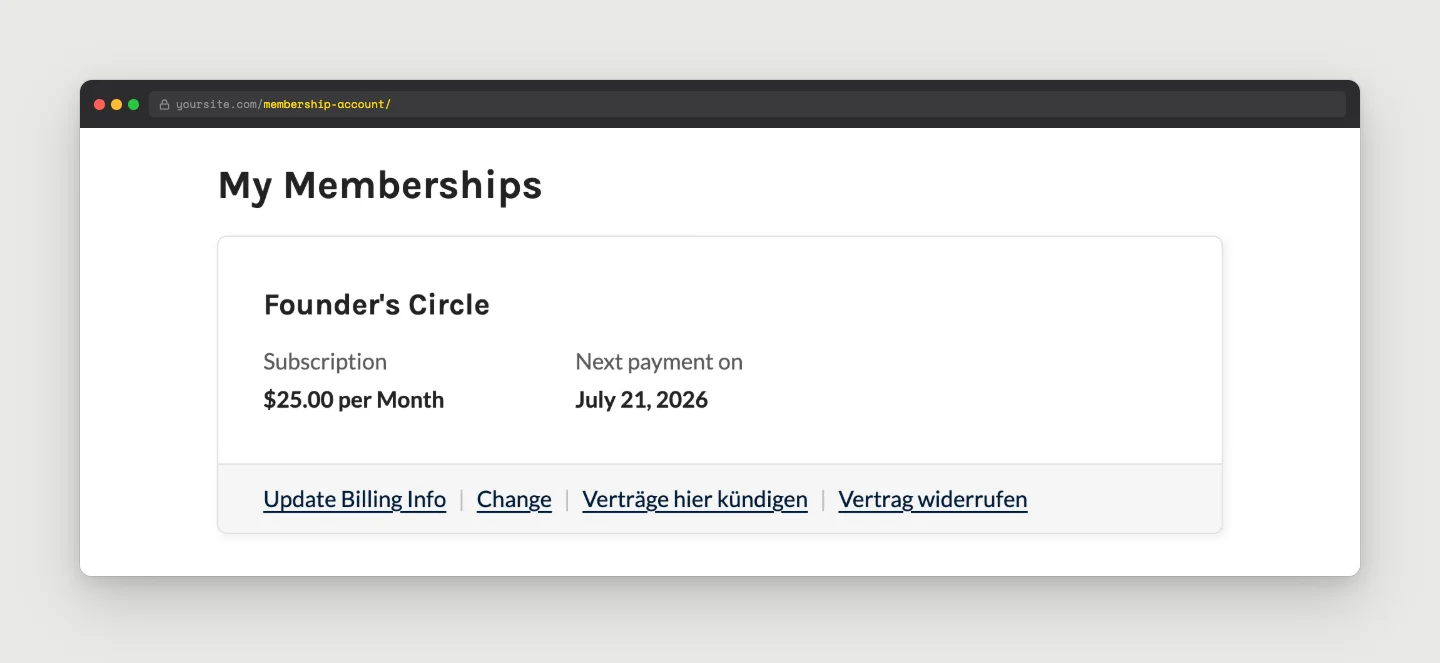
Because the member is logged in, you never have to match a typed-in email to an account. Their identity is certain. The confirmation field in step 6 defaults to their account email, so even if they choose to send the receipt elsewhere, you still know exactly which account and contract they mean. That removes the most common support headache, the one where a typed email is the only thing tying a request to an account.
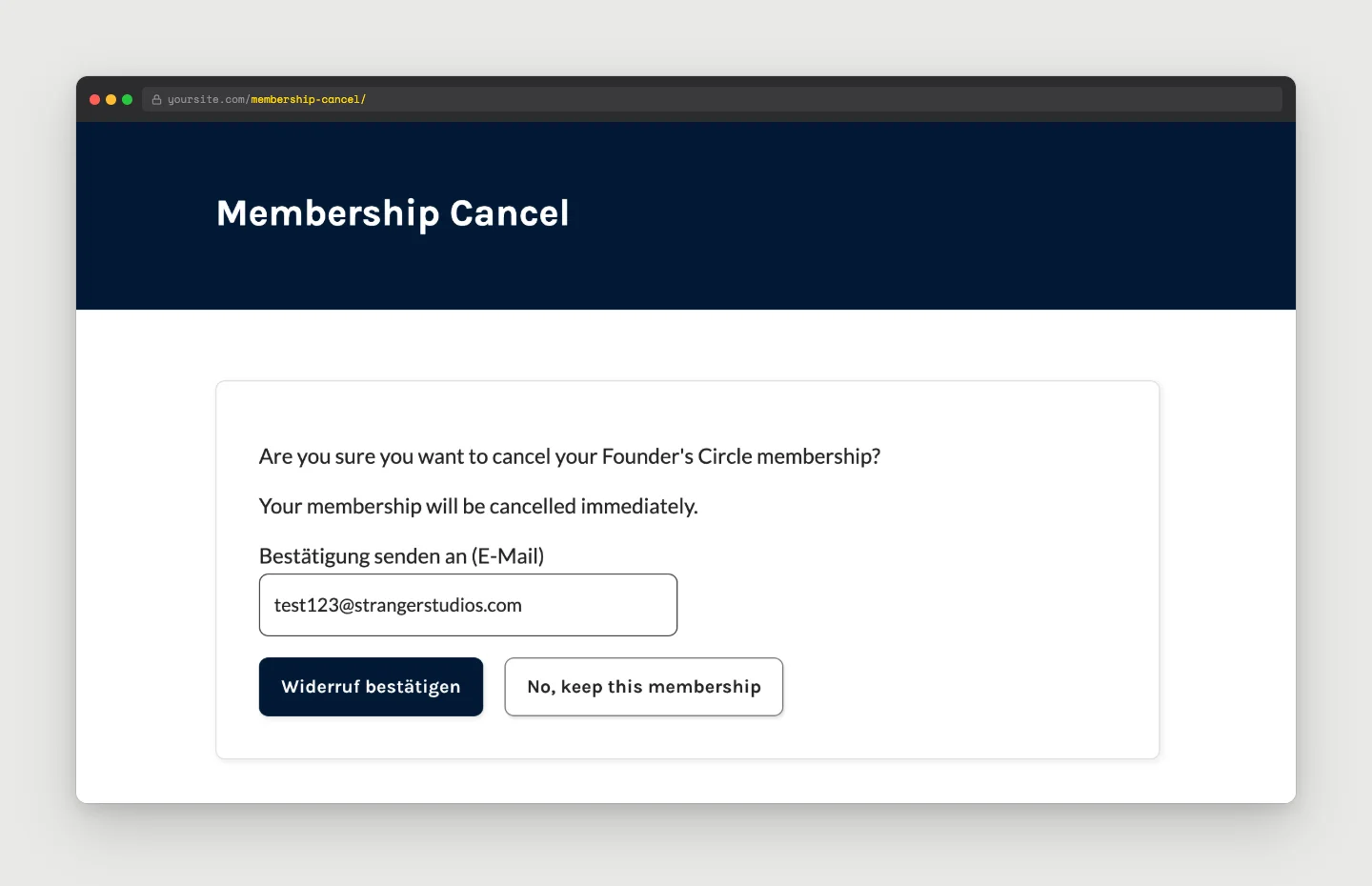
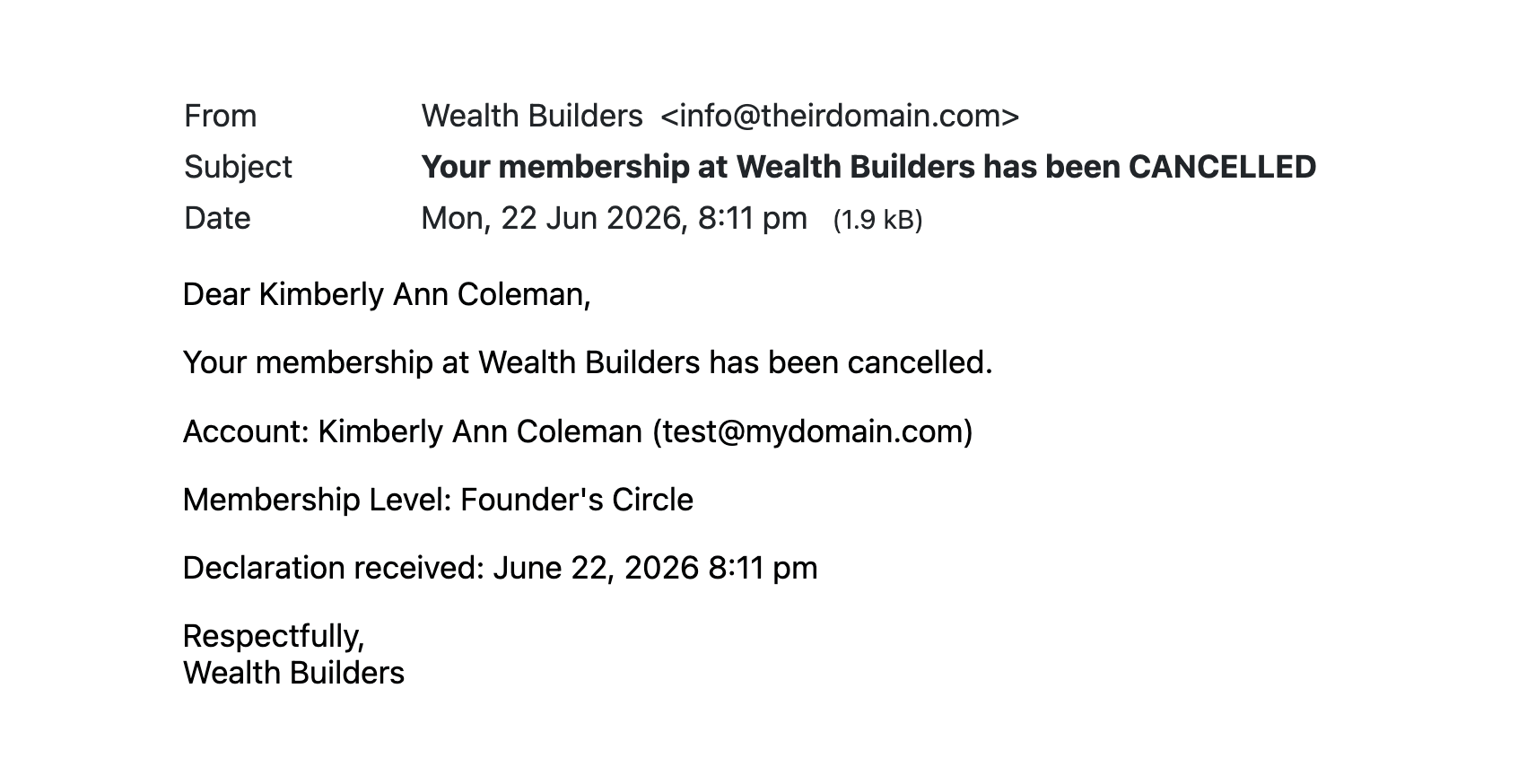
A withdrawal still leaves one manual step: the refund. The snippet ends the membership and time-stamps the acknowledgment, but you issue the refund yourself, which is covered in Processing and Who Does What below.
Method B: Build a Standalone Form
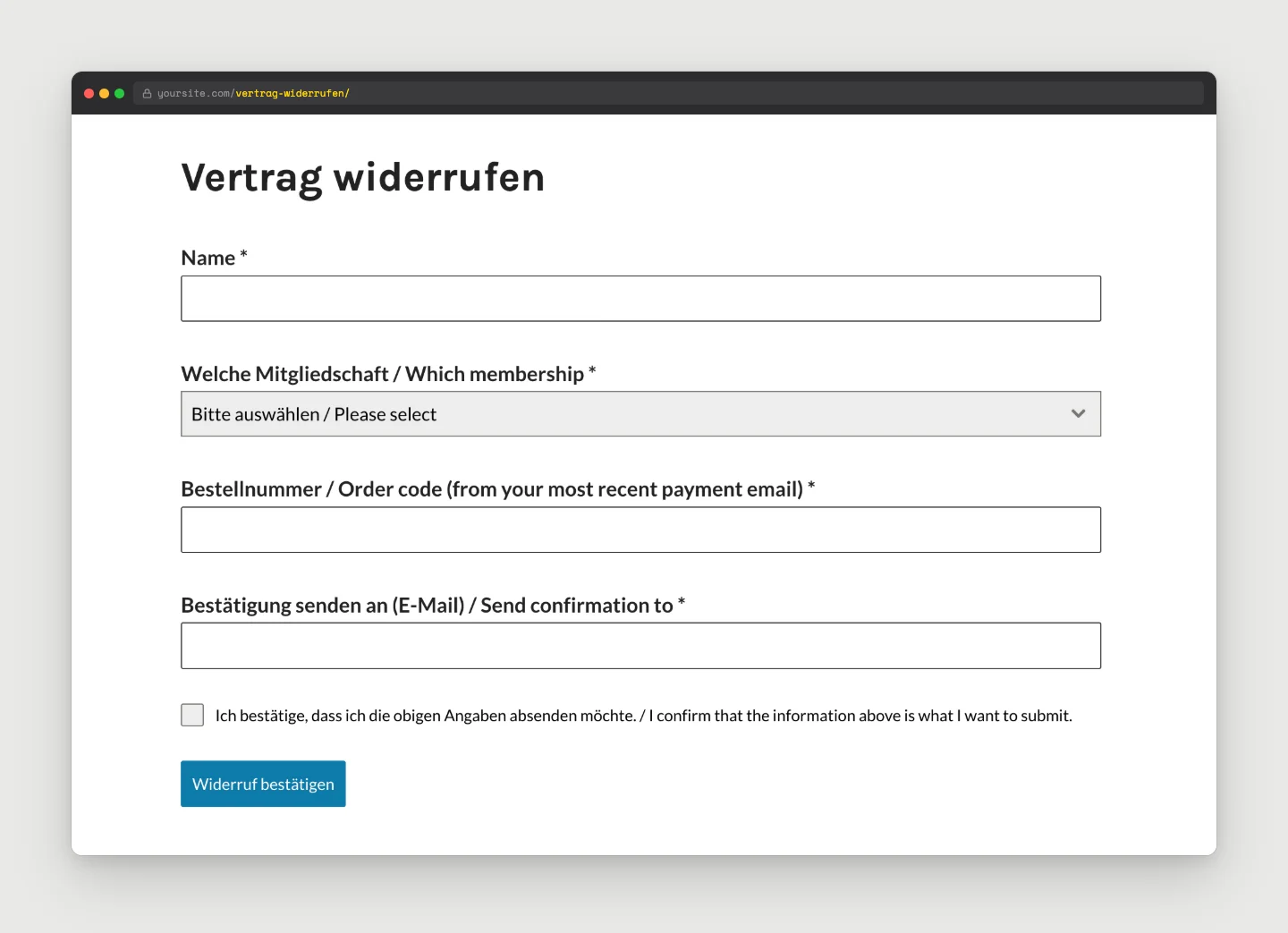
If you would rather capture the declaration as a form that a human reviews before anything changes, or you have guest contracts with no account, build a small form instead. We use Forminator because it is free and does everything this needs: an editable submit-button label, an autoresponder to the submitter, and a merge tag that drops the whole submission into that email. It is also what we use in our guide to multi-step cancellation surveys.
1. Create the Form
Install Forminator (Plugins > Add New), then Forminator > Forms > Create.
2. Add The Necessary Fields
- For a logged-in member: an Email field (to confirm where the acknowledgment goes).
- If members can hold more than one level, a Which membership selector.
- For a guest, also add Name and Order Code fields, since there is no account to read.
- Label the order code plainly, for example “Bestellnummer / order code from your most recent payment email”.
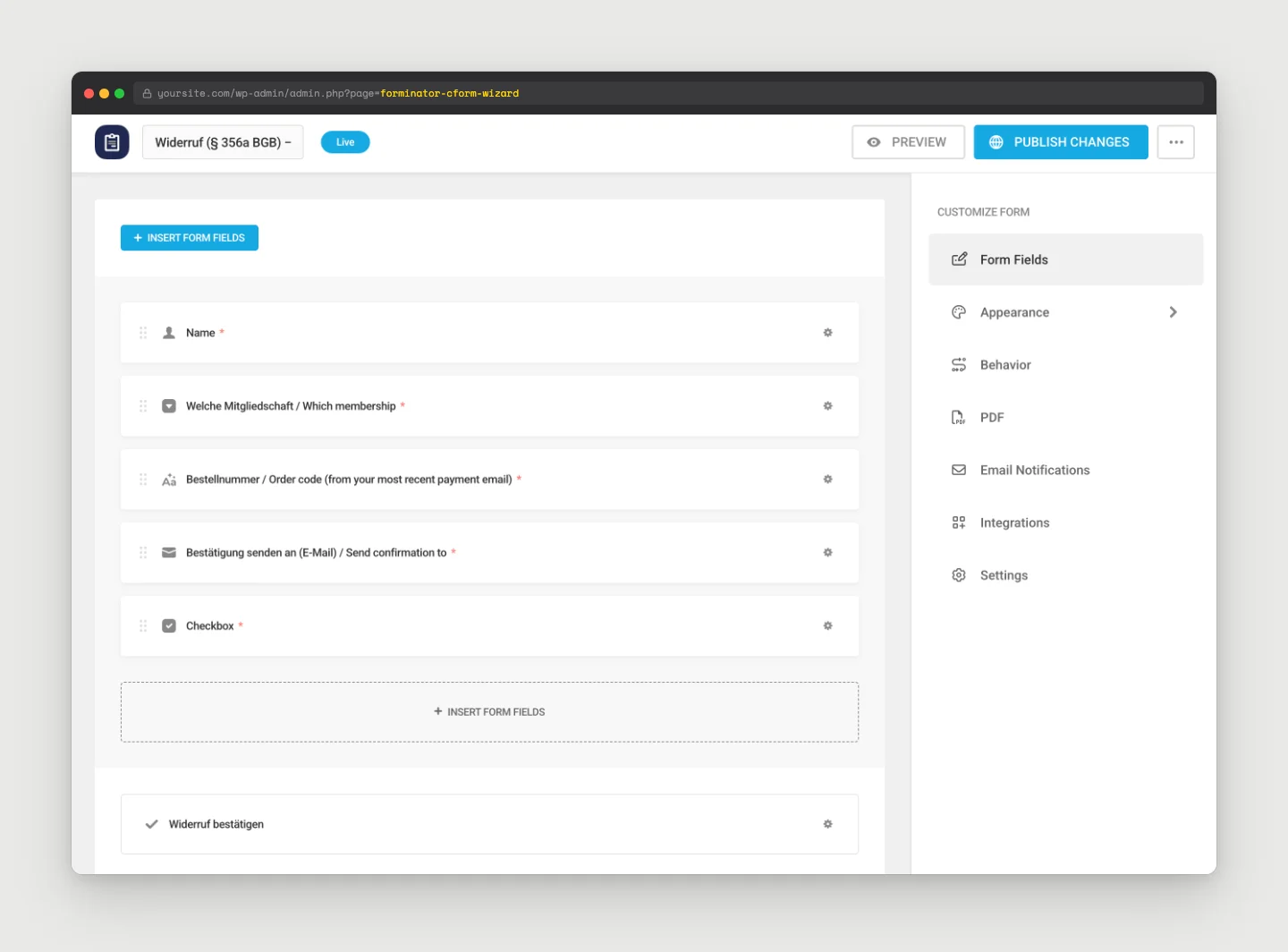
3. Label the Confirmation Button
Open the Submit field and set its text to “Widerruf bestätigen” (or “jetzt kündigen” for a cancellation form). A generic “Submit” does not satisfy the rule.
A required consent checkbox above it (“I confirm that the information in this form is what I want to submit”) is a good extra.
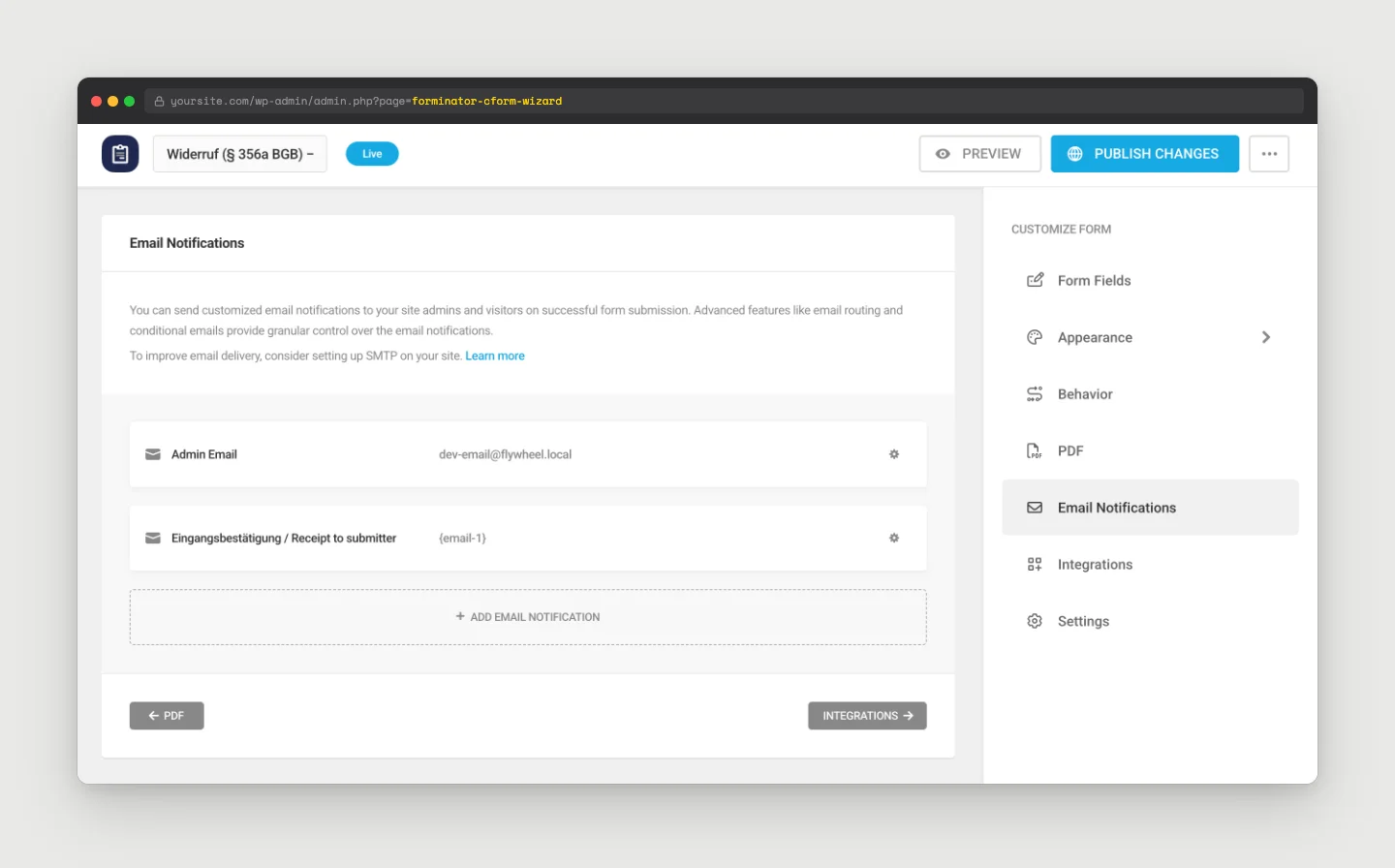
4. Wire in the Two Emails
- Under Email Notifications, send one to your support inbox with the
{all_fields}macro plus the submission date, and a second to the submitter (set the recipient to the email-field merge tag, e.g.{email-1}) that echoes{all_fields}and the submission date. - That gives the member the declaration’s content plus the timestamp. Word it as a receipt, never as an effective withdrawal. A PDF attachment is optional (Forminator Pro). The email itself is already a durable medium.
5. Place the Form On Your Site
- For members, put the form on a page restricted to logged-in members and link to it prominently from the account area.
- For guests, put it on a public page (not restricted to any level) and link it from the footer so a logged-out visitor can reach it without registering.
With Method B, nothing happens to the membership automatically. Each submission lands in your inbox and your team actions it, which is the next section.
Processing and Who Does What
It helps to be clear about what is automatic and what is manual, because it differs by method and by function.
- Cancellation (§ 312k): With Method A the member self-cancels and PMPro ends the subscription on the next payment date by default, so they keep the paid term. With Method B you replicate that in Memberships > Members > Edit Member: use Edit to set the membership to expire on the next payment date, and cancel the recurring subscription at the gateway.
- Withdrawal (§ 356a): The declaration and its timestamp are captured automatically in both methods (and with Method A access also ends immediately). The refund is always manual. Find the member, look the order up under Memberships > Orders, confirm validity (inside the window, no applicable exclusion), then on the Edit Member > Memberships panel use Cancel with refund the last payment ticked and Cancel payment subscription (recommended). PMPro processes native one-click refunds on Stripe, PayPal, and Paystack. On other gateways you issue the refund in the gateway dashboard. Process it promptly, since some gateways and merchants of record cap how far back a refund can reach (PayPal, for example, allows refunds only within about 180 days).
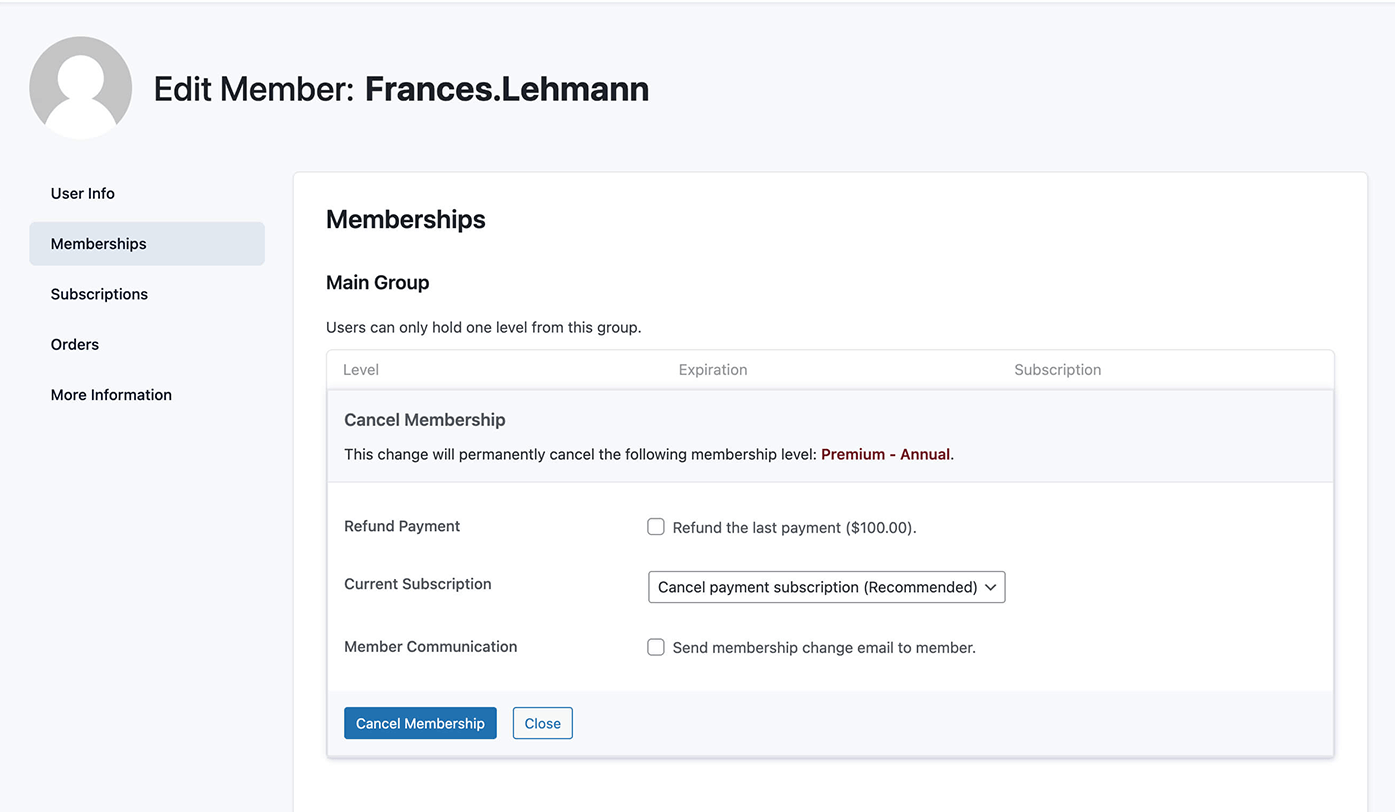
The refund stays manual on purpose. Validity is a legal judgement, a member may hold several subscriptions and mean only one, and many gateways need the refund issued by hand anyway. The law is fine with this: the button’s job is to let the customer submit the declaration easily, not to execute every consequence automatically. For the full reference on these admin actions, see the PMPro docs on canceling a user membership.
Beyond the Button: Terms and Checkout
The function is the visible part, but a few paperwork items make the difference between a button that looks compliant and one that actually is. If you are going to fully embrace this, handle these alongside the build. None of it is legal advice, and the exact wording comes from your legal-text provider. The point is just to flag what sits around the button so it does not get missed.
- Disclose the right at checkout. As noted above, the 14-day withdrawal right has to be communicated at checkout (the Widerrufsbelehrung), or the window can stretch to 12 months and 14 days. This is the single most consequential item.
- Put the rights in your terms. Add language to your terms and conditions covering the withdrawal right, the cancellation right, and how a member exercises each. Our guide to creating a terms and conditions page for your membership site covers where this lives and how to require acceptance at checkout.
- Know the separate contract-duration rule. A related German rule (§ 309 No. 9 BGB) limits how long auto-renewing B2C contracts can run. The initial term is up to two years. For renewals with a monthly cancellation option, an annual advance payment is still fine. It’s separate from the buttons, but if you are tightening up for the EU, it belongs on the same checklist.
- Update your privacy policy to cover the data the form or function collects.
Summary Checklist
- One clearly labelled entry point per function, kept distinct. Withdrawal reads “Vertrag widerrufen”, cancellation reads “Verträge hier kündigen”.
- For members, the function lives in the logged-in Membership Account area (login is fine because membership requires an account). A public, footer-linked form is only needed for guest contracts.
- The submission goes through a confirmation button labelled “Widerruf bestätigen” or “jetzt kündigen”, never a generic “Submit”.
- The acknowledgment email records the declaration’s content plus the date and time received, worded as a receipt, not an effective withdrawal.
- Method A: add the snippet, then add
{{ cancellation_datetime }}to the cancellation emails under Memberships > Settings > Email Templates. Test the immediate-cancel behavior on staging. - Method B: a short Forminator form with the right confirmation-button label and two emails (
{all_fields}plus a timestamp). - The withdrawal refund is handled by hand in Memberships > Orders and Edit Member.
- An updated withdrawal notice (naming where the function lives) and privacy policy, with wording from your legal-text provider.
Frequently Asked Questions
Yes, when the contract itself requires an account, which a membership does. The “no login” rule prohibits forcing someone to register just to withdraw. It does not require a logged-out path for customers who already have an account. A public path is only needed where people transact as guests.
No. If your customers all have accounts, the cleanest route is Method A: extend PMPro’s existing cancel flow, which is already an entry link, a confirmation page, and an email. A standalone form (Method B) is for guest contracts or when you specifically want a declaration that a human reviews before anything changes.
No, and the difference matters. A cancellation (Kündigung) ends a subscription going forward. A withdrawal (Widerruf) is the statutory 14-day right to undo the contract entirely, which means a full, no-questions-asked refund and immediate end of access. The button does not create that right. It is just a required, easier way to exercise it.
For a withdrawal, the acknowledgment must record the content of the declaration plus the date and time it was received. The {{ cancellation_datetime }} variable (Method A) or the {all_fields} macro plus a submission date (Method B) covers it. Word it as a receipt, not a ruling that the withdrawal is effective.
Possibly. They are independent obligations: the Kündigungsbutton (§ 312k, since 2022) covers ending ongoing subscriptions, and the Widerrufsbutton (§ 356a, since 19 June 2026) covers the statutory right of withdrawal. A site selling recurring memberships may need both, kept clearly distinct. Confirm what applies to you with your legal-text provider.

Free Download: The AI-Powered Membership Site Blueprint
Download the free guide: Learn how to plan, build, and grow a membership site using AI as your strategic partner: from buyer persona to launch and beyond.