If you are building or running a membership site, you will quickly encounter a wide range of terms that are often used inconsistently. While many of these concepts are common across the membership industry, how they are implemented can vary significantly between platforms and plugins.
This glossary defines common membership site terms and explains how each one applies specifically in Paid Memberships Pro.
Use this page as a reference while planning your membership model, configuring PMPro, or reviewing related documentation.

Membership Models and Pricing
Membership Level
A membership level defines what a member can access and how much they pay. It controls pricing, billing rules, access permissions, and expiration. A membership tier is another term for a membership level. The terms are often used interchangeably in marketing.
In PMPro, membership levels are the core building block of your membership site. Every member holds at least one level.
Example: A site offers a Free level with access to blog posts and a Pro level at $20 per month that unlocks premium tutorials.
Free Membership Level
A free membership level allows users to register without payment.
In PMPro, configure a free levels by setting the level price to zero and disabling recurring billing.
Example: Visitors can create a free account to access restricted content before upgrading to a paid plan.
Paid Membership Level
A paid membership level requires payment to join. Paid levels can be configured as one-time payments, recurring subscriptions, or expiring memberships.
Example: A Pro-level plan costs $15 per month and renews automatically until cancelled.
Trial Membership
A trial membership gives users temporary access at a reduced price or no cost.
In PMPro, trials can be set up in several ways depending on your requirements, including free, discounted, or limited-time access, with configuration handled through membership levels and related settings.
Example: A 7-day free trial will automatically charge the member a $25-per-month membership when the trial ends.
Related: Mega Guide for Trial Memberships
Expiration Date
An expiration date defines when a membership level ends, and access to member-only content is removed.
In PMPro, expiration dates are set within the membership level settings and are typically used for free or one-time payment levels. They cannot be used alongside recurring payments.
Example: A free membership level is set to expire after 30 days, so the member automatically loses access when that period ends unless they upgrade.
Freemium
Freemium is a model in which basic access is free and advanced features require payment. This is common to offer a free level alongside paid upgrades.
Example: Free members can read articles, while paid members unlock downloads and video courses.
Premium Content
Premium content includes pages, posts, or features that require a paid membership to view.
In PMPro, premium content is protected using content restriction rules tied to membership levels.
Example: Only paid members can view a private course library.

Subscription
A subscription is an agreement where payments recur at set intervals.
In PMPro, subscriptions are created through recurring membership levels and managed by the payment gateway.
Example: A yearly subscription renews automatically every 12 months.
Billing Cycle
A billing cycle defines how often a subscription renews, such as monthly or yearly.
In PMPro, the billing cycle and any optional Billing Cycle Limit are set per membership level. The billing cycle controls the renewal interval, while the cycle limit determines how many times billing repeats before stopping.
Example: A membership level renews monthly with a Billing Cycle Limit of 11, so the member pays their membership fee once per month for 12 cycles before billing stops.
One-time Payment
A one-time payment is charged once with no automatic renewal.
You can configure a one-time payment by disabling recurring billing.
Example: A $99 lifetime access pass with no future payments.
Subscription Fatigue
Subscription fatigue occurs when customers lose interest in, or get tired of paying for your subscription product or service over time.
We have a blog post that explains what subscription fatigue is and how businesses can deal with it.
DOWNLOAD NOW
Download the free ebook: Membership Site Glossary From A to Z. Get clear and concise definitions for the most common membership site terminology out there so you can navigate the world of membership businesses with ease.
Membership Site Glossary
You must be a Membership Site Glossary member to access this download.
Payments, Billing, and Checkout
Payment Gateway
A payment gateway processes online transactions. PMPro integrates with Stripe and offers a PayPal Gateway Add On.
Payment Environment
Payment environments separate testing from live transactions.
PMPro gateways usually support sandbox or test modes. We recommend running test purchases before launch.
Checkout Page
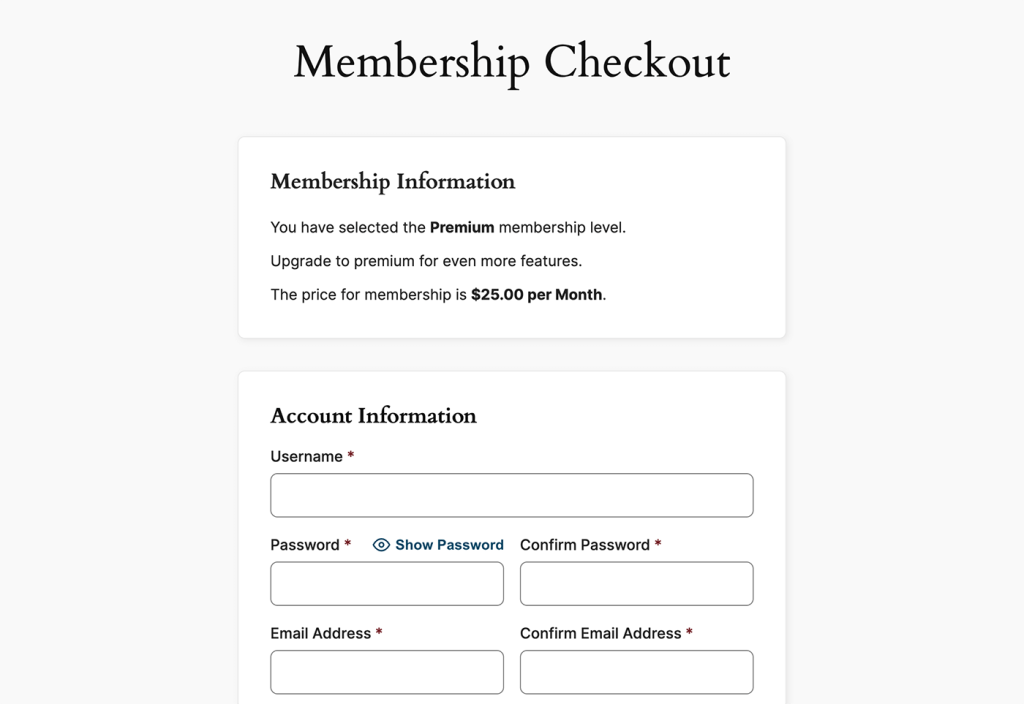
The checkout page is where users complete registration and payment.
PMPro generates a dynamic checkout page based on the selected level. This page will display level information that is configured within the membership level settings and User Fields, if applicable.
Order
An order records a payment attempt or completed transaction.
In PMPro, every membership checkout and recurring payment for membership has a unique order. Admin can view all Orders by navigating to Memberships > Orders. Members can view all Orders via their Membership Account Page.
Recurring Payments
Recurring payments, also known as Subscriptions, are charges made automatically on a set schedule.
In PMPro, the payment gateway processes recurring payments, while the frequency and amount are defined in the membership level settings.
Recurring Revenue
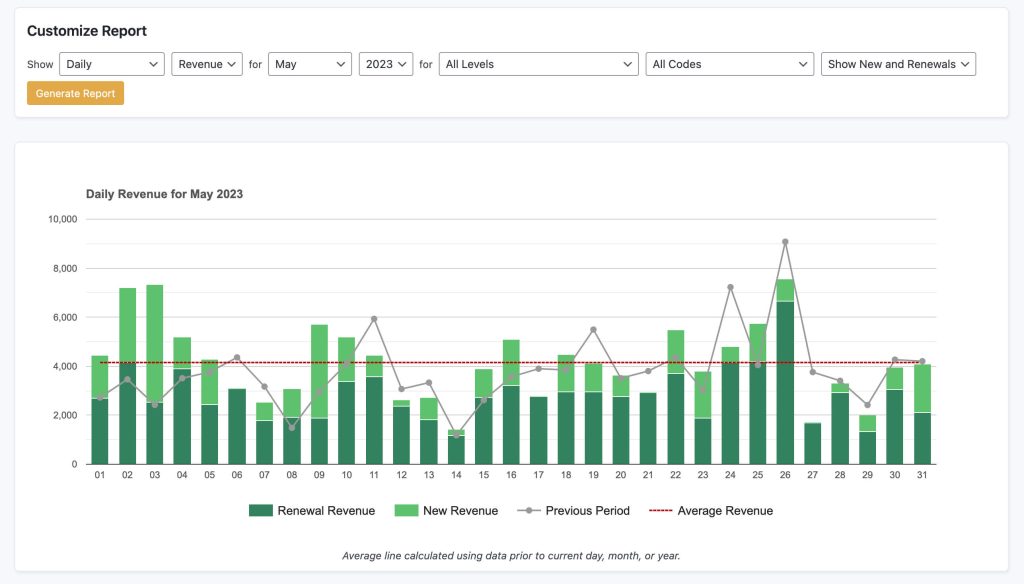
Recurring revenue is income generated from active subscriptions.
PMPro site owners track this using orders and reporting tools.
Refunds and Cancellations
Refunds return funds back to the member. Cancellations stop future billing.
The most common situation is that you are processing a full refund for the last payment received and cancelling a user’s membership in one step.
Related: How to Process a Refund
Content Access and Delivery
Content Restriction
Limit access to specific assets on your membership site with content restrictions. PMPro has various features to lock down any piece of content, feature, or download you might have on your WordPress site.
Restricted content could be pages, posts, categories, tags or specific aspects within a page/post.
Drip Content
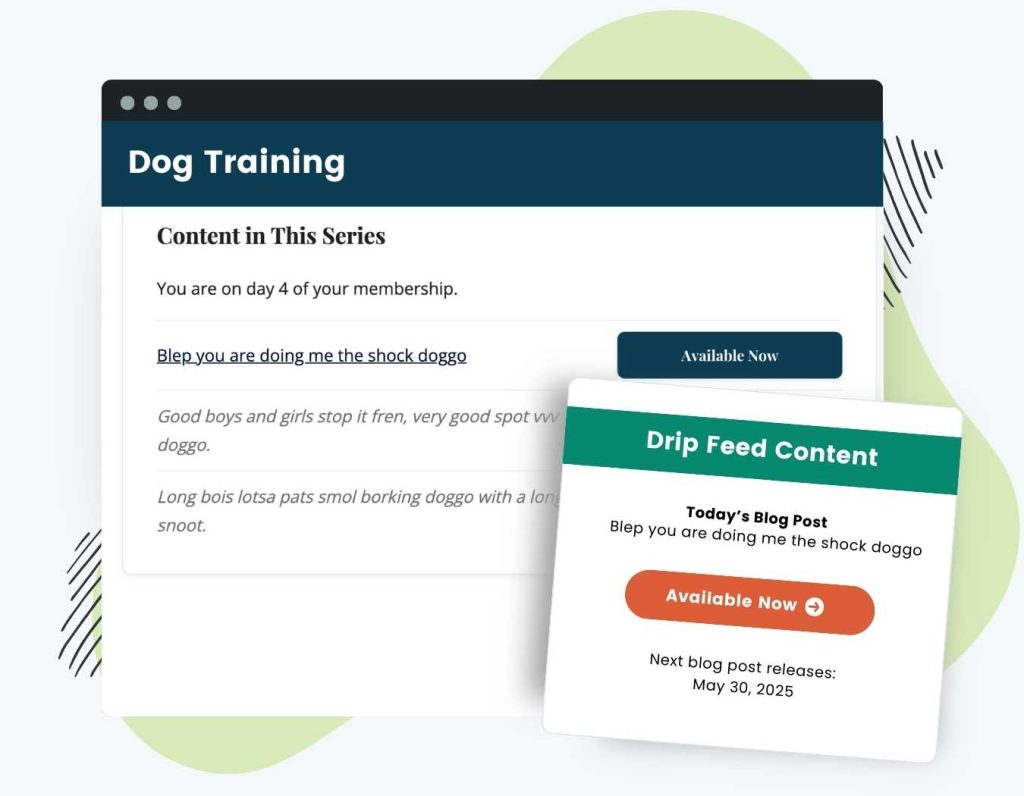
Blog posts, lessons or other content that is released over time is known as drip content.
The best way to create a structured content series to drip to your members is our Series Add On.
Content Visibility
Content visibility controls whether specific content is shown or hidden based on membership level or login status.
With PMPro and the WordPress block editor, conditional content can be managed using the Content Visibility Block. This block allows you to show or hide blocks of content for specific audiences.
Example: A page shows a preview message to logged-out users, while members with a paid level see the full content.
Member Lifecycle and Experience
Account Page
The account page allows members to view and manage their membership. PMPro provides a default account page. This page can evolve into a true membership dashboard.
Billing Details / Update Billing Page
This page allows members to update their payment information.
In PMPro, access to the billing update page depends on whether the member has an active subscription and which payment gateway was used. When available, members can update their payment details without changing their membership level.
Example: A member with an active subscription updates an expired credit card linked to their monthly plan.
Member Onboarding
It’s best practice to introduce your new members to the site. This can be done in a number of ways via blog posts or emails, and referred to as member onboarding.
In PMPro, onboarding begins immediately after checkout and typically includes the confirmation page, system-generated emails, and access to the member account area. These elements guide new members to their content and next steps.
Cancellation
A cancellation is used to end the term of a membership, either immediately or on a scheduled date. In PMPro, the member or site admin can cancel the membership level.
Example: A member cancels their recurring subscription. Their next payment date becomes their expiration date.
Related: Cancel a Member
Marketing, Growth, and Strategy
Automation
Using technology to perform tasks without manual input is automation. Running a membership site involves ongoing work, and site admins can reduce that effort by automating repetitive processes such as communication, billing, and user management.
The PMPro plugin handles recurring billing, transactional emails, and content restriction to automate previously manual processes. With other third party tools, site owners can also automate actions such as sending onboarding emails, tagging members in email platforms, or triggering workflows based on membership activity.
Example: A site owner schedules a series of onboarding emails and uses an integration to automatically add new members to an email list after checkout.
Buyer Persona
A buyer persona represents your ideal member based on goals, needs, and behavior. Understanding your target audience can help you maximize the success of your website.
Content Strategy
The content you offer, how it is structured, and how it is delivered over time is your content strategy. For membership sites, this often involves planning regular content releases to keep members engaged and to support retention, including decisions around topics, timing, and user goals.
PMPro provides the features to structure content using membership levels, restricted categories, and drip schedules. Site owners can control who sees content and when, aligning content delivery with their membership model.
Example: A site publishes weekly lessons for paying members while keeping introductory articles free to attract new users.
Email Marketing
Communicate with members and leads with Email Marketing.
In PMPro, transactional emails are triggered by events such as checkout, cancellations, or renewals. PMPro can integrate with your Email Marketing System to send targeted campaigns, automate follow-ups, segment subscribers, and analyze performance
Gamification
The use of rewards or progress systems to increase engagement is called gamification. With membership sites, this can include points and rewards, member leaderboards, badges, timers, and other interactive elements designed to help explore and complete content.
In PMPro, this is typically implemented using third-party tools alongside membership levels.
Example: Awarding badges for course completion.
Lead Capture
Lead capture collects contact details from potential members.
In PMPro, lead capture is often handled using free membership levels or trial-based levels that require account registration. This allows you to collect user details through the checkout process and follow up through email.
Example: A free newsletter signup level that feeds into paid upgrades.
Member Experience
How your users interact with your site throughout your membership is the member experience.
In PMPro, this includes onboarding emails, account pages, billing management, and access to protected content.
It also includes qualitative elements, such as how easy it is to use your website, how enjoyable being a member is, and how relevant, effective, and/or helpful the content is.
Example: A member logs in, accesses content easily, and updates billing details without friction.
Member Journey
The member journey, or buyer’s journey, is the path a member takes through your site and content, from first visit through to ongoing use. Depending on the type of membership site and the nature of your content, there may be more than one possible journey, such as beginner, intermediate, or advanced paths.
In PMPro, this journey typically includes stages such as exploring the benefits, checking out, onboarding, accessing protected content, account management, and renewal or cancellation.
Example: A visitor signs up for a free level, upgrades to a paid plan after exploring content, and later renews annually to maintain access.
Membership Platform
A membership platform is the system that powers a membership site. While these platforms can be convenient, they often offer less flexibility and may become more expensive as your membership grows.
Example: A common platform for membership is Wild Apricot.
Related: Paid Memberships Pro vs Wild Apricot
Membership Plugin
A membership plugin is software that can be installed on a website, such as a WordPress site, to add membership features like recurring payments and content restrictions.
Membership plugins offer greater customization, flexibility, and scalability as your membership grows.
PMPro is the plugin that manages membership levels, payments, and access control within WordPress.
Related: What PMPro Plan is Right For You?
Social Proof
Building trust with potential members using testimonials, reviews, or member activity is social proof. This is typically on the homepage or pricing page to increase conversions.
Example: Displaying testimonials next to membership levels.

Minimum Viable Product (MVP)
A simplified initial version of a membership site is the Minimum Viable Product.
In PMPro, an MVP of a membership site is often a single membership level with a simple pricing model and limited protected content. Site owners can then expand by adding new levels, content restrictions, or pricing options over time.
Example: Launching with one course before adding additional content.
Related: Test Your Membership Idea with a MVP
Metrics and Reporting
The terms below are common business and membership metrics used across the industry. Not all of them are calculated or surfaced by default in PMPro, but site owners often use them alongside PMPro’s built-in reports and external tools to understand performance.
Active Members
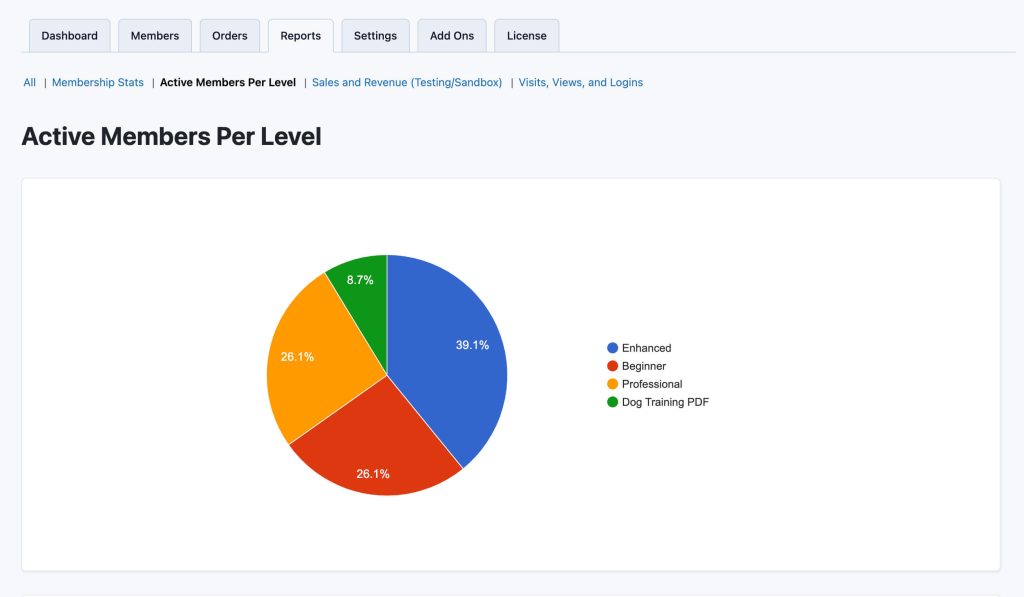
Users who currently have valid access to a membership level are active members. PMPro tracks active members per level in its reports.
Conversion Rate
The percentage of visitors who become members is your conversion rate. Conversion tracking is handled using external analytics tools, often combined with checkout data.
Our Google Analytics Add On integrates GA4 with PMPro to measure traffic, interactions, and ecommerce conversions across your WordPress membership site.
Churn
Members leave or cancel their memberships over time. This is referred to as churn.
Our philosophy is to focus less on tracking churn as a standalone number and more on understanding why members cancel, using tools like the Reason for Cancelling Add On to gather actionable feedback.
Example: Members type in a cancellation reason when leaving, helping site owners identify patterns and improve the membership experience.
Customer Lifetime Value (CLV)
CLV estimates the total revenue a member generates over time.
This metric is often used alongside PMPro data to guide pricing and marketing decisions.
Example: Comparing average membership length against acquisition costs.
Engagement
Engagement measures how actively members use your content or features. In a membership site, it also reflects how often users return and interact with what you offer. Strong engagement is important because ongoing participation is closely tied to retention, as members are more likely to continue paying if they regularly find value in your content.
Engagement is not a single metric. Within PMPro it can be inferred through reports, logins, and content access. Site owners often look at member activity patterns to understand how engaged their audience is and where improvements may be needed.
Example: Tracking how often members log in or access protected content to identify which areas of the site are most actively used.
Key Performance Indicators
Metrics used to measure how a business is performing are called Key Performance Indicators, or KPIs.
The most common KPIs for membership sites include:
- Website traffic
- Conversion rate
- Customer lifetime value (LTV)
- Churn rate
- Monthly recurring revenue (MRR)
- Member acquisition cost (more typically referred to as customer acquisition cost or CAC)
- Member engagement
Related: Top Membership Site KPIs to Measure
Monthly Recurring Revenue (MRR)
MRR measures predictable recurring income from subscriptions.
While PMPro reports on sales and revenue, MRR is typically calculated by site owners using subscription data.
Reports Dashboard
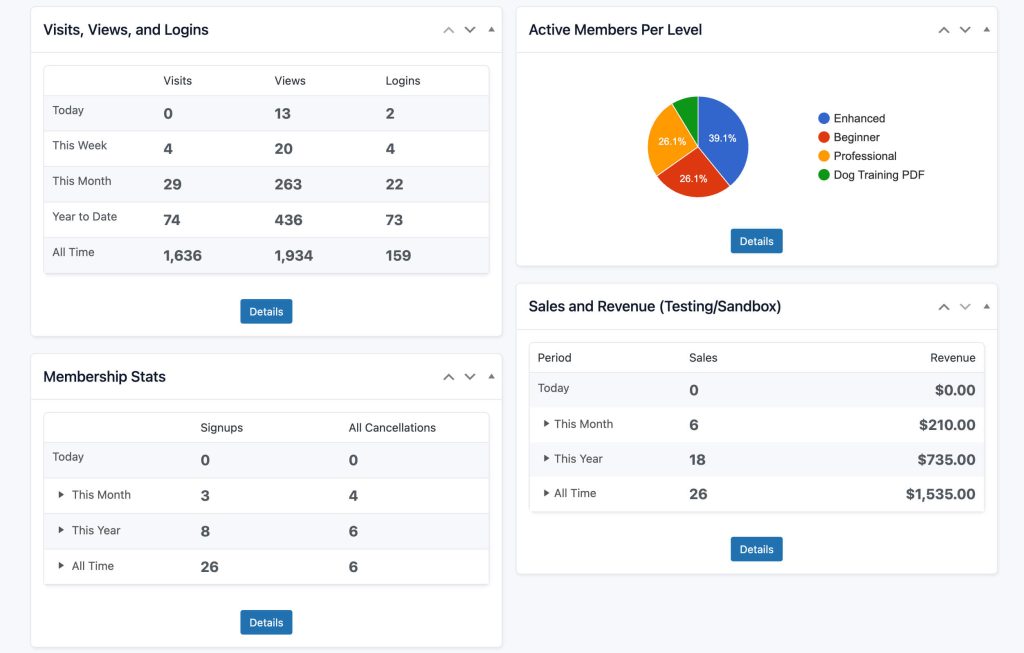
The PMPro Reports dashboard provides an overview of key membership activity. This includes reports for sales and revenue, signups and cancellations, active members per level, and member visits, views, and logins.
Retention
Members continuing their membership over time is known as retention. This can be calculated as a retention rate.
Billing settings, content availability, and cancellation flows influence member retention. Site owners often review cancellations and use our Reason for Cancelling Add On to understand retention issues.
Putting This Glossary to Work
If you’ve made it this far, you’ve probably noticed there’s no single “official” rulebook for membership site language. The same term can mean different things depending on the platform, the business model, or even who you’re talking to.
This glossary is here to provide a shared reference point, not just for membership terms in general, but also for how they appear and behave in PMPro. It’s something you can come back to while building, tweaking, or troubleshooting your site.
If you want to go deeper, these resources are a good next step:
- PMPro documentation for step-by-step guidance on membership levels, payments, and content restriction
- PMPro guides and blog posts for practical examples and real-world use cases
- Our Slack Community for direct access to the PMPro creators just like you
Think of this glossary as your starting point. Once the terminology is clear, it becomes much easier to configure membership levels, set up billing, and manage access correctly.

Free Download: The AI-Powered Membership Site Blueprint
Download the free guide: Learn how to plan, build, and grow a membership site using AI as your strategic partner: from buyer persona to launch and beyond.