You have decided to run a paid newsletter. The hard questions are no longer whether to charge for your writing, but what to publish week after week, and how to deliver it without locking your business inside someone else’s platform.
This is the part most “how to start a paid newsletter” articles skip. They send you straight to Substack, hand-wave about “great content,” and leave the actual machinery for later. We are going to do the opposite.
The thesis is simple: a paid newsletter works best as a hybrid. Email handles distribution. Your own WordPress site handles hosting, gating, archives, and everything that lasts longer than an inbox. Below, we will cover the content strategy first. Then we will walk through the membership setup using Paid Memberships Pro (PMPro).
If you are still platform-shopping, our Paid Memberships Pro vs. Substack comparison is the right next stop. If you are ready to move today, jump straight to our step-by-step migration guide. Everyone else, keep reading for the strategy first.
Part 1: What to Put in a Paid Newsletter
It’s important to start with strategy before diving into the tooling. A perfectly built membership site cannot save a paid newsletter that nobody wants to read.
Five formats that convert
Most paid newsletters that succeed are doing one of these things, and usually a blend of two. Pick the format your audience would miss if you stopped publishing.
- Curated links with original commentary: You read everything in your niche, so they do not have to. Your commentary is the product. Curation alone will not earn a renewal. Think of it as a column, not a feed.
- Original thought leadership and opinion essays: Long-form perspective from someone with credibility in a specific field. Industry insiders pay for opinions that are sharper than the LinkedIn average.
- Behind-the-scenes and unfiltered takes: Builders, founders, and creators who share what they are actually working on: the numbers, the mistakes, the decisions in progress. This is the format Substack made famous.
- Tools, templates, and resources: Practical assets people can use immediately. A weekly prompt, a calendar template, a vetted vendor list, a code recipe. Readers pay for the time you save them.
- Serialized content: Multi-part investigations, fiction chapters, a recurring column, or a slow-release “course in disguise.” Built-in reason to renew.
A sixth honorable mention: case studies and how-tos. These work as anchor content inside any of the formats above. They build trust and convert better than abstract advice.
Choosing your cadence and length
Cadence is a promise you make to your readers, and consistency matters more than frequency. A reliable monthly is worth more than an erratic weekly.
- Weekly keeps you top of mind but is exhausting. Best if your format is curation, short essays, or one tool per issue.
- Biweekly is the sweet spot for most paid newsletters. Long enough to make each issue meaningful, short enough to stay in inbox memory.
- Monthly works if every issue is substantial. This could be a deep-dive essay, a major resource drop, or a chunky case study.
Length follows cadence. Readers should be able to skim weekly issue in five to ten minutes. Monthly issues should reward the wait. 1,500 words or more is reasonable. Avoid the trap of making each issue longer to justify the price. Readers pay for relevance, not word count.
The free and paid content split
The free tier is your marketing engine. It exists to demonstrate value and earn the right to ask for money. The paid tier is the reason someone upgrades. A few patterns that work:
- Free essay, paid archive: New issues go out to everyone. The back catalog, searchable, browsable, and tagged, lives behind the paywall on your site.
- Free curation, paid analysis: The links and headlines are free. The “so what” essay that connects the dots is for paying members.
- Free preview, paid full piece: The first 300 to 500 words land in the inbox for everyone. The remaining content is gated behind a click-through to your site.
Pick one pattern and stick with it for at least three months before you adjust. Constantly changing the rules trains your free readers to wait you out.
What kills paid newsletters
Three things that can hurt a newsletter, in order of how often we see them:
- Inconsistency: Missing a week is recoverable. Missing a month tells subscribers the publication is winding down, and they will cancel before you do.
- Paywalling content that was not worth paying for: If your free content is “10 tips” and your paid content is “10 more tips,” nobody upgrades. Paid content needs to be qualitatively different from the free tier.
- Copying the format of free Substack newsletters: Free newsletters are typically promotional vehicles for a book, a course, or a consultancy. They are designed to be skimmed and shared. Paid newsletters need to be designed to be kept. Different goal, different format.
The Hybrid Model: Why Your Newsletter Needs a Home Base
A paid newsletter is two jobs: getting content into inboxes, and storing it somewhere that lasts. Hosted platforms try to do both with the same tool. The hybrid model splits them on purpose.
- Email handles distribution: Your email service provider does what it is built for: deliver to the inbox, track opens and clicks, manage unsubscribes.
- PMPro handles hosting and gating: Every issue lives as a post on your site. The paywall, the archive, the search, the member account: all on infrastructure you own.
A concrete example. Say you publish a weekly essay. Tuesday, you send a teaser email with the lede and a “Read the full piece” link. The link goes to a members-only post on your site. Paying members read it instantly. Free readers hit your paywall and see an upgrade prompt. Friday, you send a curated links roundup to the free list to keep them engaged. Two channels, one source of truth: your site.
What you get that a hosted platform cannot match:
- An archive readers can browse: Categories, tags, search, related posts. The back catalog becomes a reason to subscribe on its own.
- Tier flexibility: Free, monthly, annual, founding member, plus comped accounts, group accounts, and any future tier you invent.
- Multi-format content: Audio, video, PDF downloads, members-only forums. Not just text in an inbox.
- Real analytics from both sides: Email opens and clicks from your ESP, on-site behavior from your site.
- Ownership: Your subscribers, your data, your URL, your archive. If a platform changes its rules, you are not affected.
For the full comparison, see our Paid Memberships Pro vs. Substack blog post.
Part 2: How to Set It Up with PMPro
Now that you know what you are publishing, here is how to build it.
The stack
You need three things: a WordPress site, PMPro for membership and gating, and an email marketing platform of your choice. That is the entire stack.
This combination beats all-in-one newsletter platforms in three places: you own the data, you can extend any piece independently, and you are not paying a percentage of revenue on top of payment processing fees. Trade-off: you assemble it yourself, which is the work this post is about.
Membership levels for paid newsletters
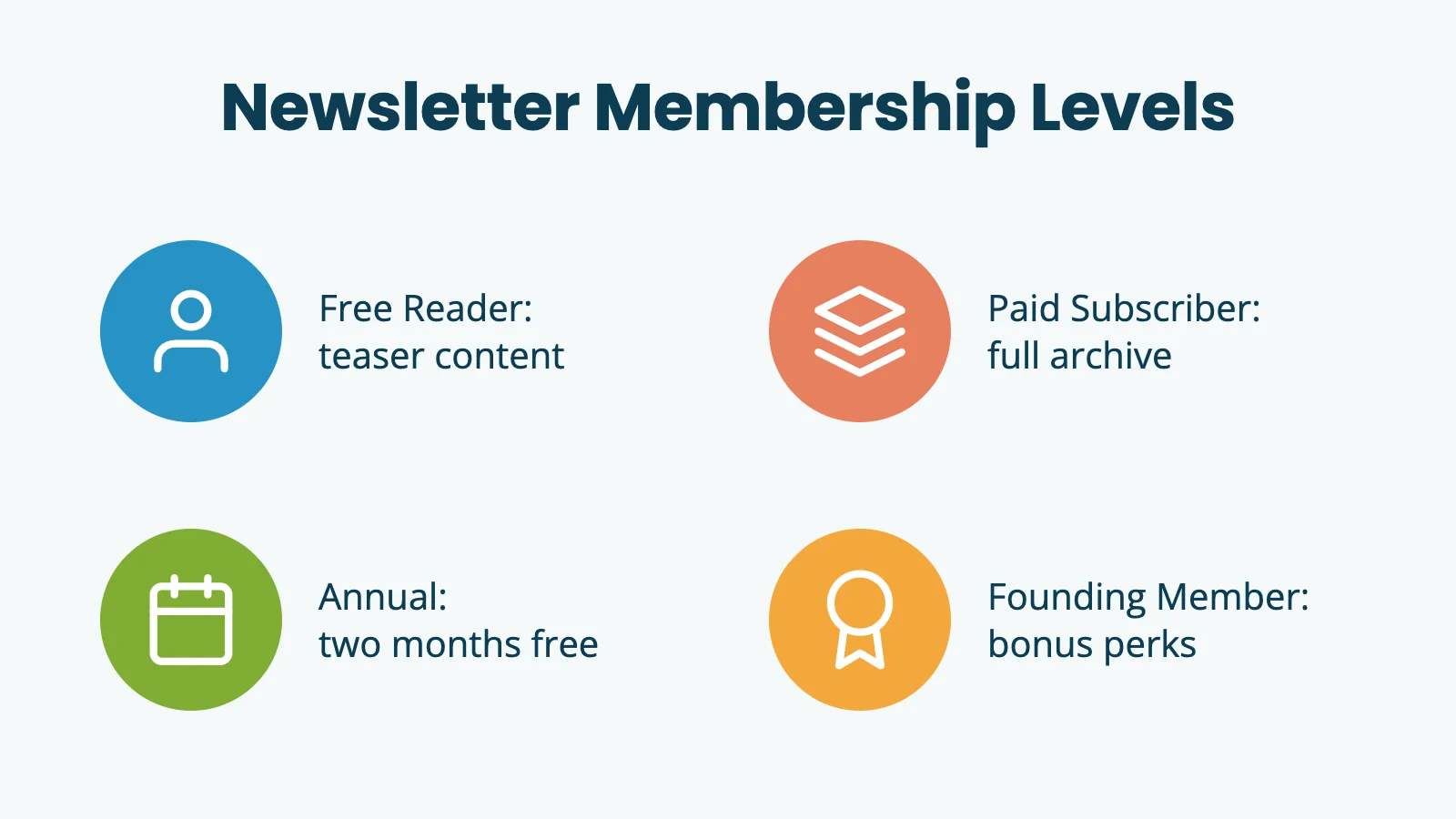
Skip the generic “monthly, yearly, premium” structure. A working paid newsletter tier setup looks more like this:
- Free Reader: Teaser content, occasional full pieces, and announcements. This is your top-of-funnel level: the free email list, modeled as a free membership level.
- Paid Subscriber (Monthly): Full access to new issues and the complete archive. The standard monthly subscription.
- Annual: A discounted version of the monthly tier, billed once a year. The math is usually “two months free.” Annual subscribers churn less and they are happier customers.
- Founding Member: A higher-priced tier with extras: bonus content, contributor credit in issues, access to a private community or AMA, or simply the chance to support the work.
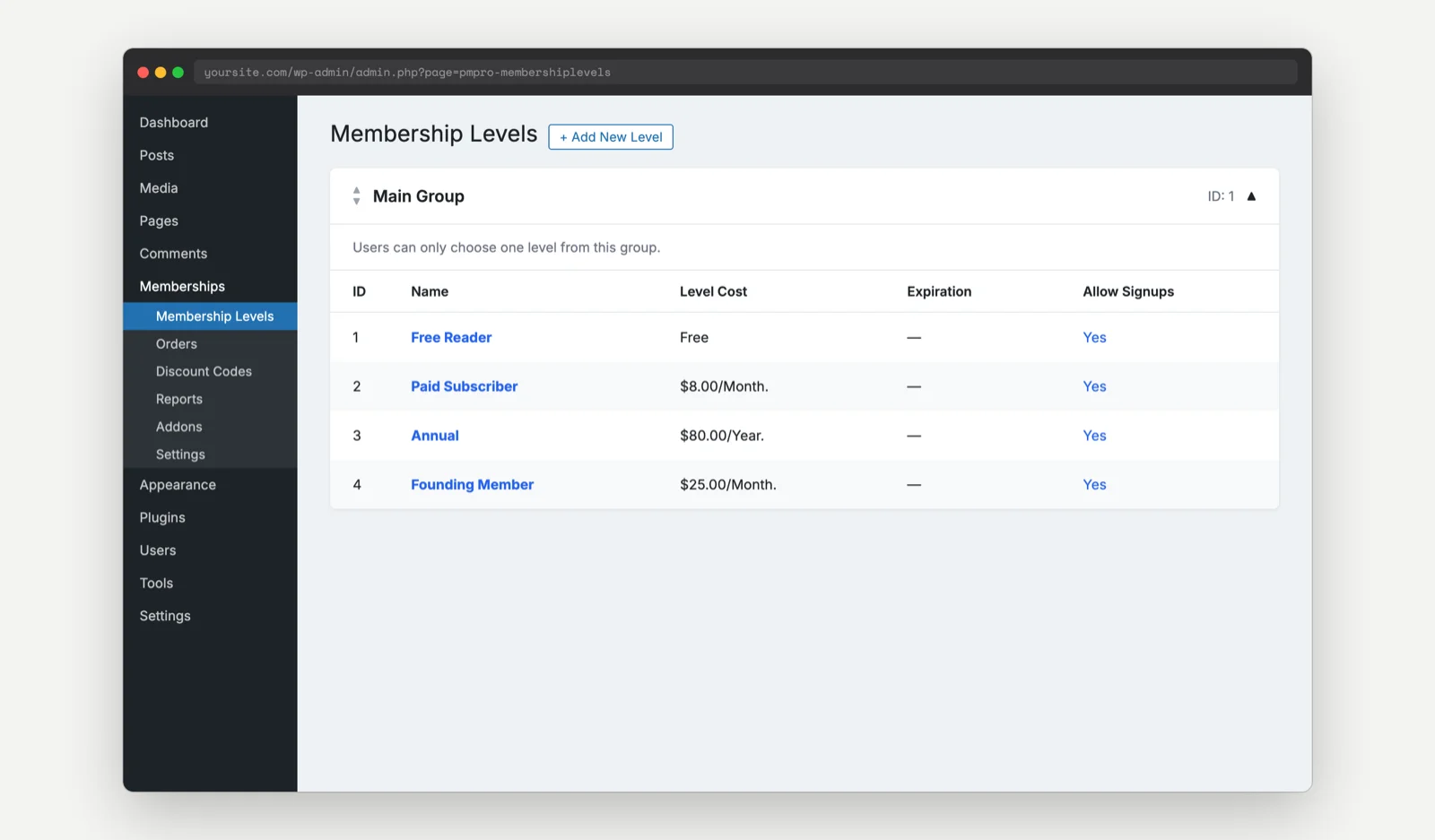
You can set up all four in PMPro out of the box, with no Add Ons required.
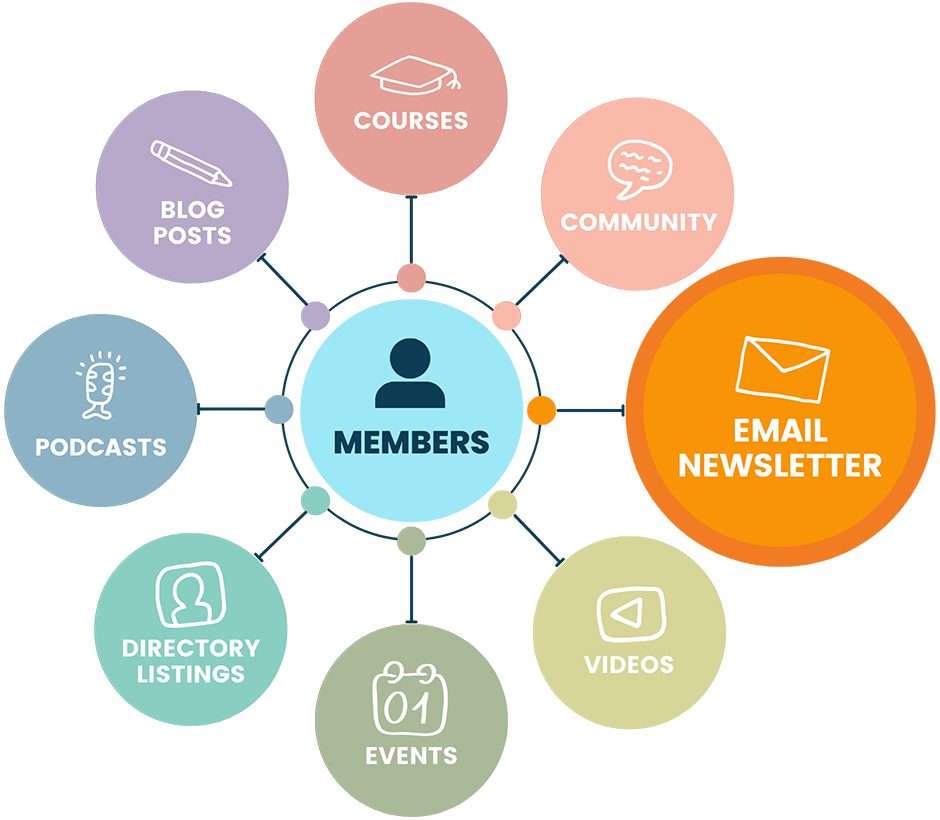
Create Your Paid Newsletter on a Platform That Grows With You
Paid Memberships Pro is the most robust membership plugin to sell paid newsletters on WordPress.
We always say, “Own the land your business is built on,” and with paid newsletters this could not be more relevant. With robust free tools like WordPress and PMPro, you can run your paid newsletter on a site you fully own and manage.
Connecting your email platform
PMPro integrates with most major email marketing services through dedicated Add Ons. When a member signs up, upgrades, downgrades, or cancels, their record in your email platform stays in sync, so you can send the right content to the right tier without manual list management.
- The Kit Integration (formerly ConvertKit) is a favorite for creator-led newsletters.
- The Mailchimp Integration handles list-based segmentation by level.
- The MailPoet Integration is the right choice if you want to send newsletters directly from inside WordPress.
For other platforms, including ActiveCampaign, Brevo, and dozens of others, WP Fusion bridges PMPro to most major CRMs and email platforms. Our full Email Marketing Integrations guide walks through how to pick the right one for your stack.
The publish-day workflow
Here is what a typical issue looks like from draft to delivery:
- Draft on the site as a members-only post: Restrict the post to your “Paid Subscriber” level (and above) using the standard PMPro Require Membership block or meta box.
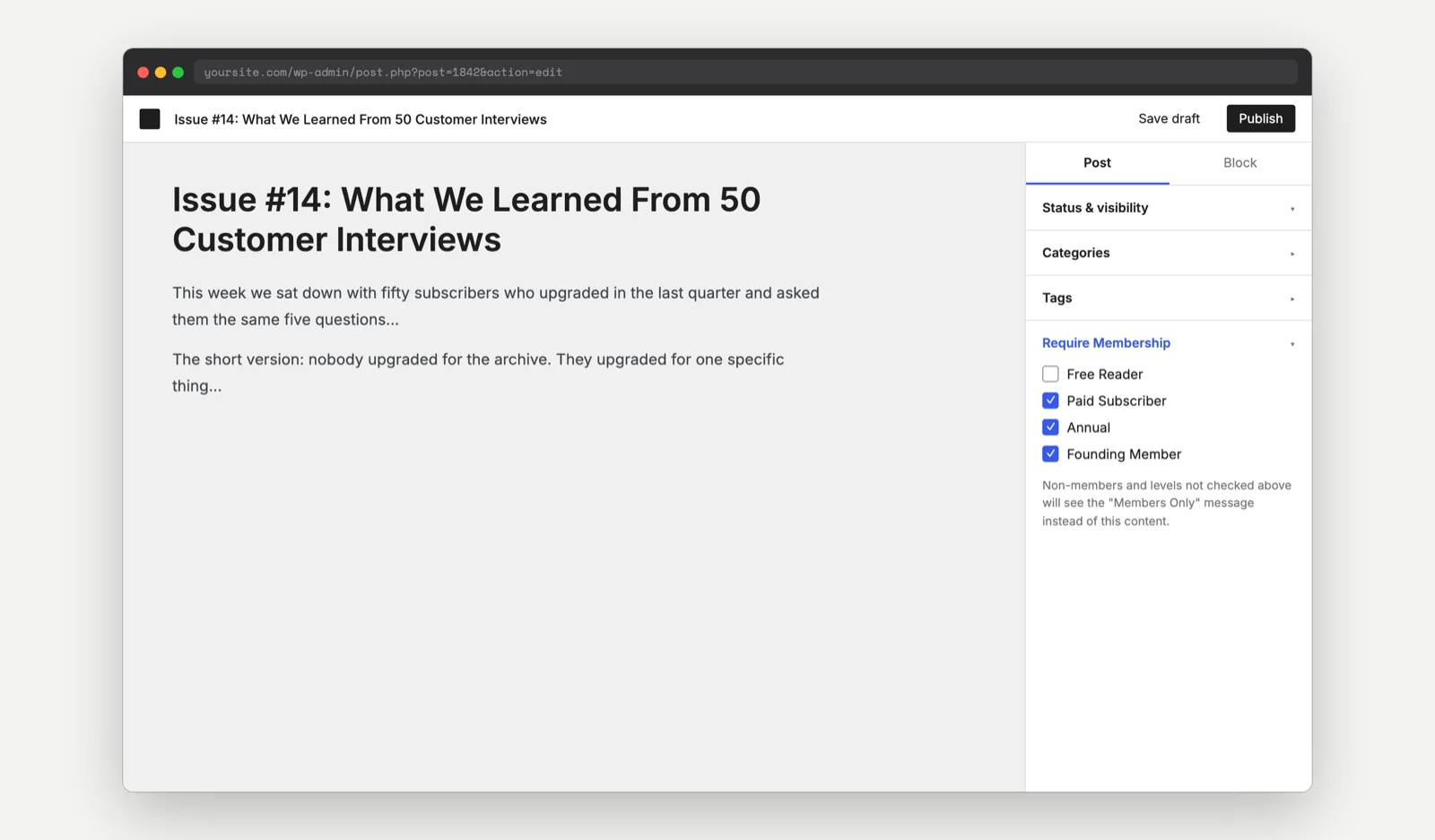
- Schedule the publish time: WordPress scheduling is fine. Match it to when you want the email to go out.
- Send the email: Two patterns work: send a teaser plus link (lede paragraph and “Read the full piece” CTA), or send the full piece with a “Read on the site” CTA at the top. The first protects your paywall harder; the second has higher open-to-read rates.
- Members read on the site. Non-members hit the paywall: Your “Members Only” content message becomes the upgrade prompt. Customize it.
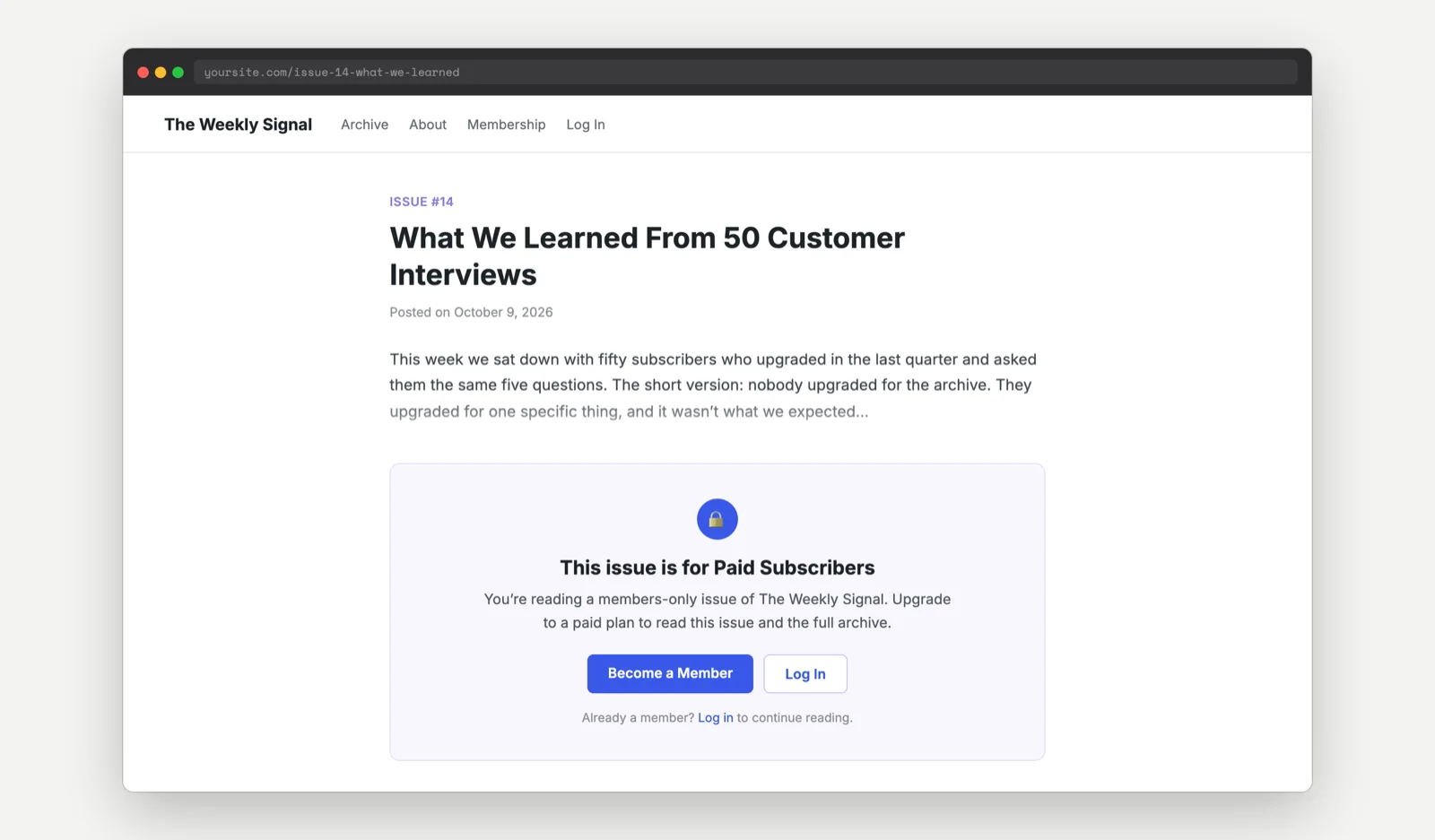
- Optional: open the post to the public after a delay: Issues that are six months or a year old can be flipped from members-only to public to drive search traffic and earn new subscribers. A scheduled-action plugin or a simple code recipe can flip the level restriction automatically.
Add Ons worth knowing about
A few PMPro Add Ons are particularly useful for paid newsletters:
- Series: Drip-Feed Content. Use this for serialized formats: chapter releases, multi-part investigations, or a “members get last year’s archive on a weekly drip” onboarding.
- Protected Downloads and Download Monitor Integration. Gate PDF versions of issues, audio files, or member-only resources.
- Email integration Add On for your platform: Pick one. Do not run two at the same time.
- WP Fusion. Use this when your email platform does not have a native PMPro integration.
Common Questions About Paid Newsletters
Mostly yes, but be honest with yourself. If you are comfortable installing a WordPress plugin, configuring a payment gateway, and following step-by-step setup docs, you can do this in an afternoon. If you have never installed a WordPress plugin, plan a weekend, or hire a developer for the initial setup and run it yourself from there
Both work. Teasers protect your paywall and drive readers to the site (which is good for analytics and archive discovery). Full-piece emails get higher engagement but can train readers to skip the site entirely. We generally recommend teasers for paid issues and full content for free promotional issues.
The short version: export your subscriber list, import them into your PMPro site with the appropriate level assigned, redirect old Substack URLs to new ones, and announce the move clearly. Read our full How to Migrate Your Newsletter From Substack to WordPress and PMPro guide for the complete walkthrough.
Start Your Paid Newsletter on Your Own Site
Every issue you publish on your own site does two things at once: it earns revenue today, and it adds another page to an archive that keeps pulling in search traffic and new subscribers long after you hit send. Strategy first, then setup. Pick a format you can sustain, choose a cadence you can keep, and use the hybrid model so your archive grows in a place you control.
When you are ready to build, the Paid Newsletters Hub is the single best starting point. It walks through level setup, email integration, and the publishing workflow in detail.
Have questions or want to compare notes with other paid newsletter publishers running on Paid Memberships Pro? Join the conversation in the PMPro Community Slack. It is free, and there are 1,000+ membership site owners in there ready to help.

Free Download: The AI-Powered Membership Site Blueprint
Download the free guide: Learn how to plan, build, and grow a membership site using AI as your strategic partner: from buyer persona to launch and beyond.