The honest answer is somewhere between $30 a month to several thousand dollars. That’s not a vague answer. It reflects the reality that costs depend on your scale, the tools you need, and how much of the setup, maintenance, and growth work you choose to handle yourself versus outsource.
This guide breaks down every line item in the budget for a membership site built with WordPress. We will use three tiers (starter, growth, and scale) and give you a real dollar range for every category so you can sketch out your own numbers as you read.
If you are weighing a fully hosted platform like Memberstack, Memberful, Circle, Mighty Networks, or Substack, read our WordPress vs. SaaS for membership sites comparison first. This post assumes you have decided to own the stack.

Table of contents
- The Three Tiers: Starter, Growth, Scale
- The Foundation: Domain, Hosting, and Core Software
- The Membership Engine
- Content, Design, and Member Experience
- Operations and Growth Tools
- Development and Customization
- The Often-Overlooked: Hidden Costs
- Putting It All Together
- Tips for Keeping Costs Down:
- Frequently Asked Questions
The Three Tiers: Starter, Growth, Scale
Most cost guides give you one big number. That is not helpful, because what you spend on a membership site in month one should look very different from what you spend in year three.
We will use these three tiers throughout the post:
- Starter: You are launching. The goal is to get a working site online without overspending.
- Growth: You have paying members and recurring revenue. You are investing in tools that improve retention and reduce support load.
- Scale: You are established with steady revenue. Performance, compliance, and operational efficiency matter more than saving $30 here or there.
You are not locked into any one tier. Most sites move through them as they grow.
The Foundation: Domain, Hosting, and Core Software
Every membership site has the same three foundational costs: a domain, a host, and the WordPress software that runs on it. WordPress itself is free. The other two are not.
Domain Name
A standard .com domain costs $10 to $25 per year, including basic WhoIs privacy protection. Some registrars bundle privacy for free; others charge extra. There is no functional reason for a membership site to spend more than this unless you want a premium domain for branding reasons.
Be sure to always renew your domain on time. A lapsed domain on a membership site is a true emergency. Your members cannot log in, your checkout breaks, and your transactional email starts to bounce.
Web Hosting
Hosting is where most new membership site owners under-invest. Generic shared hosting plans are tuned for static blog traffic, not for the logged-in, dynamic, payment-processing workload a membership site actually generates. Expect to pay at least $30 per month for hosting that can reliably power Paid Memberships Pro.
Here is a rough range by tier:
- Starter ($30 to $50 per month): A quality managed WordPress host with dedicated resources. Skip the $5 shared plans.
- Growth ($50 to $200 per month): Membership-aware managed hosting with object caching, smart cache exclusions, and reliable transactional email.
- Scale ($200 to $500+ per month): Dedicated infrastructure, multiple environments, CDN, and operations support.
Why “Membership-Aware” Hosting Matters
Generic hosts often layer aggressive page caching on top of WordPress. That is fine for an anonymous blog. On a membership site, it can serve one member’s dashboard to another member, block paywalled content, or break checkout silently, often without any visible error to warn you.
This is why we built PMPro Max with membership-aware caching baked in. Max handles the cache exclusion rules that generic hosts miss, bundles transactional email delivery so your welcome messages and billing notices land reliably, and includes hosting monitoring and maintenance. Everything that makes a membership site different from a standard blog is handled at the hosting layer.
What Hosting May or May Not Include
Most reputable hosts include a free SSL certificate via Let’s Encrypt. Many bundle a basic CDN, automated backups, and staging environments. Some do not. Before you sign up, confirm SSL, CDN, daily restorable backups, and reliable transactional email are part of the base plan. If any are upsells, factor them in.
The Membership Engine
This is the layer that actually sells, manages, and protects your members. It is where the core Paid Memberships Pro plugin lives.
The Membership Plugin
Our core plugin is 100% free with no upsell required to launch. Unlimited members, unlimited levels, recurring subscriptions, Stripe and PayPal gateways, and over 30 free Add Ons are all included.
For premium support, automatic updates, and 80+ Add Ons, paid plans start at $49 per month for Standard. PMPro Max at $99 per month (or $999 per year) goes further: it bundles managed hosting tuned specifically for membership sites, plus a Do It For Me development service. That means a snippet, a filter, a configuration, or a small integration, installed and explained, without having to source a developer yourself.
Competing plugins like MemberPress, Restrict Content Pro, and WooCommerce Memberships use annual licensing. Plan on $150 to $1,000 per year for a comparable premium license elsewhere, and that is before factoring in the managed hosting and developer time you would still need to source separately. With PMPro Max, both are already in the plan.
Add Ons and Extensions
Most membership sites end up running two kinds of extras on top of the membership plugin itself:
- PMPro Add Ons: Some are free for everyone, including Stripe, Mailchimp Integration, BuddyBoss, and Member Directory. Premium Add Ons are included with our Standard, Max, and Max 2x plans.
- General WordPress plugins: Form builders, page builders, security plugins, and similar. Budget around $50 to $300 per year combined.
Payment Processing
Stripe, PayPal, and most other gateways all charge in the same neighborhood: 2.9% + $0.30 per transaction for standard US cards. International cards, currency conversion, and chargebacks add more. A disputed transaction typically costs $15 to $25 in addition to lost revenue.
Most reputable membership plugins keep their fees transparent and separate from gateway fees. PMPro’s free plan includes a 2% fee via Stripe Connect to cover costs, which is not applied on any paid plan. When comparing platforms, look at the full picture: a flat plan price with no percentage fee can cost less than a free plugin with a transaction cut once you have real revenue.
Tax Compliance: The Cost Almost Nobody Plans For
This is the single most-overlooked line item on a membership site budget. EU digital sales owe VAT at the buyer’s local rate. US sales may trigger state nexus rules post-Wayfair. International sales at any scale eventually need a real plan.
Practical pricing:
- DIY at the start: Free, but you take on calculation and filing risk yourself.
- Calculation services: Quaderno, TaxJar, or Anrok start around $49 to $99 per month at low volume.
- Accountant: Expect $500 to $2,000+ per year for someone who understands digital products and recurring billing.
Revisit this once you cross $10,000 in annual revenue or start seeing checkouts from new countries. Ignoring it for too long is one of the costlier mistakes a growing site can make.
Content, Design, and Member Experience
You can have the best membership engine on the planet and still lose members if the experience feels cheap or the content is thin. This section is where most of the discretionary budget goes.
Theme and Design
A free WordPress theme can work for a starter site. Our own Memberlite theme is included with any PMPro plan and is built specifically for membership sites. If you want more flexibility:
- Premium themes: $50 to $200, often one-time or a modest annual fee.
- Page builders: Elementor Pro, Beaver Builder, or Bricks at $50 to $200 per year.
- Custom design: Freelance designers typically charge $1,500 to $10,000 for a polished build. Agencies run higher.
Most starter sites do not need custom design. Most growth-stage sites benefit from a page builder plus some custom help on the conversion-critical pages.
Content Production
Hosting is the cheap part of content. Producing it is the real expense, and it varies wildly by format:
- Video: Camera and lighting if you are filming yourself, plus editing software like Descript ($24 per month) or Adobe Premiere ($23 per month). Stock footage and music licensing add another $10 to $50 per month.
- Writing: Editors and ghostwriters typically charge $0.10 to $1.00 per word. AI writing tools lower the floor on this for many use cases.
- Graphics: Canva Pro is $15 per month. Stock images on Adobe Stock or Shutterstock run $30 to $100 per month.
Video and Media Hosting
Video bandwidth creeps up on growing sites. Your options:
- YouTube (unlisted): Free. Works for a starter site if you do not mind YouTube branding. See how to restrict videos with YouTube.
- Vimeo: Plans start around $12 per month, up to $75+ for full creator and OTT features.
- Wistia: Free at low volume, scaling to $24 to $399 per month for serious use.
- Bunny Stream: Pay-as-you-go at roughly $0.005 per GB. Often the cheapest option at volume. Combine with Presto Player.
- Self-hosted: Technically free, but a fast way to blow up your bandwidth bill.
Community Platform
If your membership includes a community component, this is its own line item. Common options:
- Discord: Free, with optional Nitro boosts. Most communities operate fine on the free tier.
- bbPress or BuddyPress: Free WordPress plugins, native to your site.
- BuddyBoss: Starts around $228 per year for the platform plus theme. Pairs cleanly with PMPro.
- Circle: Starts at $99 per month and scales up quickly with member count and feature usage.
Operations and Growth Tools
These are the tools that keep the site running and help it grow. Most are not optional once you have real members.
Email Marketing Service
Your email service is how you nurture leads, recover lost members, and announce new content. Rough pricing by list size:
- 0 to 1,000 subscribers: Free on Kit, MailerLite, or Brevo.
- 1,000 to 5,000: $20 to $50 per month.
- 5,000 to 25,000: $50 to $200 per month.
- 25,000+: $200 to $500+ per month, depending on tool and send volume.
ActiveCampaign and Mailchimp tend to run more expensive at scale. Kit and Brevo tend to run cheaper. Pick the one with the integrations and automation features you actually need.
AI and Automation Tools
A new line item as of 2026, reshaping budgets on most growing membership sites. Expect a combined $20 to $200 per month for ChatGPT or Claude subscriptions, transcription tools like Otter or Descript, image generation, and AI customer support assistants. You can run a lean site on a single $20 subscription and scale from there.
Customer Support Tooling
Membership sites generate more support load per customer than ecommerce, because every member has an ongoing relationship with the product. A starter site can run on a shared Gmail inbox and good documentation. Growth-stage sites typically add Help Scout, Freshdesk, or similar at $20 to $50 per agent per month.
The cheapest improvement you can make at any stage is better documentation. The second cheapest is canned reply templates.
Security and Backups
Three line items, all of which are cheap unless you skip them:
- Backup service: BlogVault or ManageWP run $8 to $40 per month. Many quality hosts include backups in the base plan.
- Security plugin: Wordfence and Solid Security have free tiers that cover most starter and growth-stage sites. Premium tiers run $100 to $300 per year.
- Malware cleanup: If you skimp on the above, a single cleanup runs $300 to $1,500+.
Analytics and Marketing Tools
Treat this as four small line items, not a junk drawer:
- Analytics: Google Analytics 4 is free. Fathom and Plausible cost $14 to $25 per month and are simpler to read.
- Social scheduling: Buffer and Hootsuite start free or near it, scaling to $15 to $99 per month for active publishing.
- SEO research: Ahrefs and Semrush start around $129 per month. Lower-cost alternatives like Ubersuggest or Mangools run $30 to $50 per month.
Most growth-stage sites get by with GA4, one scheduling tool, and one SEO tool.
Development and Customization
Most membership sites can go live without writing a single line of code. PMPro’s admin settings, free Add Ons, and an extensive code recipes library cover the vast majority of common use cases out of the box. When you do need custom work, here is what to budget.
Small Customizations
Code snippets that tweak PMPro behavior (a custom redirect after checkout, a modified welcome email, a members-only nav item) are usually DIY-friendly. Search the code recipes library first. If you need to hire someone, a developer typically charges $200 to $500 for a small snippet or configuration job.
Mid-Size Development
Custom Add Ons, third-party integrations, or anything that requires building rather than tweaking lands in the $1,000 to $5,000 range. Common examples: a custom reporting dashboard, a bespoke checkout flow, or connecting PMPro to a CRM that does not already have an integration.
Ongoing Development Support
If you are at scale and need a developer on retainer to handle feature requests, updates, and firefighting, plan on $2,000 to $10,000+ per month depending on the scope and whether you are working with a freelancer or an agency.
When to DIY, When to Hire
A quick decision framework:
- DIY when the code recipe exists and you are comfortable copying and pasting PHP into your site.
- Hire for a snippet when the customization is not documented, but the scope is clearly defined.
- Hire for a project when the work spans multiple systems, requires ongoing QA, or you cannot afford downtime if something breaks.
On PMPro Max? Check here first. Max includes a Do It For Me development service. Small snippet installs, filter adjustments, configuration work, and lightweight integrations are exactly what it is designed for. For many growth-stage sites, Max’s included development time covers routine custom requests without the need to source a freelancer. See what is included in PMPro Max.
The Often-Overlooked: Hidden Costs
Every cost guide covers the SaaS subscriptions. These are the costs that do not show up on a credit card statement.
Maintenance and Updates
WordPress core, plugin, and PHP updates need to happen. A breach or broken site on a live membership business is expensive in lost revenue and member trust. At the beginning, you are likely doing this yourself. Budget a few hours per month. PMPro Max includes managed updates as part of the hosting layer. If you are on standard managed hosting without that coverage, confirm your host is handling core updates, or build the occasional developer call into your budget.
Legal and Administrative Overhead
At minimum, you need a privacy policy and terms of service. Free templates exist; a lawyer who understands recurring digital subscriptions will charge $500 to $2,000 to draft something airtight. GDPR and US state privacy laws add cookie consent tooling ($10 to $50 per month) and potential compliance review costs as you grow internationally.
Your Own Time
This is the largest hidden cost on most membership sites, and almost nobody counts it. A few hours per week of content creation, member support, and platform maintenance, valued at even a modest notional rate, adds up to thousands of dollars per year. It is not a sunk cost; it is a real input. Knowing what your time costs is how you decide when to delegate.
Putting It All Together
Here is what a reasonable monthly budget looks like at each tier.
| Category | Starter | Growth | Scale |
|---|---|---|---|
| Domain | $2 | $2 | $2 |
| Hosting* | $30–50 | $50–200 | $200–500+ |
| Membership plugin (PMPro)* | $0 | $49–99 | $99–299 |
| Other plugins | $5–10 | $20–40 | $40–80 |
| Payment fees | Variable | Variable | Variable |
| Tax compliance | $0 | $49–99 | $99–300 |
| Theme/design* | $5–10 | $20–40 | $40–80+ |
| Content tools | $20 | $50–100 | $100–300 |
| Video/media hosting | $0 | $20–75 | $75–400 |
| Community platform | $0 | $0–99 | $99–300+ |
| Email marketing | $0 | $30–100 | $100–500+ |
| AI tools* | $20 | $40–100 | $100–300 |
| Customer support* | $0 | $20–50 | $50–200 |
| Security/backups* | $0–10 | $10–40 | $40–100 |
| Analytics/SEO | $0 | $30–50 | $50–250 |
| Total | $80–130/mo | $390–1,090/mo | $1,100–3,400+/mo |
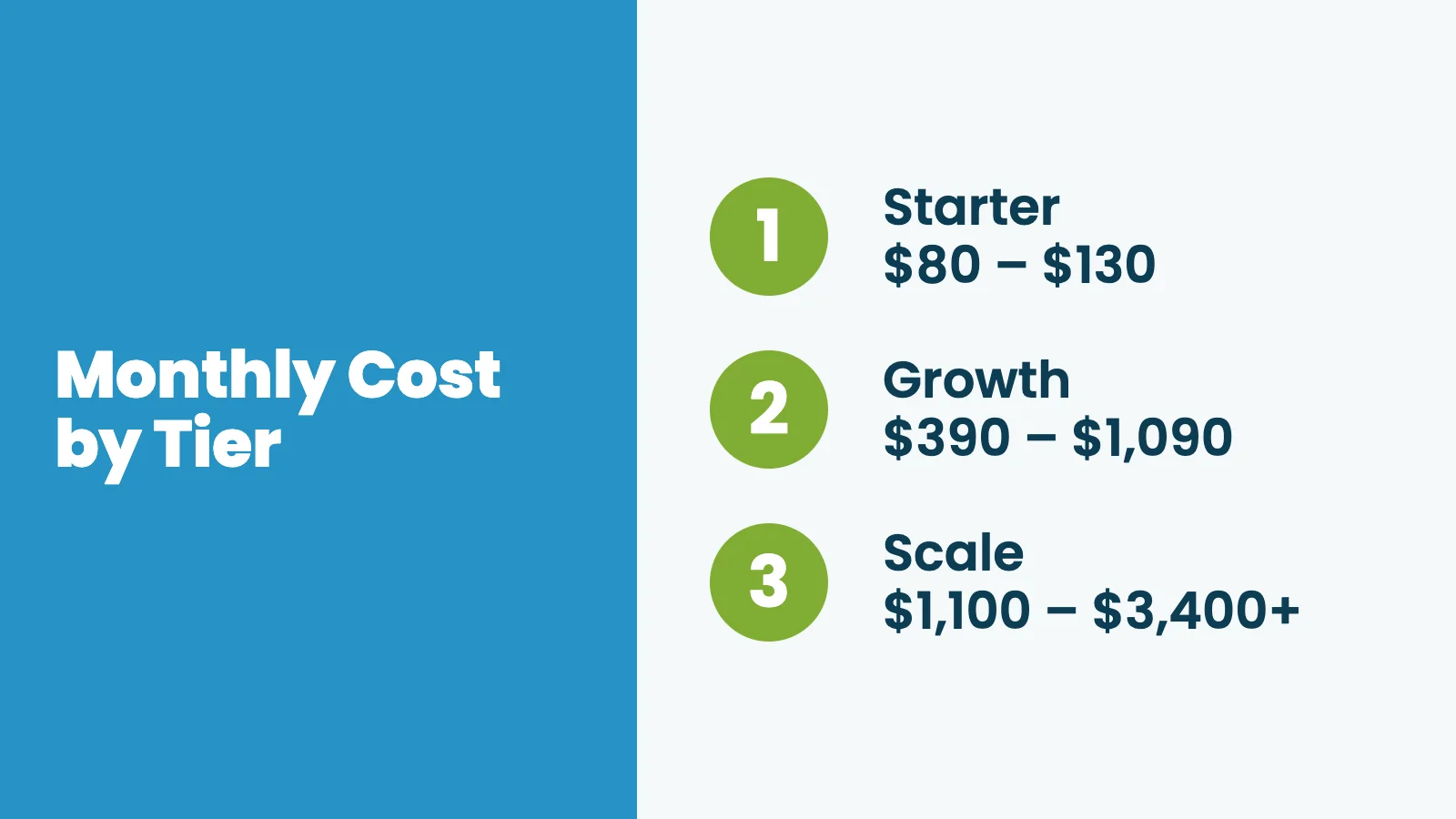
These ranges are a starting point. Most successful starter sites launch closer to $100 per month. Most scale-tier sites spend somewhere in the low four figures.
The fixed cost of running a small, healthy membership site is more accessible than most people think. The variable costs (payment processing, content production, marketing tools) are where you have the most room to optimize as you grow.
Tips for Keeping Costs Down:
- Start free and upgrade with revenue: PMPro’s core plugin, 30+ free Add Ons, and Google Analytics 4 give you a working site at no software cost. Upgrade tools when the business can support it.
- Do not cheap out on hosting: The $5 shared plan will cost you more in downtime, slow load times, and caching conflicts than a $30–50 managed plan ever will.
- Bundle where it makes sense: PMPro Max bundles managed membership-aware hosting, all Premium Add Ons, and Do It For Me development service into one plan at $99 per month. If you would otherwise pay for managed WordPress hosting and a PMPro plan separately, Max is almost always the better value, and you get the dev service on top.
- Audit your stack every six months: SaaS pricing changes constantly. Cancel what you are not actively using.
- Count your time: If a $50 per month tool saves you two hours a month, and your time is worth anything at all, that is an easy call.
If you are ready to start, the free version of Paid Memberships Pro is the lowest-risk way to do it. You can build a fully working site, take your first payment, and decide what is worth upgrading from there. Download it free at paidmembershipspro.com/free.
Frequently Asked Questions
Buy a domain, sign up for a quality WordPress host at $30 per month, and install the free version of Paid Memberships Pro. You can launch for well under $100 in your first month.
At the growth tier, plan on $1 to $3 per month per active member in tooling and infrastructure costs, not counting payment processing. Heavy video or community usage trends higher.
No. Paid Memberships Pro and most quality hosts are built so a non-developer can run a working site. Plan on $75 to $200 per hour when you do want developer help for custom integrations or design polish.
Stripe and PayPal both take roughly 2.9% + $0.30 per transaction. On a $20 monthly membership, that is $0.88 in fees, or 4.4% of revenue. Factor it into your pricing from day one.
Worry, no. Plan, yes. Revisit the topic once you cross $10,000 in annual revenue or start selling internationally.

Free Download: The AI-Powered Membership Site Blueprint
Download the free guide: Learn how to plan, build, and grow a membership site using AI as your strategic partner: from buyer persona to launch and beyond.