Memberlite Alerts lists anything you should review on your site, usually after a theme update: content the update changed, or settings Memberlite no longer uses. Alerts were added in Memberlite 8.0.
Where to Find Alerts
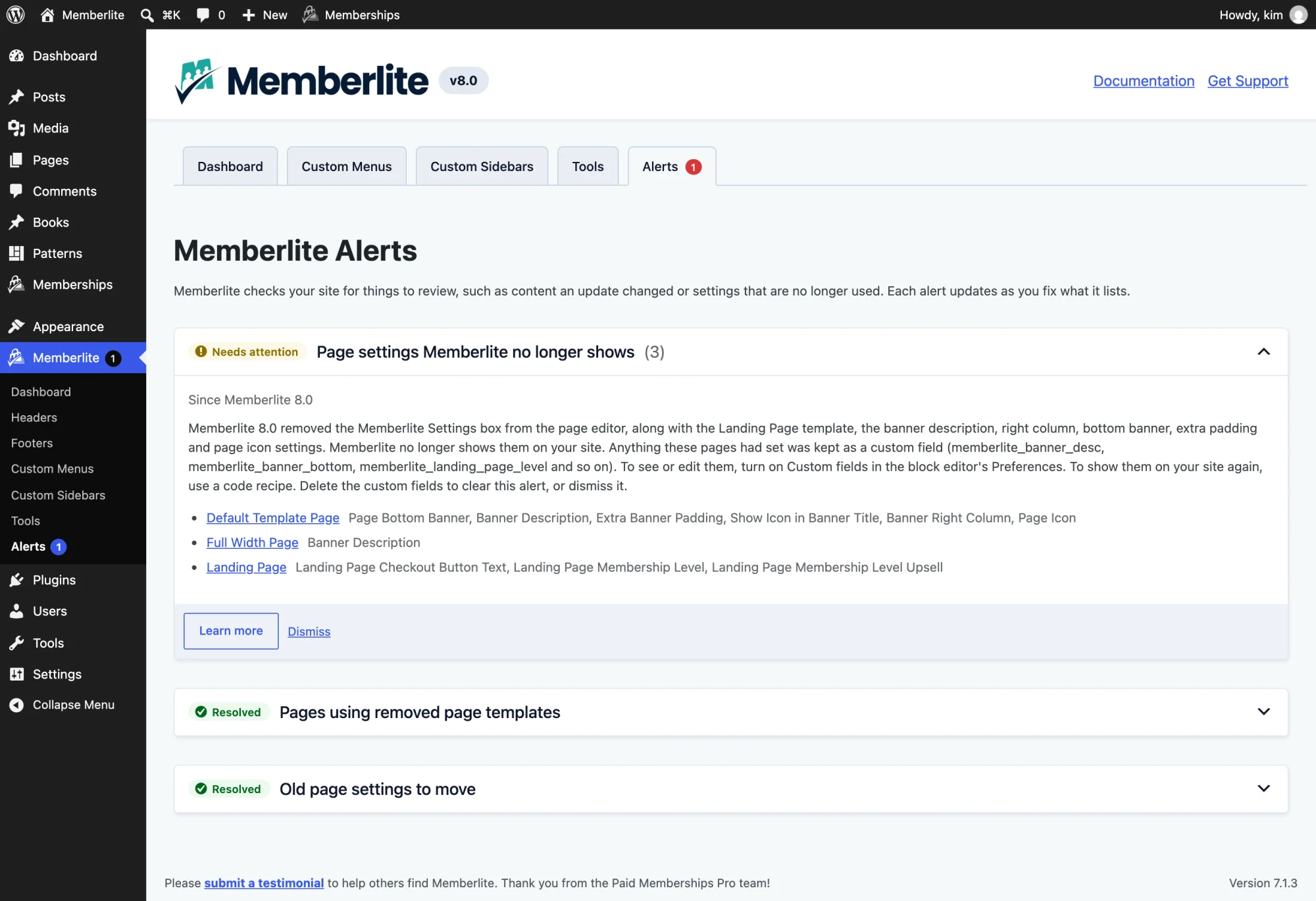
Go to Memberlite > Alerts in the WordPress admin. When an alert has something for you to look at, a count shows on the Memberlite menu item and on the Alerts menu item.
How Alerts Work
- Checked live: Each alert checks your site when you load the page. Once you fix what it lists, it shows as Resolved. If an import or a restore brings the problem back, so does the alert.
- One-click fixes: Some alerts have a button that fixes what they list, such as moving pages to a new setting. After it runs, the page tells you how many items were fixed and how many are still listed.
- Learn more: Some alerts have a Learn more button that links to documentation or code recipes.
- Dismiss: If you decide you don’t need to act on an alert, click Dismiss. The alert stays on the page, collapsed, and comes back if it finds a new item.
Alerts in Memberlite 8.0
Memberlite 8.0 removed the layout page templates and the classic Memberlite Settings meta box. Updating moves your settings for you. These alerts cover anything the update could not move, and content you add later from an older Memberlite site.
Pages Using Removed Page Templates
Lists pages still set to a removed page template: Content/Sidebar, Sidebar/Content, Narrow Width, Full Width, Fluid Width, or Landing Page. The one-click fix moves each page to the matching layout and sets its template back to the default. Pages on the Landing Page template move to Right Sidebar, which is what that template showed.
A child theme that has its own copy of a removed template (for example, templates/narrow-width.php) keeps that template, and its pages are not listed.
Old Page Settings to Move
Lists pages with settings saved by the old Memberlite Settings meta box. The one-click fix moves them to custom fields, the same as the update does. You’ll usually only see this alert after importing content from a site running an older version of Memberlite.
Page Settings Memberlite No Longer Shows
Lists each page that has a value saved for a field Memberlite no longer displays, and which fields it has: Banner Description, Banner Right Column, Page Bottom Banner, Extra Banner Padding, Page Icon, or the Landing Page level, checkout button, and upsell fields.
There is no one-click fix for this alert, because the values are kept on purpose. Click Learn more for the Memberlite legacy page settings code recipes, which show these fields on your site again. The alert resolves once those custom fields are deleted, or you can dismiss it.
After You Update to Memberlite 8.0
Most sites look the same after updating. These four changes are deliberate:
- Homepage layout on sites with Pages set to No Sidebar: If your homepage is a static page on the default template, it now uses the Contained layout (up to 1230px wide) instead of the narrow centered column (about 800px). To get the old look back, edit the homepage and choose Narrow in the Layout panel.
- More archive grid columns on mid-size screens: The grid archive display now fits columns to the content area. On archives without a sidebar, grids show 2 columns from about 580px wide (was 768px) and 3 columns from about 860px (was 1160px). Phones and screens 1160px and wider look the same.
- Block spacing: Groups, rows, stacks, grids, and column contents that don’t set their own block spacing now have 30px gaps instead of 40px, so the editor matches the front end.
- Shorter single pages and posts: The extra bottom margin on single entries is gone, so they are about 50px shorter.
Child Themes
- A child theme that has its own copy of a removed template keeps that template.
- Code that reads
_memberlite_banner_bottomor the other old_memberlite_*page fields should read the un-prefixed custom field instead (for example,memberlite_banner_bottom). - Code that checks
is_page_template( 'templates/landing.php' )should check for amemberlite_landing_page_levelcustom field instead.
The legacy page settings recipes show both patterns in working code. For the full list of changes, read the Memberlite 8.0 release post.
For Developers
Alerts are registered with the memberlite_alerts filter. This filter is internal for now: the format of alert items and how dismissals are stored may still change.
Get Support From Our Team of Experts
Have a question about how to use this feature? Our Support Page outlines three ways to get support.
Our Max plans include hands-on help customizing your membership site and implementing new features. Upgrade to PMPro Max now »
Last updated on October 28, 2026

